
如何将SimpleProvider与我自己的C#代码结合使用
我试图使用自己的MSAL代码协同工作。使用.NET Core5MVC开发。我有类似的问题,我发现在下面的链接。但我只是不知道如何使它与建议的答案一起工作。或者换句话说,我仍然混淆了这种集成是如何完成的。
我也读过以下文章:简单提供程序示例
有没有人可以指向我更详细的解释如何存档这个。
能否有人进一步解释下面的反应。怎么做。我应该将代码放在哪里,以及如何将AccessToken返回到SimpleProvider?
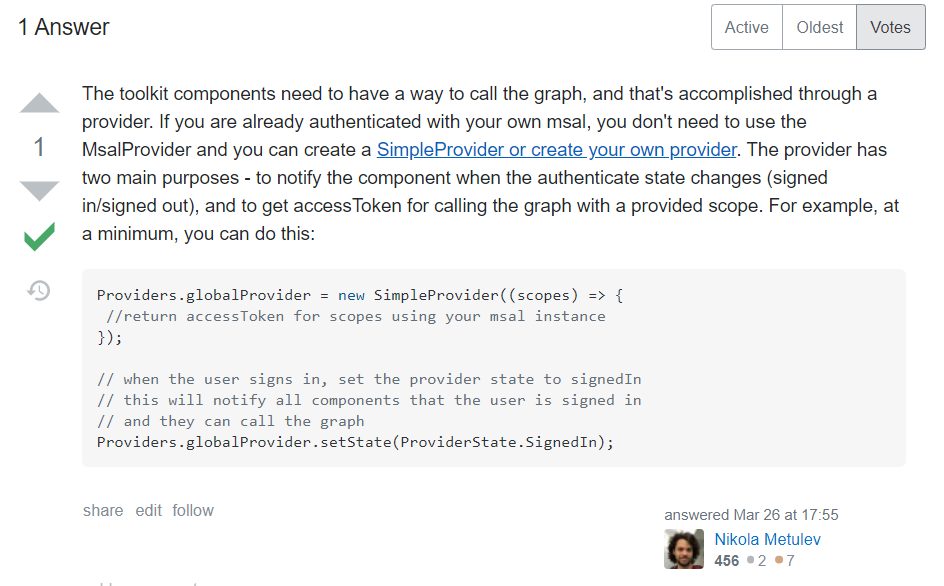
编辑:
更新我的问题,使之更加准确,除了问题之外,我还想要什么。下面是我在Startup.cs中使用的代码,当用户使用web应用程序时自动触发弹出屏幕。当使用所提供的示例时,它总是无法获得接收到的访问令牌或用户is数据。问题2:如何将接收到的令牌保存或存储在内存、缓存或cookie中,以供ProxyController及其类以后使用。
//在_layouts.aspx下登录链接
<a class="nav-link" asp-area="MicrosoftIdentity" asp-controller="Account" asp-action="SignIn">Sign in</a>
// Use OpenId authentication in Startup.cs
        services.AddAuthentication(OpenIdConnectDefaults.AuthenticationScheme)
        // Specify this is a web app and needs auth code flow
        .AddMicrosoftIdentityWebApp(options =>
        {
            Configuration.Bind("AzureAd", options);

            options.Prompt = "select_account";

            options.Events.OnTokenValidated = async context =>
            {
                var tokenAcquisition = context.HttpContext.RequestServices
                    .GetRequiredService<ITokenAcquisition>();

                var graphClient = new GraphServiceClient(
                    new DelegateAuthenticationProvider(async (request) =>
                    {
                        var token = await tokenAcquisition
                            .GetAccessTokenForUserAsync(GraphConstants.Scopes, user: context.Principal);

                        request.Headers.Authorization =
                            new AuthenticationHeaderValue("Bearer", token);
                    })
                );

                // Get user information from Graph
                try
                {
                    var user = await graphClient.Me.Request()
                        .Select(u => new
                        {
                            u.DisplayName,
                            u.Mail,
                            u.UserPrincipalName,
                            u.MailboxSettings
                        })
                        .GetAsync();

                    context.Principal.AddUserGraphInfo(user);
                }
                catch (ServiceException)
                {
                }

                // Get the user's photo
                // If the user doesn't have a photo, this throws
                try
                {
                    var photo = await graphClient.Me
                        .Photos["48x48"]
                        .Content
                        .Request()
                        .GetAsync();

                    context.Principal.AddUserGraphPhoto(photo);
                }
                catch (ServiceException ex)
                {
                    if (ex.IsMatch("ErrorItemNotFound") ||
                        ex.IsMatch("ConsumerPhotoIsNotSupported"))
                    {
                        context.Principal.AddUserGraphPhoto(null);
                    }
                }
            };

            options.Events.OnAuthenticationFailed = context =>
            {
                var error = WebUtility.UrlEncode(context.Exception.Message);
                context.Response
                    .Redirect($"/Home/ErrorWithMessage?message=Authentication+error&debug={error}");
                context.HandleResponse();

                return Task.FromResult(0);
            };

            options.Events.OnRemoteFailure = context =>
            {
                if (context.Failure is OpenIdConnectProtocolException)
                {
                    var error = WebUtility.UrlEncode(context.Failure.Message);
                    context.Response
                        .Redirect($"/Home/ErrorWithMessage?message=Sign+in+error&debug={error}");
                    context.HandleResponse();
                }

                return Task.FromResult(0);
            };
        })
        // Add ability to call web API (Graph)
        // and get access tokens
        .EnableTokenAcquisitionToCallDownstreamApi(options =>
        {
            Configuration.Bind("AzureAd", options);
        }, GraphConstants.Scopes)
        // Add a GraphServiceClient via dependency injection
        .AddMicrosoftGraph(options =>
        {
            options.Scopes = string.Join(' ', GraphConstants.Scopes);
        })
        // Use in-memory token cache
        // See https://github.com/AzureAD/microsoft-identity-web/wiki/token-cache-serialization
.AddInMemoryTokenCaches();回答 2
Stack Overflow用户
发布于 2020-12-15 21:06:00
由于您使用的是MVC,所以我建议您使用ProxyProvider而不是简单的提供程序。
- SimpleProvider -当客户端有现有身份验证(如Msal.js)时,非常有用
- ProxyProvider --当您在后端进行身份验证时,所有图形调用都从客户端代理到后端时,非常有用。
这个.NET核心MVC示例可能会有所帮助--它正在使用ProxyProvider和组件
Stack Overflow用户
发布于 2020-12-22 06:26:39
最后,我发现了如何为这两种技术做最后一英里的桥接。
下面是我所做的更改的代码行。由于我使用的是MSAL.NET反对的新开发方法,许多实现都已经简化,所以很多示例或文章可能实际上无法直接使用它。
除了使用上面@Nikola和me共享的链接之外,您还可以尝试使用下面的https://github.com/Azure-Samples/active-directory-aspnetcore-webapp-openidconnect-v2/tree/master/进行合并,从而成为您自己的解决方案。以下是我为使它发挥作用所作的改变。
Startup.cs类的变化
// Add application services. services.AddSingleton<IGraphAuthProvider, GraphAuthProvider>(); //services.AddSingleton<IGraphServiceClientFactory, GraphServiceClientFactory>();
ProxyController.cs类的变化
private readonly GraphServiceClient _graphClient;

public ProxyController(IWebHostEnvironment hostingEnvironment, GraphServiceClient graphclient)
    {
        _env = hostingEnvironment;
        //_graphServiceClientFactory = graphServiceClientFactory;
        _graphClient = graphclient;
}ProcessRequestAsync方法在ProxyController.cs下的变化
 //var graphClient = _graphServiceClientFactory.GetAuthenticatedGraphClient((ClaimsIdentity)User.Identity);

        var qs = HttpContext.Request.QueryString;
        var url = $"{GetBaseUrlWithoutVersion(_graphClient)}/{all}{qs.ToUriComponent()}";

        var request = new BaseRequest(url, _graphClient, null)
        {
            Method = method,
            ContentType = HttpContext.Request.ContentType,
};https://stackoverflow.com/questions/65301725
复制相似问题
腾讯云开发者

Copyright © 2013 - 2026 Tencent Cloud. All Rights Reserved. 腾讯云 版权所有
深圳市腾讯计算机系统有限公司 ICP备案/许可证号:粤B2-20090059  粤公网安备44030502008569号
腾讯云计算(北京)有限责任公司 京ICP证150476号 | 京ICP备11018762号