
如何获得四面同步的鸟瞰图像?(获取AVM:环视监控)
如何获得四面同步的鸟瞰图像?(获取AVM:环视监控)
提问于 2020-12-16 14:14:11
嗨,我是做avm(周围的视图监控)图像,从四个鱼眼相机获得四个侧面图像。这是AVM的示例图像。
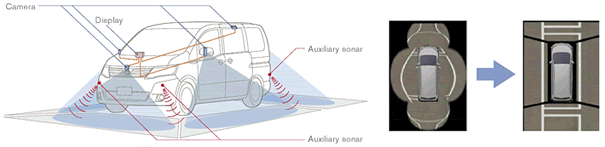
这一过程分为三个部分:
- 校准鱼眼图像/视频/流
- 获取顶部视图(鸟视图)图像
- 通过合成四边图像获得avm图像
我已经完成了1和2部分,但是我在做第三部分时遇到了麻烦。我对它进行了研究,发现它可能与‘缝纫’或'numpy阵列‘有关。但是我不知道怎么做,尽管我读了文档。
4个角重叠存在(脚趾,右上,左下角,右下角).4摄像机固定。我不知道如何合成四个图像,现在的结果图像如下:

我用np.hstack来制作三视图(左视图、中视图、右视图)(参见birdView)
如果你知道这方面的任何事情,请评论并分享你的想法。
谢谢你的阅读。(我用的是opencv,python,raspberrypi 4B)
代码:
import cv2
import numpy as np
import imutils
from Camera.Undistortion import UndistortFisheye
from Camera.PerspectiveTransformation import EagleView
# from Camera.Stitcher import stitchTwoImages
import time

class avm:
    def __init__(self):
        self.__leftCamera = UndistortFisheye("left_Camera")
        self.__rightCamera = UndistortFisheye("right_Camera")

        self.__leftEagle = EagleView()
        self.__rightEagle = EagleView()
        # self.__frontEagle.setDimensions((149, 195), (439, 207), (528, 380), (37, 374))
        # self.__backEagle.setDimensions((164, 229), (469, 229), (588, 430), (45, 435))

        #reset left/right setDimensions
        self.__leftEagle.setDimensions((186, 195), (484, 207), (588, 402), (97, 363))
        self.__rightEagle.setDimensions((171, 240), (469, 240), (603, 452), (52, 441))
        # self.__leftEagle.setDimensions((186, 195), (484, 207), (588, 402), (97, 363))
        # self.__rightEagle.setDimensions((171, 240), (469, 240), (603, 452), (52, 441))

        self.__middleView = None
        self.__counter = 0

        # self.stitcher = stitchTwoImages("Bottom2Upper")
        # self.upper = None
        # self.bottom = None

    def runAVM(self, leftFrame, rightFrame):
        leftView = self.__leftCamera.undistort(leftFrame)
        topDown_left = self.__leftEagle.transfrom(leftView)
        rightView = self.__rightCamera.undistort(rightFrame)
        topDown_right = self.__rightEagle.transfrom(rightView)
        # topDown_Back = cv2.flip(topDown_Back, 1) #flip left/right

        topDown_left , topDown_right = self.__reScale(topDown_left, topDown_right)
        # stitchingResult = self.__startStitching(topDown_Front)
        middleView = self.__getMiddleView(topDown_left)
        birdView = np.hstack((topDown_left, middleView, topDown_right))
        return birdView

    def __reScale(self, topDown_left, topDown_right):
        width_leftView = topDown_left.shape[1]
        width_rightView = topDown_right.shape[1]
        height_leftView = topDown_left.shape[0]
        height_rightView = topDown_right.shape[0]
        if height_leftView > height_rightView:
            newHeight = height_rightView
            ratio = height_rightView/height_leftView
            newWidth = int(ratio * width_leftView)
            topDown_left = cv2.resize(topDown_left, (newWidth, newHeight))
        else:
            newHeight = height_leftView
            ratio = height_leftView/height_rightView
            newWidth = int(ratio * width_rightView)
            topDown_right = cv2.resize(topDown_right, (newWidth, newHeight))

        return topDown_left, topDown_right

    def __getMiddleView(self, topDown_left):
        # the length of the image represents the distance in front or back of the car
        width_leftView = topDown_left.shape[1]
        if self.__middleView is None:
            realWidth_leftView = 13 # unit is cm
            realWidth_MiddleView = 29.5 # unit is cm
            ratio = int(width_leftView/realWidth_leftView)
            width_MiddleView = int(realWidth_MiddleView * ratio)
            height_MiddleView = int(topDown_left.shape[0])
            self.__middleView = np.zeros((height_MiddleView, width_MiddleView//2, 3), np.uint8)
            # print(ratio)
        # else:
        #     #  self.__middleView[0:stitchingResult.shape[0], :]

        return self.__middleView

    # def __startStitching(self, accView):
    #     if self.bottom is None:
    #         self.bottom = accView
    #         return None
    #     else:
    #         # time.sleep(0.5)
    #         self.upper = accView
    #         self.bottom = self.stitcher.stitch(self.bottom, self.upper)
    #         cv2.imshow("Result", self.bottom)
    #         height = accView.shape[0]
# return self.bottom[height:self.bottom.shape[0], :]回答 1
Stack Overflow用户
发布于 2020-12-18 22:01:38
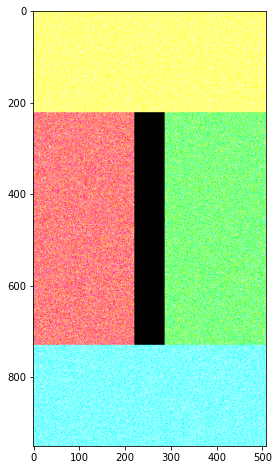
您可以使用hstack和vstack获取正在寻找的awm视图。只需确保个人图像是定向的,以下是我正在创建的随机图像。(必要时使用np.rot90 )
#Assume you have 4 views
leftview = np.random.random((508, 221, 3)) #tall image
rightview = np.random.random((508, 221, 3)) #tall image
frontview = np.random.random((221, 508, 3)) #wide image
backview = np.random.random((221, 508, 3)) #wide image

#Creating color differences to view better.
#IGNORE THIS PART OF CODE
leftview[:,:,0]=1
rightview[:,:,1]=1
frontview[:,:,0:2]=1
backview[:,:,1:3]=1

#Calculate centerview size
width = frontview.shape[1]-(leftview.shape[1]*2)
height = leftview.shape[0]
centerview = np.zeros((height,width,3))

#Hstack the l,c,r views and then Vstack it between the f, b views
lr = np.hstack([leftview,centerview,rightview])
ud = np.vstack([frontview, lr, backview])

#Plot the new image
fig = plt.figure(figsize=(5,8))
plt.imshow(ud)
页面原文内容由Stack Overflow提供。腾讯云小微IT领域专用引擎提供翻译支持
原文链接:
https://stackoverflow.com/questions/65324957
复制相关文章
相似问题
腾讯云开发者

Copyright © 2013 - 2026 Tencent Cloud. All Rights Reserved. 腾讯云 版权所有
深圳市腾讯计算机系统有限公司 ICP备案/许可证号:粤B2-20090059  粤公网安备44030502008569号
腾讯云计算(北京)有限责任公司 京ICP证150476号 | 京ICP备11018762号