
@AppStorage改变SwiftUI暗/光模式
@AppStorage改变SwiftUI暗/光模式
提问于 2020-12-18 09:53:32
我试图改变应用的主题与三个选项:默认,黑暗,光明。然后,视图跳转到主视图,但我希望停留在设置视图上。
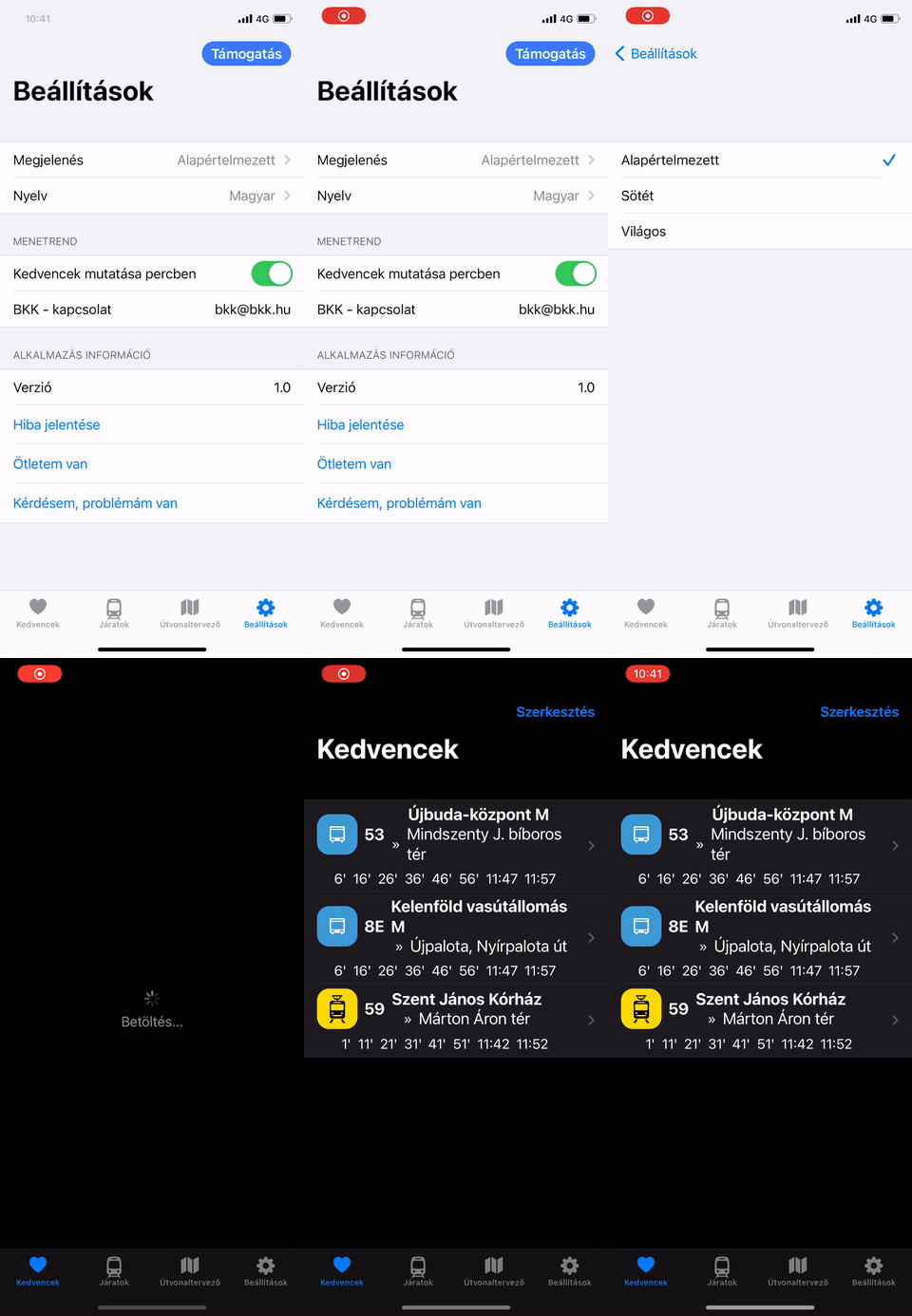
struct SettingsView: View {
...
@State var colors = ["Alapértelmezett", "Sötét", "Világos"] //Default, Dark, Light
@AppStorage("colorIndex") var colorIndex: Int = 0
...
var body: some View {
...
Picker(selection: $colorIndex, label: Text("Megjelenés")) { //Color
                            ForEach(0 ..< colors.count) {
                                Text(self.[$0])
                            }

                        }

...
在"MyApp.swift":
@main
struct MyApp: App {


    @AppStorage("colorIndex") var colorIndex: Int = 0

    @UIApplicationDelegateAdaptor(AppDelegate.self) var appDelegate
    var body: some Scene {
        WindowGroup {

            if colorIndex == 1 {

                ContentView().environment(\.colorScheme, .dark)
            }
            else if colorIndex == 2 {
                ContentView().environment(\.colorScheme, .light)
            }
            else {
                ContentView()
            }


        }

    }

}回答 1
Stack Overflow用户
回答已采纳
发布于 2020-12-18 10:09:55
为什么你要让应用程序负责黑暗和光明的主题,我认为你应该让系统处理这一点。然后检查你的功能。如果您调用ContentView,则显示它是有意义的。
如果你不想让系统处理这件事。查看这篇文章,How to switch programmatically to dark mode swift,也许这对你有帮助
页面原文内容由Stack Overflow提供。腾讯云小微IT领域专用引擎提供翻译支持
原文链接:
https://stackoverflow.com/questions/65354877
复制相关文章
相似问题
腾讯云开发者

Copyright © 2013 - 2026 Tencent Cloud. All Rights Reserved. 腾讯云 版权所有
深圳市腾讯计算机系统有限公司 ICP备案/许可证号:粤B2-20090059  粤公网安备44030502008569号
腾讯云计算(北京)有限责任公司 京ICP证150476号 | 京ICP备11018762号