
标题与浏览器完全不同
编辑:我认为这归结为不同的浏览器呈现字体。我减少并减少了代码,试图找出问题出在哪里,结果只有一个普通的网页,里面只有<h1>Ladesoft</h1>,没有其他东西,除了全局字体之外,我的CSS文件中没有任何东西,而且我注意到Chrome和Firefox对标题的处理方式完全不同。在网上搜索时,我发现了this query,基本上看起来不太可能有任何方法来实现我的目标。所以我不得不去创造一个我认为的形象。我暂时不回答这个帖子,以防有人想出解决办法。
我有一个问题,在我的网站上的标题(h1)看起来完全不同,取决于我使用的浏览器。我用它做了一些不寻常的事情,但我想不出怎样才能让事情看起来一样。我的网站是http://www.ladesoft.com
我想让我的网站的标题只写一行:
<h1>Ladesoft</h1>我使用CSS来操作文本,如下所示:
我的CSS文件可以在这里找到:https://github.com/andylatham82/Website/blob/master/styles.css
编辑:添加CSS代码。很抱歉把这一切都包括了,但我只是不知道问题出在哪里。
html
{
    height: 100%;
    width: 1000px;
    margin-left: auto;
    margin-right: auto;
}
body
{
    height: 100%;
    background-color: rgb(43, 43, 43);
    font-family: Menlo, Monaco, Lucida Console, Liberation Mono, DejaVu Sans Mono, Bitstream Vera Sans Mono, Courier New, monospace, serif;
    margin-left: auto;
    margin-right: auto;
}

h1
{
    color: orange;
    font-size: 600%;
    font-weight: 100;
    margin-top: 20px;
    margin-bottom: -60px;
    margin-left: -60px;
    transform:scale(0.9,1);
    text-decoration: underline;
    text-decoration-color: cornflowerblue;
    overflow: hidden;
    position:relative;
    z-index: -1;
}

h1::first-letter
{
    color: cornflowerblue;
    font-size: 300%;
    margin-right: -20px;
    float: left;
    margin-top: -125px;
    margin-right: -106px;
    position: relative;
}

h2
{
    color: cornflowerblue;
    text-align: center;
    font-weight: 50;
    margin-top: 20px;
    margin-bottom: 20px;
}

p
{
    color: rgb(228, 226, 179);
}

table
{
    margin-left: auto;
    margin-right: auto;
    padding: 0;
    border-spacing:0;
}

td
{
    color: rgb(228, 226, 179);
    width: auto;
    text-align: left;
    border-spacing: 0;
    padding: 2px;
    padding-left: 10px;
    padding-right: 10px;
}

a
{
    color: cornflowerblue;
}

ul
{
    list-style-type: none;
    margin: 0;
    overflow: hidden;
    background-color: orange;
}

li
{
    float: left;
}

li a
{
    display: block;
    color: white;
    text-align: center;
    padding: 16px;
    text-decoration: none;
}

li a:hover
{
    background-color: red;
}

hr
{
    margin-top: 0px;
    border-color: cornflowerblue;
    align: left;
    size: 4;
    border-style: solid;
}

iframe
{
    height: 650px;
    width: 405px;
    border: none;
    overflow: hidden;
    justify-content: center;
}

.gamelink
{
    margin-left: 20px;
}

.date
{
    color: orange;
}

.wrapper {
  margin: 0px;
  padding: 0px;
  height: 128px;
  display: flex;
  display: -moz-box;
  display: -ms-flexbox;
  display: -webkit-box;
  display: -webkit-flex;
  padding-bottom: 400px;
  justify-content: center;
}

canvas {
  border: 0px;
  width: 512px;
  height: 512px;
  background: black;
  image-rendering: optimizeSpeed;
  image-rendering: -moz-crisp-edges;
  image-rendering: -webkit-optimize-contrast;
  image-rendering: optimize-contrast;
  image-rendering: pixelated;
  -ms-interpolation-mode: nearest-neighbor;
}

#centered
{
    text-align: center;
    margin-left: auto;
    margin-right: auto;
}我的一个HTML文件可以在这里找到:https://github.com/andylatham82/Website/blob/master/pages/games.html
编辑:添加HTML代码:
<!DOCTYPE html>
<html lang="en-GB">
    <head>
    <meta charset="utf-8"/>
    <meta name="keywords" content="Game, Video, Videogame, C++, C#, Monogame, Pico-8, Pico8, Arduboy, Lua, CSS, Ladesoft, Andy, Latham">
    <meta name="description" content="Video games made by Andy Latham">
    <meta name="viewport" content="width=device-width, initial-scale=1.0">
    <meta name="author" content="Andy Latham">
    <link rel="stylesheet" href="../styles.css">
    <TITLE>Ladesoft: Games</TITLE>
    </head>
    <body>
    <h1>Ladesoft</h1>
    <ul>
        <li><a href="games.html">Games</a></li>
        <li><a href="experiments.html">Software & Experiments</a></li>
        <li><a href="about.html">About</a></li>
    </ul>

    <hr style="margin-left: 55px; width: 48px">
    <h2>Games</h2>
    <p>I love making games. Here's a selection of my output. The purpose of any game is to be played, so I'd love to <a href=about.html>hear</a> from anyone who plays any of these!</p>
    <br>
    <table>
        <tr>
        <td>
            <a href="games/textadventure.html"><img src="../images/thumbnails/textadventurethumb.png" title="Text Adventure" alt="Text Adventure" style="float:left;"></a></td>
        <td><span class="date">[2020]</span> A  work-in-progress text adventure.</td>
        </tr>

        <tr>
        <td>
            <a href="games/pointandclickadventure.html"><img src="../images/thumbnails/pointandclickthumb.png" title="Point-and-Click Adventure" alt="Point-and-Click Adventure" style="float:left;"></a></td>
        <td><span class="date">[2020]</span> A work-in-progress 'point-and-click' adventure.</td>
        </tr>

        <tr>
        <td>
            <a href="games/babydump.html"><img src="../images/thumbnails/babydumpthumb.png" title="Text Adventure" alt="Text Adventure" style="float:left;"></a></td>
        <td><span class="date">[September 2020]</span> Earn money by having (and abandoning) babies.</td>
        </tr>

        <tr>
        <td>
            <a href="games/blackdeath.html"><img src="../images/thumbnails/blackdeaththumb.png" title="Black Death" alt="Black Death" style="float:left;"></a></td>
        <td><span class="date">[August 2019]</span> Play as bubonic plague and try to wipe out the villagers.</td>
        </tr>

        <tr>
        <td>
            <a href="games/thecrawl.html"><img src="../images/thumbnails/thecrawlthumb.png" title="The Crawl" alt="The Crawl" style="float:left;"></a></td>
        <td><span class="date">[March 2019]</span> A mini dungeon crawling platform game.</td>
        </tr>
    </table>
    <br>
    <br>
    <p id="centered">
        <a href="http://www.ladesoft.com">-Ladesoft-</a>
    </p>
    <br>
    </body>
</html>
在Linux上使用Chrome,一切看起来都是正确的:

但是,对于Linux上的Firefox,我看到的是:

在Windows上使用Chrome,它是这样的:

Windows上的Firefox是这样的:

为了更好的衡量,Windows上的Edge是这样的:
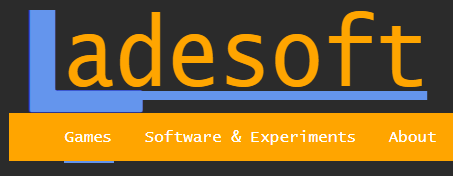
有人能帮我弄清楚这是怎么回事吗?我理解不同的浏览器呈现不同的东西,但是有什么方法可以达到我的目标,使这个标志在任何地方都是一样的,而不用使用图像?
回答 1
Stack Overflow用户
发布于 2020-12-21 10:08:48
在这一方法中存在一些问题,这导致了标识中的恶意和不同风格--可变字体和对下划线的依赖。
最明显的问题是,给出了一些字体的选择,第一个是Menlo,我认为它可能存在于某些系统中,但在我的Windows 10系统中不存在。这意味着字体样式在不同的系统上是不同的,这就解释了问题中显示的橙色字符的不同外观。不同的字体也有不同的间距,例如前导,所以在一般使用px单位时,您无法补偿这一点。
要获得完全相同的外观,字体,您将需要链接到您想要的字体。我已经使用谷歌字体Deja Vu mono,因为问题中的一些字体是付费和/或不可用的。
更微妙的问题是线条和第一个字符的定位问题。与Chrome相比,在Firefox上的下划线位置与字符的基线不完全相同。无论我们在CSS中做什么,如果不知道每个浏览器如何呈现下划线,我们就无法弥补这一点。
因此,我们避免下划线,转而使用边框来绘制“L”,因为第一个字符的位置在不同浏览器上也可能不一致。这种方法工作得相当好,除了一些屏幕上的放大效果外,渲染中还存在像素差异。
因此,这里的方法使用线性梯度来设置前后伪元素的背景。为了得到看似像素完美的契合,我们使伪元素的颜色重叠,而不是扩大。
显然,您可以调整大小以适应,但所有的都在ems中,所以事情应该有反应。
在Windows10上使用Chrome、Edge、Firefox、IE11和iPadIOS 14 Safari进行测试,结果是相当一致的。不过,最好放弃使用h1,因为浏览器确实添加了自己的样式,而使用div来处理类。只有h1和它的伪元素在这个CSS中被改变了,标志的文本已经从主HTML转换成伪元素,L不是作为字符呈现,而是像浏览器第一个字母呈现不同的线性渐变一样呈现。
<!DOCTYPE html>
<html lang="en-GB">
    <head>
    <meta charset="utf-8"/>
    <meta name="keywords" content="Game, Video, Videogame, C++, C#, Monogame, Pico-8, Pico8, Arduboy, Lua, CSS, Ladesoft, Andy, Latham">
    <meta name="description" content="Video games made by Andy Latham">
    <meta name="viewport" content="width=device-width, initial-scale=1.0">
    <meta name="author" content="Andy Latham">
    <TITLE>Ladesoft: Games</TITLE>
    <link rel="stylesheet" href="../styles.css">
    <link rel="preconnect" href="https://fonts.gstatic.com">
    <link href="https://fonts.googleapis.com/css2?family=Space+Mono&display=swap" rel="stylesheet">
    <style>

html
{
    height: 100%;
    width: 1000px;
    margin-left: auto;
    margin-right: auto;
}
body
{
    height: 100%;
    background-color: rgb(43, 43, 43);
    font-family: 'Space Mono', monospace;
    margin-left: auto;
    margin-right: auto;
}

h1 {
  border-style: solid;
  border-width: 0 0 0 0.2em;
  border-color: transparent transparent transparent transparent;
  height: 1.5em;
  position: relative;
  padding: 0 0 0.05em 0;
  margin: 0 0 0.1em 0;
  display: inline-block;
  width: auto;
  transform: scale(0.9, 1);
}
h1:before {
  content: '';
  position: absolute;
  background-image: linear-gradient(to top, cornflowerblue 0em, cornflowerblue 0.11em, transparent 0.11em, transparent 100%), linear-gradient(to right, cornflowerblue 0%, cornflowerblue 0.21em, transparent 0.21em, transparent 100%);
  height: 1em;
  width: 1.1em;
  top: 0.4em;
  margin-left: -0.2em;
  background-color: transparent;
  display: inline-block;
  z-index:2;
}
h1:after {
  color: orange;
  content: 'adesoft';
  position: relative;
  font-weight: 100;
  padding-left: 0.1em;
  background-image: linear-gradient(to top, transparent 0em, transparent 0.15em, cornflowerblue 0.15em, cornflowerblue 0.25em, transparent 0.25em, transparent 100%);
}

h2
{
    color: cornflowerblue;
    text-align: center;
    font-weight: 50;
    margin-top: 20px;
    margin-bottom: 20px;
}

p
{
    color: rgb(228, 226, 179);
}

table
{
    margin-left: auto;
    margin-right: auto;
    padding: 0;
    border-spacing:0;
}

td
{
    color: rgb(228, 226, 179);
    width: auto;
    text-align: left;
    border-spacing: 0;
    padding: 2px;
    padding-left: 10px;
    padding-right: 10px;
}

a
{
    color: cornflowerblue;
}

ul
{
    list-style-type: none;
    margin: 0;
    overflow: hidden;
    background-color: orange;
}

li
{
    float: left;
}

li a
{
    display: block;
    color: white;
    text-align: center;
    padding: 16px;
    text-decoration: none;
}

li a:hover
{
    background-color: red;
}

hr
{
    margin-top: 0px;
    border-color: cornflowerblue;
    align: left;
    size: 4;
    border-style: solid;
}

iframe
{
    height: 650px;
    width: 405px;
    border: none;
    overflow: hidden;
    justify-content: center;
}

.gamelink
{
    margin-left: 20px;
}

.date
{
    color: orange;
}

.wrapper {
  margin: 0px;
  padding: 0px;
  height: 128px;
  display: flex;
  display: -moz-box;
  display: -ms-flexbox;
  display: -webkit-box;
  display: -webkit-flex;
  padding-bottom: 400px;
  justify-content: center;
}

canvas {
  border: 0px;
  width: 512px;
  height: 512px;
  background: black;
  image-rendering: optimizeSpeed;
  image-rendering: -moz-crisp-edges;
  image-rendering: -webkit-optimize-contrast;
  image-rendering: optimize-contrast;
  image-rendering: pixelated;
  -ms-interpolation-mode: nearest-neighbor;
}

#centered
{
    text-align: center;
    margin-left: auto;
    margin-right: auto;
}
</style>
</head>

    <body>
    <h1></h1>
    <ul>
        <li><a href="games.html">Games</a></li>
        <li><a href="experiments.html">Software & Experiments</a></li>
        <li><a href="about.html">About</a></li>
    </ul>

    <hr style="margin-left: 55px; width: 48px">
    <h2>Games</h2>
    <p>I love making games. Here's a selection of my output. The purpose of any game is to be played, so I'd love to <a href=about.html>hear</a> from anyone who plays any of these!</p>
    <br>
    <table>
        <tr>
        <td>
            <a href="games/textadventure.html"><img src="../images/thumbnails/textadventurethumb.png" title="Text Adventure" alt="Text Adventure" style="float:left;"></a></td>
        <td><span class="date">[2020]</span> A  work-in-progress text adventure.</td>
        </tr>

        <tr>
        <td>
            <a href="games/pointandclickadventure.html"><img src="../images/thumbnails/pointandclickthumb.png" title="Point-and-Click Adventure" alt="Point-and-Click Adventure" style="float:left;"></a></td>
        <td><span class="date">[2020]</span> A work-in-progress 'point-and-click' adventure.</td>
        </tr>

        <tr>
        <td>
            <a href="games/babydump.html"><img src="../images/thumbnails/babydumpthumb.png" title="Text Adventure" alt="Text Adventure" style="float:left;"></a></td>
        <td><span class="date">[September 2020]</span> Earn money by having (and abandoning) babies.</td>
        </tr>

        <tr>
        <td>
            <a href="games/blackdeath.html"><img src="../images/thumbnails/blackdeaththumb.png" title="Black Death" alt="Black Death" style="float:left;"></a></td>
        <td><span class="date">[August 2019]</span> Play as bubonic plague and try to wipe out the villagers.</td>
        </tr>

        <tr>
        <td>
            <a href="games/thecrawl.html"><img src="../images/thumbnails/thecrawlthumb.png" title="The Crawl" alt="The Crawl" style="float:left;"></a></td>
        <td><span class="date">[March 2019]</span> A mini dungeon crawling platform game.</td>
        </tr>
    </table>
    <br>
    <br>
    <p id="centered">
        <a href="http://www.ladesoft.com">-Ladesoft-</a>
    </p>
    <br>
    </body>
</html>
https://stackoverflow.com/questions/65371570
复制相似问题
腾讯云开发者

Copyright © 2013 - 2026 Tencent Cloud. All Rights Reserved. 腾讯云 版权所有
深圳市腾讯计算机系统有限公司 ICP备案/许可证号:粤B2-20090059  粤公网安备44030502008569号
腾讯云计算(北京)有限责任公司 京ICP证150476号 | 京ICP备11018762号