
使用具有有限堆的azure-sdk-for-java上载大型文件
我们正在开发文档微服务,需要使用Azure作为文件内容的存储。Azure Block Blob似乎是一个合理的选择。文档服务的堆限制在512 to (-Xmx512m)。
我没有成功地使用azure-storage-blob:12.10.0-beta.1 (也在12.9.0上进行了测试)获得有限堆的流文件上传。
尝试了以下方法:
- 使用文档复制粘贴
BlockBlobClient
BlockBlobClient blockBlobClient = blobContainerClient.getBlobClient("file").getBlockBlobClient();

File file = new File("file");

try (InputStream dataStream = new FileInputStream(file)) {
  blockBlobClient.upload(dataStream, file.length(), true /* overwrite file */);
}
结果: java.io.IOException: mark/reset not supported - SDK尝试使用标记/重置,即使文件输入流将此特性报告为不支持。
- 添加
BufferedInputStream以减少标记/重置问题(每个建议):
BlockBlobClient blockBlobClient = blobContainerClient.getBlobClient("file").getBlockBlobClient();

File file = new File("file");

try (InputStream dataStream = new BufferedInputStream(new FileInputStream(file))) {
  blockBlobClient.upload(dataStream, file.length(), true /* overwrite file */);
}
结果: java.lang.OutOfMemoryError: Java heap space.我假设SDK试图将所有1.17GB的文件内容加载到内存中。
- 用
BlockBlobClient替换BlobClient并删除堆大小限制(-Xmx512m):
BlobClient blobClient = blobContainerClient.getBlobClient("file");

File file = new File("file");

try (InputStream dataStream = new FileInputStream(file)) {
  blobClient.upload(dataStream, file.length(), true /* overwrite file */);
}
结果:使用了 1.5GB堆内存,所有文件内容都被加载到内存+在反应堆一侧的缓冲

- 通过
BlobOutputStream切换到流
long blockSize = DataSize.ofMegabytes(4L).toBytes();

BlockBlobClient blockBlobClient = blobContainerClient.getBlobClient("file").getBlockBlobClient();

// create / erase blob
blockBlobClient.commitBlockList(List.of(), true);

BlockBlobOutputStreamOptions options = (new BlockBlobOutputStreamOptions()).setParallelTransferOptions(
  (new ParallelTransferOptions()).setBlockSizeLong(blockSize).setMaxConcurrency(1).setMaxSingleUploadSizeLong(blockSize));

try (InputStream is = new FileInputStream("file")) {
  try (OutputStream os = blockBlobClient.getBlobOutputStream(options)) {
    IOUtils.copy(is, os); // uses 8KB buffer
  }
}结果:文件在上传过程中损坏。Azure门户网站显示1.09GB,而不是预期的1.17GB。从Azure门户手动下载的文件确认文件内容在上载期间已损坏。内存占用显著减少,但文件损坏是一个显示障碍。
问题:无法想出一个小内存占用的工作上传/下载解决方案
任何帮助都将不胜感激!
回答 1
Stack Overflow用户
发布于 2020-12-22 04:09:01
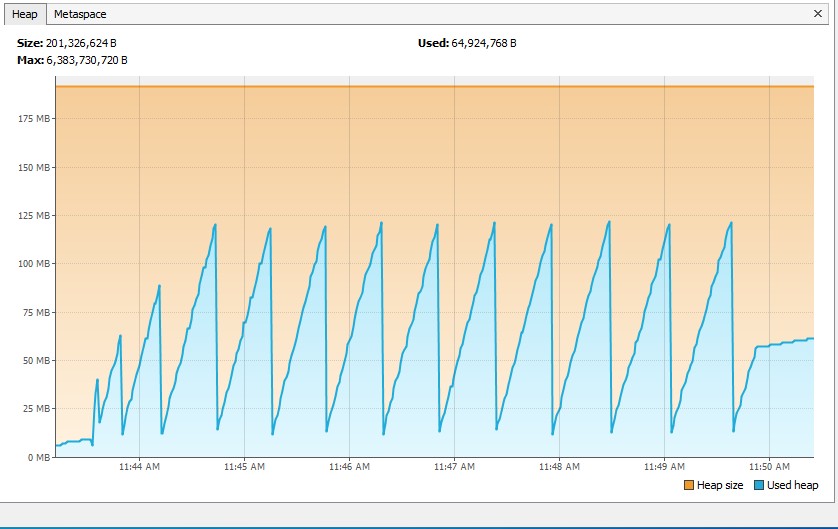
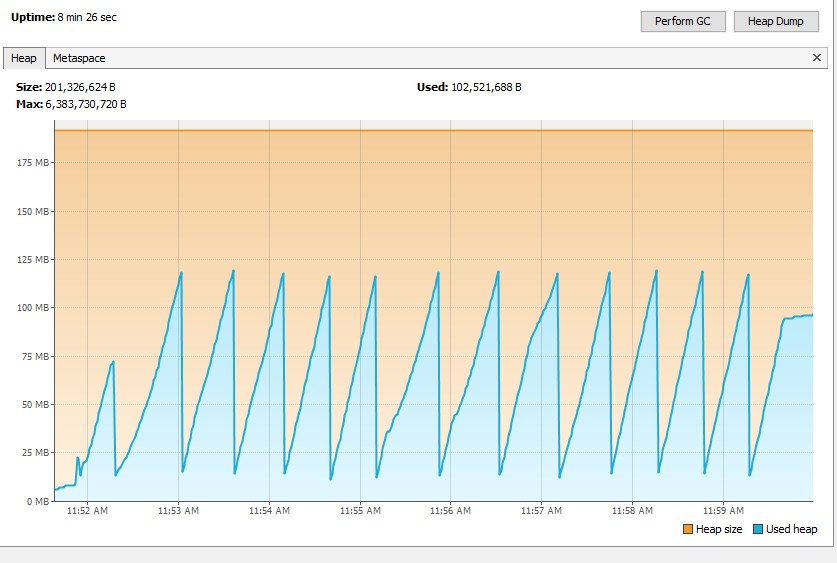
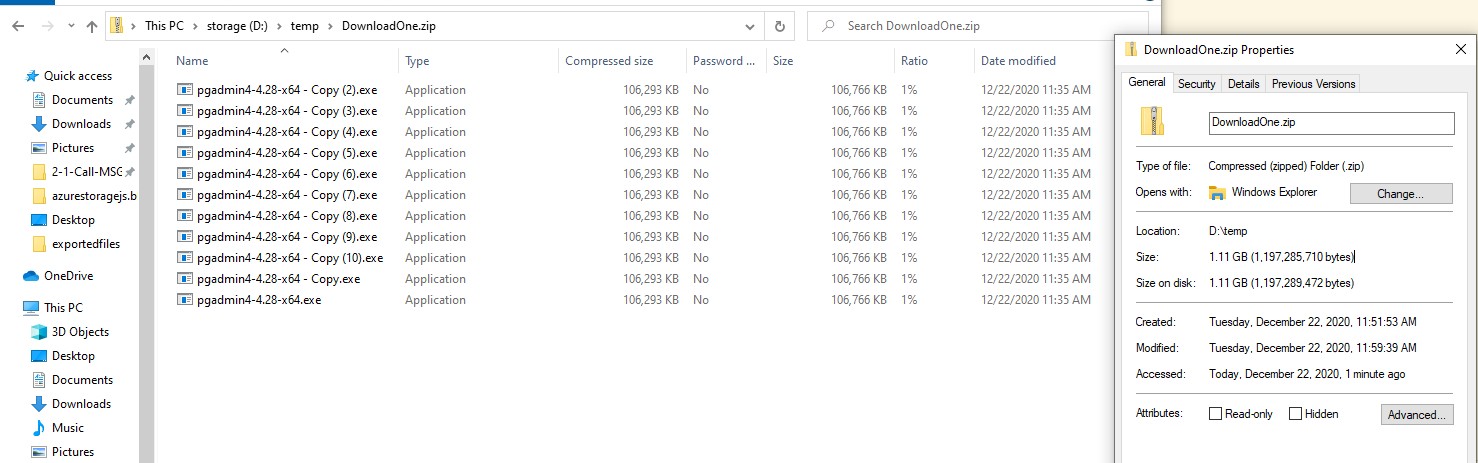
请尝试下面的代码来上传/下载大文件,我已经使用一个大小约为1.1GB的.zip文件进行了测试。
上传文件:
public static void uploadFilesByChunk() {
                String connString = "<conn str>";
                String containerName = "<container name>";
                String blobName = "UploadOne.zip";
                String filePath = "D:/temp/" + blobName;

                BlobServiceClient client = new BlobServiceClientBuilder().connectionString(connString).buildClient();
                BlobClient blobClient = client.getBlobContainerClient(containerName).getBlobClient(blobName);
                long blockSize = 2 * 1024 * 1024; //2MB
                ParallelTransferOptions parallelTransferOptions = new ParallelTransferOptions()
                                .setBlockSizeLong(blockSize).setMaxConcurrency(2)
                                .setProgressReceiver(new ProgressReceiver() {
                                        @Override
                                        public void reportProgress(long bytesTransferred) {
                                                System.out.println("uploaded:" + bytesTransferred);
                                        }
                                });

                BlobHttpHeaders headers = new BlobHttpHeaders().setContentLanguage("en-US").setContentType("binary");

                blobClient.uploadFromFile(filePath, parallelTransferOptions, headers, null, AccessTier.HOT,
                                new BlobRequestConditions(), Duration.ofMinutes(30));
        }
内存足迹:
下载文件:
public static void downLoadFilesByChunk() {
                String connString = "<conn str>";
                String containerName = "<container name>";
                String blobName = "UploadOne.zip";

                String filePath = "D:/temp/" + "DownloadOne.zip";

                BlobServiceClient client = new BlobServiceClientBuilder().connectionString(connString).buildClient();
                BlobClient blobClient = client.getBlobContainerClient(containerName).getBlobClient(blobName);
                long blockSize = 2 * 1024 * 1024;
                com.azure.storage.common.ParallelTransferOptions parallelTransferOptions = new com.azure.storage.common.ParallelTransferOptions()
                                .setBlockSizeLong(blockSize).setMaxConcurrency(2)
                                .setProgressReceiver(new com.azure.storage.common.ProgressReceiver() {
                                        @Override
                                        public void reportProgress(long bytesTransferred) {
                                                System.out.println("dowloaded:" + bytesTransferred);
                                        }
                                });

                BlobDownloadToFileOptions options = new BlobDownloadToFileOptions(filePath)
                                .setParallelTransferOptions(parallelTransferOptions);
                blobClient.downloadToFileWithResponse(options, Duration.ofMinutes(30), null);
        }
内存足迹:
结果:
https://stackoverflow.com/questions/65395726
复制相似问题
腾讯云开发者

Copyright © 2013 - 2026 Tencent Cloud. All Rights Reserved. 腾讯云 版权所有
深圳市腾讯计算机系统有限公司 ICP备案/许可证号:粤B2-20090059  粤公网安备44030502008569号
腾讯云计算(北京)有限责任公司 京ICP证150476号 | 京ICP备11018762号