
如何使用react导航5导航其他屏幕
如何使用react导航5导航其他屏幕
提问于 2020-12-23 09:12:08
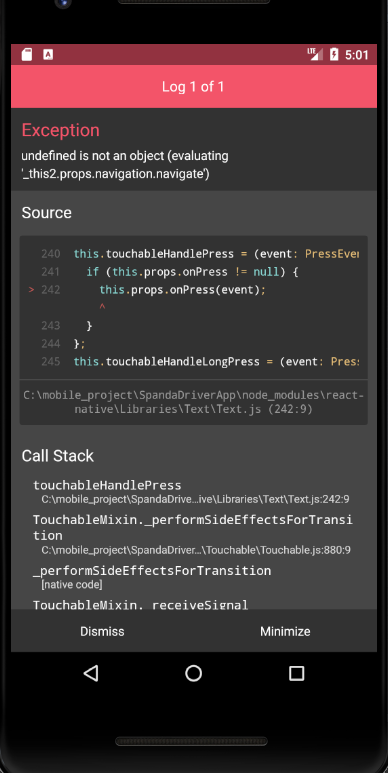
我目前在我的按下移动屏幕上有问题。它说,未定义不是一个对象(评估'_this2.props.navigation.navigate') ,主要目的是当我按下这个文本时,我的屏幕将在策略屏幕上移动。只是给出更多的细节,我在我为其创建的堆栈屏幕(登录、注册、策略)中创建了navigation.js组件,所以现在我有一个任务,当我按下检查图标模式时,将在注册屏幕上弹出。在该模式中,有一个策略可点击文本,当我按下该文本时,我的屏幕将移动到Stack.Screen策略。
Onpress函数:
onPress={() => this.props.navigation.navigate('Policy')}堆栈屏幕:
 <Stack.Screen
     name="Policy"
     component={PrivacyPolicy}
     options={{
        headerShown: false,
     }}
 />
错误:
整体代码:
    import React, {useState} from 'react';
import { NavigationContainer, useNavigation } from '@react-navigation/native';
import { createStackNavigator } from '@react-navigation/stack';
import Login from '../screens/Login';
import Register from '../screens/Register';
import PrivacyPolicy from '../screens/PrivacyPolicy';
import {Button,TouchableOpacity,View,Modal,Text, Alert, TouchableHighlight, StyleSheet, ScrollView } from 'react-native';
import Icon from 'react-native-vector-icons/FontAwesome';
import {Overlay} from 'react-native-elements';
import CheckBox from '@react-native-community/checkbox';

const Stack = createStackNavigator();

class Navigator extends React.Component {

    constructor(props) {
        super(props);

        this.state = {
            modalVisible: false
        }
    }

    setModalVisible = (visible) => {
        this.setState({ modalVisible: visible });
    }

    PrivacyModalShow() {
        const { modalVisible } = this.state;

        return (
        <Modal
            animationType="slide"
            transparent={true}
            visible={modalVisible}
            onRequestClose={() => {
                this.setModalVisible(false);
            }}
            >
                <ScrollView>
                    <View style={styles.centeredView}>
                        <View style={styles.modalView}>

                            <Text style={styles.modalText}>
                                Lorem ipsum dolor sit amet, consectetur adipiscing elit. Nullam ac enim odio. Curabitur at dui a velit bibendum aliquet. Suspendisse elit erat, posuere eget tellus eget, maximus tristique sapien. Integer ornare erat a turpis aliquam, et scelerisque metus congue. Nulla turpis ante, rutrum ac massa egestas, ultrices blandit est. Etiam lectus nisl, viverra vel gravida quis, lacinia nec sapien. Etiam eu facilisis leo. Duis ac aliquam ante. Donec vel velit ipsum. Morbi tempor erat consectetur, aliquet augue nec,
                                tristique nibh. In hendrerit sem non aliquet convallis. Donec molestie mauris sit amet quam posuere euismod.
                            </Text>

                            <View style={styles.checkboxContainer}>
                                <CheckBox
                                />
                                <Text style={styles.label}>I have read and agree to the <Text onPress={() => this.props.navigation.navigate('Policy')} style={{textDecorationLine:'underline', color:'#4ABDFF', fontWeight:'bold', fontSize:17}}>terms and condition and data privacy policy</Text></Text>
                            </View>

                            <View style={styles.confirmationContainer}>
                                <Text style={{fontSize:17,textAlign:"right",flex:1, fontWeight:'bold'}} onPress={() => {
                                this.setModalVisible(!modalVisible);
                                }}>No</Text>
                                <Text style={{marginLeft:30,fontSize:17,textAlign:"right",  color:'#4ABDFF', fontWeight:'bold'}}>Yes, Agree</Text>
                            </View>
                        </View>
                    </View>
                </ScrollView>
            </Modal>
        )
    }

    render() {
        return (
            <NavigationContainer>

                    <Stack.Navigator>
                        <Stack.Screen
                            name="Login"
                            component={Login}
                            options={{
                                headerShown: false,
                            }}
                        />

                        <Stack.Screen
                            name="Registration"
                            component={Register}
                            options={{
                                headerStyle: {
                                    backgroundColor: '#4ABDFF'
                                },
                                headerTitleStyle: {
                                    color: '#fff',
                                },
                                headerTintColor:'#fff',
                                headerRight: () => (
                                    <View style={{flexDirection: "row",justifyContent: "flex-end",paddingRight:10,width: 120}}>
                                    <TouchableOpacity
                                        onPress={() => this.setModalVisible(true) }
                                        >
                                        <Icon type="font-awesome" name="check" size={20} color="white" />
                                        </TouchableOpacity>
                                    </View>
                                ),
                            }}

                        />

                        <Stack.Screen
                            name="Policy"
                            component={PrivacyPolicy}
                            options={{
                                headerShown: false,
                            }}
                        />
                </Stack.Navigator>
                {this.PrivacyModalShow()}
            </NavigationContainer>

        );
    }

}

const styles = StyleSheet.create({
    centeredView: {
      marginTop: 22,
      width:'100%'

    },
    checkboxContainer: {
        flexDirection: "row",
        marginBottom: 0,
    },
    confirmationContainer: {
        flexDirection: "row",
    },
    label: {
        margin: 6,
        fontSize:17
    },
    confirmationLabel: {

        fontSize:17,
        textAlign:'right',
        flex:1
    },
    modalView: {
      margin: 30,
      backgroundColor: "white",
      borderRadius: 5,
      padding: 35,
      shadowOpacity: 0.5,
      shadowRadius: 2,
      elevation: 5,
      maxWidth:'100%'
    },
    textStyle: {
      color: "white",
      fontWeight: "bold",
    },
    modalText: {
      marginBottom: 5,
      fontSize:17,
    }
});


export default Navigator;回答 1
Stack Overflow用户
发布于 2020-12-23 09:25:29
将PrivacyModalShow()函数转换为箭头函数:
PrivacyModalShow = () => {

...

}或将this绑定到构造函数内的PrivacyModalShow():
constructor(props) {
    super(props);

    this.PrivacyModalShow = this.PrivacyModalShow.bind(this);

    ...
}页面原文内容由Stack Overflow提供。腾讯云小微IT领域专用引擎提供翻译支持
原文链接:
https://stackoverflow.com/questions/65421706
复制相关文章
相似问题
腾讯云开发者

Copyright © 2013 - 2026 Tencent Cloud. All Rights Reserved. 腾讯云 版权所有
深圳市腾讯计算机系统有限公司 ICP备案/许可证号:粤B2-20090059  粤公网安备44030502008569号
腾讯云计算(北京)有限责任公司 京ICP证150476号 | 京ICP备11018762号