
为QML QAbstractListModel实现ListView子类?
为QML QAbstractListModel实现ListView子类?
提问于 2020-12-23 03:53:20
如何实现data函数的QAbstractListModel,使其返回一些属性是从QML ListView的委托可见的?
对于项目类型,我尝试实现一个具有QObject s的Q_PROPERTY子类,但是QAbstractListModel::data返回QVariant,并且QObject*不能转换为QVariant
如何创建具有QML可见属性的QVariant?
class MyListItem : public QObject {
  Q_OBJECT
  Q_PROPERTY(type name READ name WRITE set_name NOTIFY nameChanged)
  /*...*/
public:
  MyListItem(QObject* parent, const QString& name) : QObject(parent) {
    set_name(name);
  }
};

class MyList : public QAbstractListModel
{
public:
  MyList(QObject* parent);

  Q_INVOKABLE int rowCount(const QModelIndex &parent = QModelIndex()) const override;
  Q_INVOKABLE QVariant data(const QModelIndex &index, int role = Qt::DisplayRole) const override;

  QVector<MyListItem*> items;
};

Q_INVOKABLE int MyList::rowCount(const QModelIndex &) const {
  return items.size();
}

Q_INVOKABLE QVariant MyList::data(const QModelIndex &index, int) const {
  MyListItem* item = items[index.row()];
  return item; // <--- ERROR
}
得到:
成员函数中的
‘QVariant MyList::data(const &,int) const: error:使用已删除的函数’QVariant::QVariant(void*)‘18 QVariant返回项;分部^~
回答 1
Stack Overflow用户
回答已采纳
发布于 2020-12-23 04:39:32
如果要将QObject封装在QVariant中,则必须使用QVariant::fromValue。
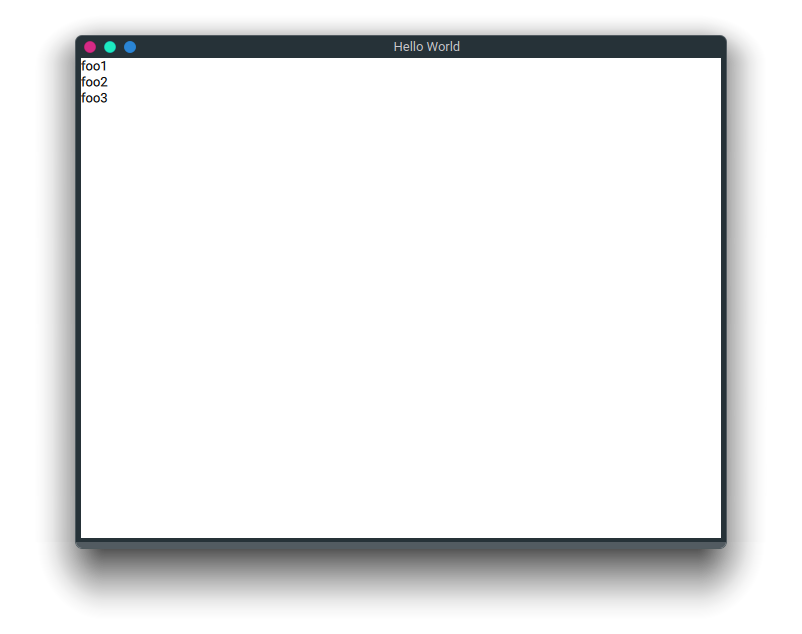
return QVariant::fromValue(item);MWE:
main.cpp
#include <QAbstractListModel>
#include <QGuiApplication>
#include <QQmlApplicationEngine>
#include <QQmlContext>

class MyListItem : public QObject {
    Q_OBJECT
    Q_PROPERTY(QString name READ name WRITE set_name NOTIFY nameChanged)
public:
    MyListItem(const QString& name, QObject* parent=nullptr) : QObject(parent), m_name(name) {
    }
    QString name() const{
        return m_name;
    }
public slots:
    void set_name(QString name){
        if (m_name == name)
            return;
        m_name = name;
        emit nameChanged(m_name);
    }
signals:
    void nameChanged(QString name);
private:
    QString m_name;
};

class MyList : public QAbstractListModel
{
public:
    enum MyListRoles {
        ItemRole = Qt::UserRole + 1
    };
    MyList(QObject* parent=nullptr): QAbstractListModel(parent){}
    ~MyList(){
        qDeleteAll(items);
        items.clear();
    }
    void append(MyListItem *item){
        beginInsertRows(QModelIndex(), rowCount(), rowCount());
        items.append(item);
        endInsertRows();
    }
    int rowCount(const QModelIndex &parent=QModelIndex()) const override{
        if(parent.isValid())
            return 0;
        return items.count();
    }
    QVariant data(const QModelIndex &index, int role) const override{
        if(!index.isValid())
            return {};
        if(index.row() <0 || index.row() >= rowCount())
            return {};
        if(role == ItemRole)
            return QVariant::fromValue(items[index.row()]);
        return {};
    }
    QHash<int, QByteArray> roleNames() const override{
        return {{ItemRole, "item"}};
    }
private:
    QVector<MyListItem*> items;
};
#include "main.moc"
int main(int argc, char *argv[])
{
#if QT_VERSION < QT_VERSION_CHECK(6, 0, 0)
    QCoreApplication::setAttribute(Qt::AA_EnableHighDpiScaling);
#endif
    QGuiApplication app(argc, argv);
    MyList model;
    model.append(new MyListItem("foo1"));
    model.append(new MyListItem("foo2"));
    model.append(new MyListItem("foo3"));
    QQmlApplicationEngine engine;
    engine.rootContext()->setContextProperty("mylist", &model);
    const QUrl url(QStringLiteral("qrc:/main.qml"));
    QObject::connect(&engine, &QQmlApplicationEngine::objectCreated,
                     &app, [url](QObject *obj, const QUrl &objUrl) {
        if (!obj && url == objUrl)
            QCoreApplication::exit(-1);
    }, Qt::QueuedConnection);
    engine.load(url);
    return app.exec();
}
main.qml
import QtQuick 2.12
import QtQuick.Window 2.12

Window {
    width: 640
    height: 480
    visible: true
    title: qsTr("Hello World")
    ListView{
        anchors.fill: parent
        model: mylist
        delegate: Text {
            text: model.item.name
        }
    }
}
页面原文内容由Stack Overflow提供。腾讯云小微IT领域专用引擎提供翻译支持
原文链接:
https://stackoverflow.com/questions/65418804
复制相关文章
相似问题
腾讯云开发者

Copyright © 2013 - 2026 Tencent Cloud. All Rights Reserved. 腾讯云 版权所有
深圳市腾讯计算机系统有限公司 ICP备案/许可证号:粤B2-20090059  粤公网安备44030502008569号
腾讯云计算(北京)有限责任公司 京ICP证150476号 | 京ICP备11018762号