
使用Swagger上传一个MultipartFile对象数组到Spring应用程序?
我正在尝试上传.pdf/.docx/.whatever.数组
根据Swagger的文档,它们确实允许发送一个文件数组。我只是不知道如何告诉Swagger-UI创建这样的请求。
对于Swagger,我有以下依赖项(不确定这是指OAS2还是OAS3):
    <dependency>
        <groupId>io.springfox</groupId>
        <artifactId>springfox-swagger2</artifactId>
        <version>2.9.2</version>
    </dependency>

    <dependency>
        <groupId>io.springfox</groupId>
        <artifactId>springfox-swagger-ui</artifactId>
        <version>2.9.2</version>
</dependency>下面是我的SwaggerConfig类(放在main Spring函数包中):
@Configuration
@EnableSwagger2
public class SwaggerConfig {

    @Bean
    public Docket swaggerPlugin() {
        return new Docket(DocumentationType.SWAGGER_2)
                .select()
                .paths(PathSelectors.any())
                .apis(RequestHandlerSelectors.any())
                .build()

                .securitySchemes(Arrays.asList(apiKey()))
                .securityContexts(Arrays.asList(securityContext()))
                .apiInfo(metaData());
    }

    private ApiInfo metaData() {
        return new ApiInfoBuilder()
                .title("Spring Boot REST API - Garbage Collectors App")
                .description("*")
                .version("1.0.0")
                .license("Apache License Version 2.0")
                .licenseUrl("http://www.apache.org/licenses/LICENSE-2.0")
                .build();
    }

    @Bean
    public SecurityConfiguration security() {
        return SecurityConfigurationBuilder.builder().scopeSeparator(",")
                .additionalQueryStringParams(null)
                .useBasicAuthenticationWithAccessCodeGrant(false).build();
    }

    private ApiKey apiKey() {
        return new ApiKey("apiKey", "Authorization", "header");
    }

    private SecurityContext securityContext() {
        return SecurityContext.builder().securityReferences(defaultAuth())
                .forPaths(PathSelectors.any()).build();
    }

    private List<SecurityReference> defaultAuth() {
        AuthorizationScope authorizationScope = new AuthorizationScope(
                "global", "accessEverything");
        AuthorizationScope[] authorizationScopes = new AuthorizationScope[1];
        authorizationScopes[0] = authorizationScope;
        return Arrays.asList(new SecurityReference("apiKey",
                authorizationScopes));
    }

    @Bean
    UiConfiguration uiConfig() {
        return UiConfigurationBuilder.builder()
                .deepLinking(true)
                .displayOperationId(false)
                .defaultModelsExpandDepth(1)
                .defaultModelExpandDepth(1)
                .defaultModelRendering(ModelRendering.EXAMPLE)
                .displayRequestDuration(true)
                .docExpansion(DocExpansion.NONE)
                .filter(false)
                .maxDisplayedTags(null)
                .operationsSorter(OperationsSorter.ALPHA)
                .showExtensions(false)
                .tagsSorter(TagsSorter.ALPHA)
                .supportedSubmitMethods(UiConfiguration.Constants.DEFAULT_SUBMIT_METHODS)
                .validatorUrl(null)
                .build();
    }

}
另外,这里是我使用的控制器:
@ApiParam(allowMultiple=true)
@RequestMapping(value = "/send/email", consumes = {"multipart/form-data"}, method = RequestMethod.POST)
    public String sendEmail(@RequestParam("attachments") MultipartFile[] attachments) throws IOException {

        System.out.println(attachments.length);

        return "test";
}
我能够从文件系统中选择一组文件:
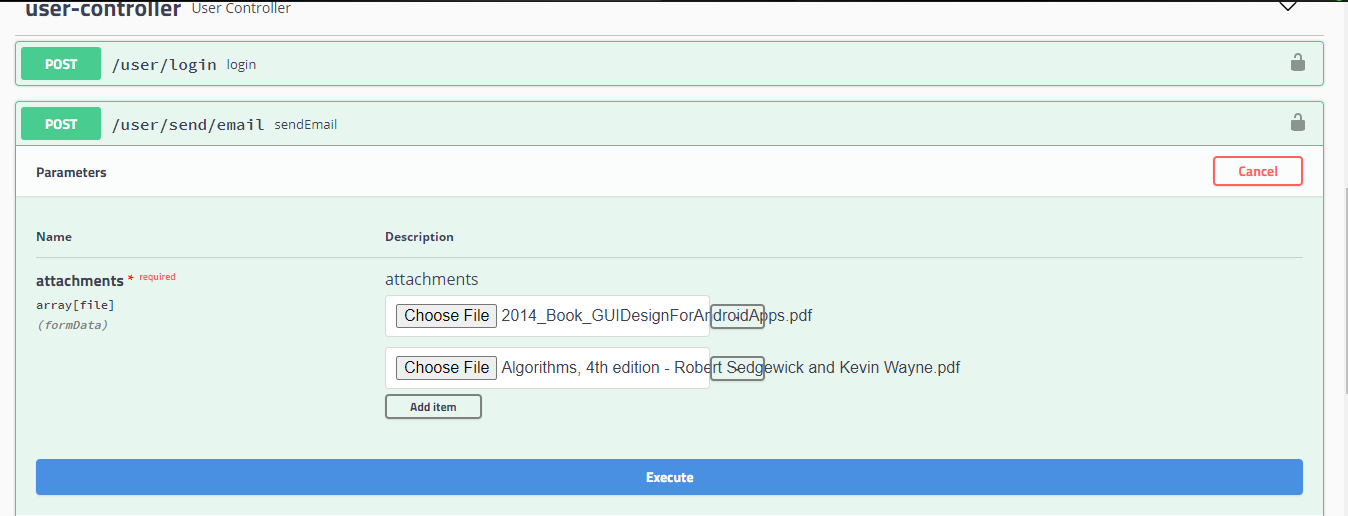
但是在发送请求后,我得到以下错误:
{
      "timestamp": "2020-12-22T18:29:29.578+00:00",
      "status": 400,
      "error": "Bad Request",
      "trace": "org.springframework.web.multipart.support.MissingServletRequestPartException: Required request part 'attachments' is not present org.springframework.web.method.annotation.RequestParamMethodArgumentResolver.handleMissingValue(RequestParamMethodArgumentResolver.java:199)\r\n\tat org.springframework.web.method.annotation.AbstractNamedValueMethodArgumentResolver.resolveArgument(AbstractNamedValueMethodArgumentResolver.java:114)\r\n\tat org.springframework.web.method.support.HandlerMethodArgumentResolverComposite.resolveArgument(HandlerMethodArgumentResolverComposite.java:121)\r\n\tat org.springframework.web.method.support.InvocableHandlerMethod.getMethodArgumentValues(InvocableHandlerMethod.java:170)\r\n\tat org.springframework.web.method.support.InvocableHandlerMethod.invokeForRequest(InvocableHandlerMethod.java:137)\r\n\tat org.springframework.web.servlet.mvc.method.annotation.ServletInvocableHandlerMethod.invokeAndHandle(ServletInvocableHandlerMethod.java:106)\r\n\tat org.springframework.web.servlet.mvc.method.annotation.RequestMappingHandlerAdapter.invokeHandlerMethod(RequestMappingHandlerAdapter.java:894)\r\n\tat org.springframework.web.servlet.mvc.method.annotation.RequestMappingHandlerAdapter.handleInternal(RequestMappingHandlerAdapter.java:808)\r\n\tat
}另一方面,单一的MultipartFile上传和任意数量的单独预先确定的MultipartFile可以被上传,没有任何问题。
我还试过什么:
-going over google和out -reading文档:在这里中,我可以看到他们已经解决了这个问题,但我仍然不知道如何告诉Swagger在服务器端发出请求,无论我使用的是哪个依赖版本。-try可以像这样设置application.ymal:
 requestBody:
    content:
      multipart/form-data:
        schema:
          type: object
          properties:
            orderId:
              type: integer
            userId:
              type: integer
            fileName:
              type: string
              format: binary
另外,我尝试了这两种依赖关系:
        <dependency>
            <groupId>io.springfox</groupId>
         <artifactId>springfox-swagger-ui</artifactId>
            <version>3.0.0</version>
    </dependency>


    <dependency>
            <groupId>commons-fileupload</groupId>
            <artifactId>commons-fileupload</artifactId>
            <version>1.3.1</version>
        </dependency>
    </dependencies>
我的最后一个解决方案是允许发送2-3 MultipartFile,但我真的想避免这种情况。我如何配置这个?
回答 1
Stack Overflow用户
发布于 2021-06-03 12:07:16
你不能在Swagger2.x上这么做。根据Swagger医生的说法。
但是,不支持上传任意数量的文件(文件数组)。在https://github.com/OAI/OpenAPI-Specification/issues/254中有一个开放的特性请求。现在,您可以使用二进制字符串数组作为上载任意数量文件的解决方案:
https://stackoverflow.com/questions/65414232
复制相似问题
腾讯云开发者

Copyright © 2013 - 2026 Tencent Cloud. All Rights Reserved. 腾讯云 版权所有
深圳市腾讯计算机系统有限公司 ICP备案/许可证号:粤B2-20090059  粤公网安备44030502008569号
腾讯云计算(北京)有限责任公司 京ICP证150476号 | 京ICP备11018762号