
如何在新造型设计理念下改变Android中的按钮背景?
如何在新造型设计理念下改变Android中的按钮背景?
提问于 2020-12-24 06:18:05
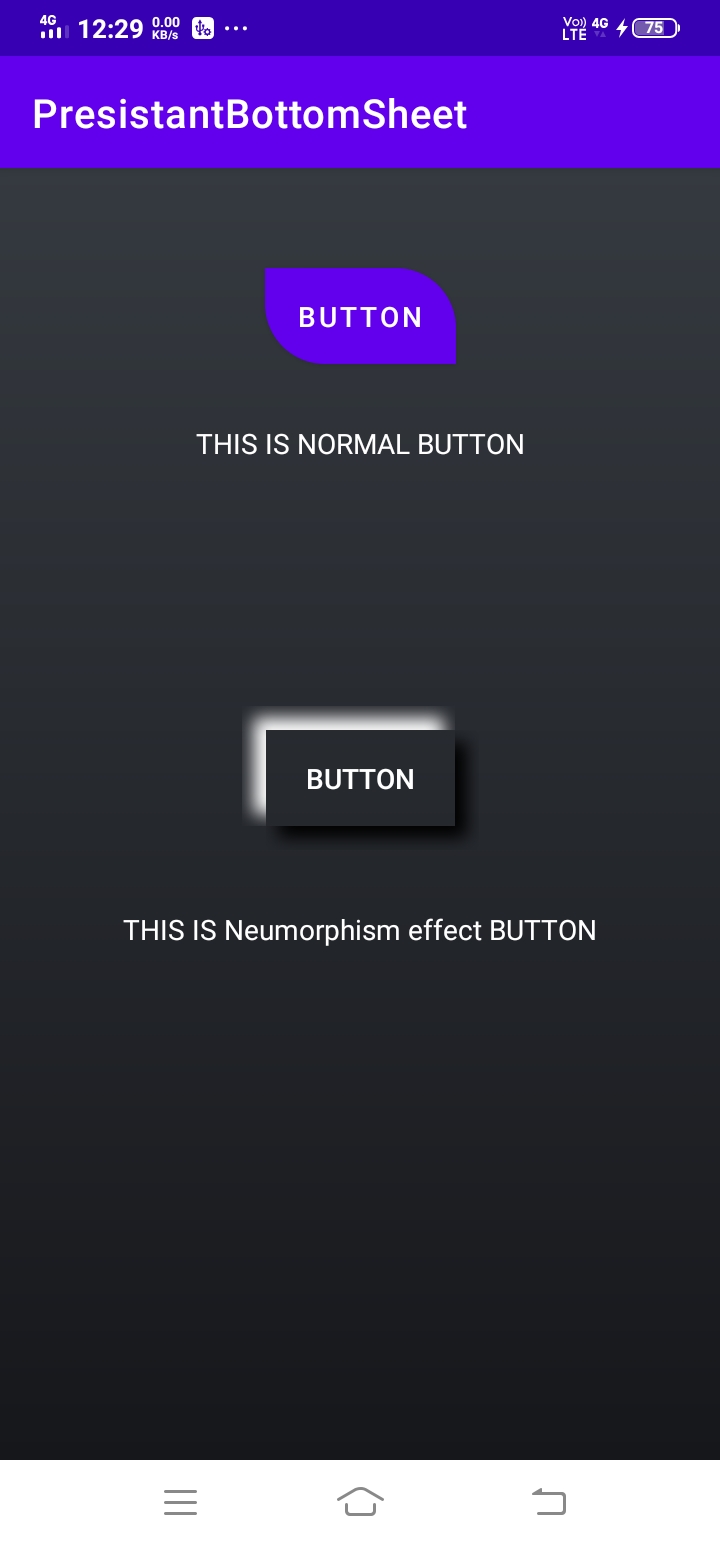
我在我的项目中从事基于新孤儿的设计。我使用这个库https://github.com/fornewid/neumorphism作为新孤儿效应。我的问题是我不能改变按钮或任何其他视图的背景。
这是我的布局文件
activity_neumorphism.xml
    <?xml version="1.0" encoding="utf-8"?>
<androidx.constraintlayout.widget.ConstraintLayout xmlns:android="http://schemas.android.com/apk/res/android"
    xmlns:app="http://schemas.android.com/apk/res-auto"
    xmlns:tools="http://schemas.android.com/tools"
    android:layout_width="match_parent"
    android:layout_height="match_parent"
    android:background="@drawable/screen_background_gradient"
    tools:context=".NeumorphismActivity">


    <soup.neumorphism.NeumorphButton
        android:id="@+id/button"
        style="@style/Widget.Neumorph.Button"
        android:layout_width="wrap_content"
        android:layout_height="wrap_content"
        android:layout_marginBottom="36dp"
        android:drawablePadding="8dp"
        android:background="@drawable/res_transparent_yellow_roundedfilled_corner"
        android:text="Button"
        android:textColor="#FFFFFF"
        app:layout_constraintTop_toTopOf="parent"
        app:layout_constraintBottom_toBottomOf="parent"
        app:layout_constraintEnd_toEndOf="parent"
        app:layout_constraintStart_toStartOf="parent" />

    <Button
        android:id="@+id/normal_button"
        android:layout_width="wrap_content"
        android:layout_height="wrap_content"
        android:text="button"
        android:layout_marginTop="50dp"
        app:layout_constraintStart_toStartOf="parent"
        app:layout_constraintEnd_toEndOf="parent"
        app:layout_constraintTop_toTopOf="parent"
        android:background="@drawable/res_transparent_yellow_roundedfilled_corner"/>

    <TextView
        android:layout_width="wrap_content"
        android:layout_height="wrap_content"
        app:layout_constraintTop_toBottomOf="@+id/normal_button"
        app:layout_constraintStart_toStartOf="parent"
        app:layout_constraintEnd_toEndOf="parent"
        android:text="THIS IS NORMAL BUTTON"
        android:textColor="#FFFFFF"
        android:layout_marginTop="30dp"
        />

    <TextView
        android:layout_width="wrap_content"
        android:layout_height="wrap_content"
        app:layout_constraintTop_toBottomOf="@+id/button"
        app:layout_constraintStart_toStartOf="parent"
        app:layout_constraintEnd_toEndOf="parent"
        android:text="THIS IS Neumorphism effect BUTTON"
        android:textColor="#FFFFFF"
        android:layout_marginTop="30dp"
        />

</androidx.constraintlayout.widget.ConstraintLayout>
这个xml中有两个按钮。一种是正常按钮,另一种是肺炎。我已经为两者设置了背景,但它只适用于普通按钮。
下面是可绘制的背景文件。
res_transparent_yellow_roundedfilled_corner.xml
<?xml version="1.0" encoding="utf-8"?>
<shape xmlns:android="http://schemas.android.com/apk/res/android"
    android:layout_width="wrap_content"
    android:layout_height="wrap_content"
    android:shape="rectangle">
    <corners
        android:radius="10dp"
        />


    <gradient
        android:startColor="#C8A800"
        android:endColor="#FFD80A"/>
</shape>
下面是给出的样式。
<?xml version="1.0" encoding="utf-8"?>
<resources>
    <style name="Widget.Neumorph.Button" parent="Widget.AppCompat.Button">
        <item name="android:textAppearance">?android:attr/textAppearanceButton</item>
        <item name="android:minHeight">72dip</item>
        <item name="android:minWidth">112dip</item>
        <item name="android:background">@drawable/res_transparent_yellow_roundedfilled_corner</item>
        <item name="android:paddingLeft">@dimen/design_btn_padding_left</item>
        <item name="android:paddingRight">@dimen/design_btn_padding_right</item>
        <item name="android:paddingTop">@dimen/design_btn_padding_top</item>
        <item name="android:paddingBottom">@dimen/design_btn_padding_bottom</item>
        <item name="android:stateListAnimator">@animator/button_state_list_anim_neumorph</item>
        <item name="android:focusable">true</item>
        <item name="android:clickable">true</item>
        <item name="android:gravity">center_vertical|center_horizontal</item>
        <item name="neumorph_inset">@dimen/design_default_inset</item>
        <item name="neumorph_shadowElevation">6dp</item>
        <item name="neumorph_shadowColorLight">#FFFFFF</item>
        <item name="neumorph_shadowColorDark">#000000</item>
        <item name="neumorph_shapeType">flat</item>
        <item name="neumorph_shapeAppearance">@style/ShapeAppearance.Neumorph.Button</item>

    </style>

    <style name="ShapeAppearance.Neumorph.Button" parent="">

        <item name="background"> @drawable/res_transparent_yellow_roundedfilled_corner</item>

    </style>
</resources>
回答 1
Stack Overflow用户
回答已采纳
发布于 2020-12-24 06:27:13
使用此属性更改xml中的背景app:neumorph_backgroundColor="@color/background_color"。
如果不能工作,NeumorphButton中有一个方法是setBackgroundDrawable。可以以编程方式设置绘图。
编辑
不能在这个库中设置自定义背景,因为它显示
不支持设置自定义背景的
。
页面原文内容由Stack Overflow提供。腾讯云小微IT领域专用引擎提供翻译支持
原文链接:
https://stackoverflow.com/questions/65434693
复制相关文章
相似问题
腾讯云开发者

Copyright © 2013 - 2026 Tencent Cloud. All Rights Reserved. 腾讯云 版权所有
深圳市腾讯计算机系统有限公司 ICP备案/许可证号:粤B2-20090059  粤公网安备44030502008569号
腾讯云计算(北京)有限责任公司 京ICP证150476号 | 京ICP备11018762号