
使用i18next进行反作用产品生成会导致转换只显示字符串。
我相信我已经搜索了互联网的各个部分,寻找答案和解决办法,但似乎没有一个可行。
发行:
- 在构建使用i18n作为翻译的生产反应应用程序时,将导致产品生成只显示字符串,而不显示翻译文本本身(见图片引用)
。
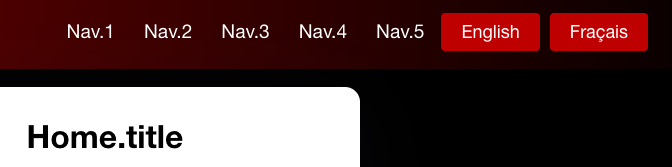
,
- ,奇怪的是,在本地主机中,当开发服务器运行时,它将正确显示转换。(参考图)

在生成产品生成后,在浏览器控制台(使用铬)中显示以下错误:Fetch API cannot load file:///Documents/streaming_site/build/static/locales/en/translation.json. URL scheme must be "http" or "https" for CORS request.
在看到这个错误后,我马上就认为是我的i18next.js文件中的错误导致了这个问题。以下是文件:
import i18n from 'i18next';
import { initReactI18next } from 'react-i18next';
import Backend from 'i18next-http-backend';
import LanguageDetector from 'i18next-browser-languagedetector';
import XHR from 'i18next-xhr-backend';

// don't want to use this?
// have a look at the Quick start guide
// for passing in lng and translations on init

const Languages = ['en', 'fr'];

i18n
  .use(XHR)
  // load translation using http -> see /public/locales (i.e. https://github.com/i18next/react-i18next/tree/master/example/react/public/locales)
  // learn more: https://github.com/i18next/i18next-http-backend
  .use(Backend)
  // detect user language
  // learn more: https://github.com/i18next/i18next-browser-languageDetector
  .use(LanguageDetector)
  // pass the i18n instance to react-i18next.
  .use(initReactI18next)
  // init i18next
  // for all options read: https://www.i18next.com/overview/configuration-options
  .init({
    lng : 'en',
    react: {
      useSuspense: false,
      wait: true
    },
    fallbackLng: 'en',
    debug: false,
    whitelist: Languages,
    interpolation: {
      escapeValue: false, // not needed for react as it escapes by default
    },
    nsSeperator : false,
    keySeperator : false,
    backend:{
      loadPath: () => {

        var cors = require('cors');
        var app = cors();

        // check the domain
        const host = window.location.host;
        return (host === 'index.html#' ? '':'') + '/static/locales/{{lng}}/{{ns}}.json';
      },
    }
  });


export default i18n;在我的index.js文件中,我添加了这些额外的修复程序,以确保该应用程序能够在产品构建中正确地显示翻译文本:
i18next.init({// <-- This was added
  interpolation: {escapeValue: false},
});
i18next.init().then(() => // <-- This was added
  ReactDOM.render(
    <React.StrictMode>
    <Suspense fallback={<div>Loading...</div>}>// <-- This was added
      <I18nextProvider i18n={i18next}>// <-- This was added
        <App />
      </I18nextProvider>
    </Suspense>
    </React.StrictMode>,
    document.getElementById('root')
  )
);唉,同样的错误(第三点的错误)发生在npm run build之后。
这使我相信,如果没有一个后端服务器承载en和fr的translation.json文件,就不可能在本地访问它们。
我的问题如下:在构建产品构建之后,是否有可能让i18n翻译在本地运行,而不需要服务器来承载json文件?如果是的话,我该怎么做?
关于参考资料,我尝试了一些从这个网站修复的方法,例如:
当我尝试-> res.header('Access-Control-Allow-Origin', "*");时,我已经接近了--尽管这是以提出一些安全问题为代价的,但我不想那样做。虽然如果这是一个潜在的解决办法,我愿意尝试。
所以我没有想法了..。:/
回答 1
Stack Overflow用户
发布于 2020-12-24 08:18:48
看起来,i18next服务有一些错误的配置。
首先,i18next-http-backend & i18next-xhr-backend正在解决同样的问题,获取json文件。
删除第二个(i18next-xhr-backend),因为它是对i18next-http-backend不利的。
将backend.loadPath更改为字符串,您的代码没有意义。
看起来应该是:
import i18n from 'i18next';
import { initReactI18next } from 'react-i18next';
import Backend from 'i18next-http-backend';
import LanguageDetector from 'i18next-browser-languagedetector';

// don't want to use this?
// have a look at the Quick start guide
// for passing in lng and translations on init

const Languages = ['en', 'fr'];

i18n
  .use(Backend)
  // detect user language
  // learn more: https://github.com/i18next/i18next-browser-languageDetector
  .use(LanguageDetector)
  // pass the i18n instance to react-i18next.
  .use(initReactI18next)
  // init i18next
  // for all options read: https://www.i18next.com/overview/configuration-options
  .init({
    lng: 'en',
    react: {
      useSuspense: false,
      wait: true,
    },
    fallbackLng: 'en',
    debug: false,
    whitelist: Languages,
    interpolation: {
      escapeValue: false, // not needed for react as it escapes by default
    },
    nsSeperator: false,
    keySeperator: false,
    backend: {
      loadPath: '/locales/{{lng}}/{{ns}}.json',
    },
  });

export default i18n;https://stackoverflow.com/questions/65431391
复制相似问题
腾讯云开发者

Copyright © 2013 - 2026 Tencent Cloud. All Rights Reserved. 腾讯云 版权所有
深圳市腾讯计算机系统有限公司 ICP备案/许可证号:粤B2-20090059  粤公网安备44030502008569号
腾讯云计算(北京)有限责任公司 京ICP证150476号 | 京ICP备11018762号