
如何“锁定”组件在反应本机屏幕上的位置?
我正试图在我的社交网络应用程序上构建一个用户的个人资料屏幕。我想要的方式是屏幕的顶部1/3是用户配置文件信息,底部2/3是所有用户帖子的平面列表。目前,我有所有的工作逻辑明智。下面是应用程序的截图:
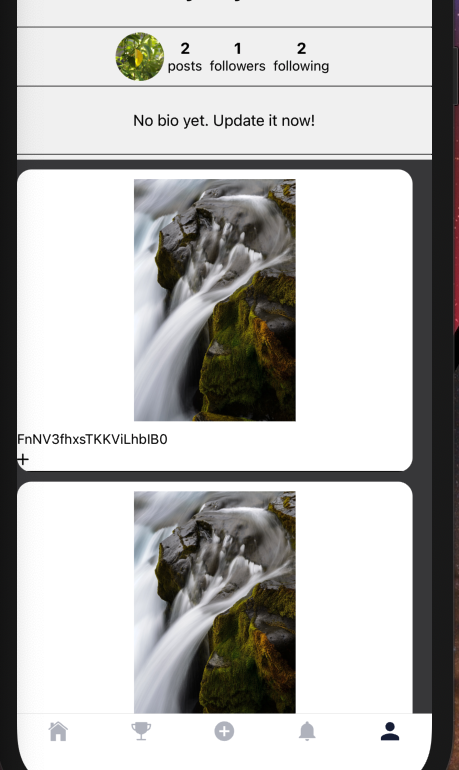
如您所见,用户配置文件信息显示在顶部,用户的帖子历史记录在下面的平面列表中正确显示。然而,平面列表正在将用户配置文件信息“向上”推到屏幕上。
下面是配置文件的代码:
class Profile extends React.Component {

constructor(props) {
    super(props)
    this.state = {
        user: this.props.user
    }

}

goToSettings = () => {
    this.props.navigation.navigate('Settings')
}

render() {
    return (
        <View style={styles.container}>

            <View style={{ flexDirection: "row", padding: 20 }}>
                <Text style = {styles.subheader}> {this.state.user.username} </Text> <------The username is being pushed up, where only the bottom half of it is visible

                <TouchableOpacity
                    onPress={this.goToSettings}>
                    <Ionicons name="ios-settings" size={24} color="black" />
                </TouchableOpacity>

            </View>


            <View style = {styles.lineStyle} />

            <View style={{ flexDirection: "row" }}>
                <ProfilePic/>
                <ProfileStats/>
            </View>

            <View style = {styles.lineStyle} />

            <ProfileBio />

            <View style = {styles.lineStyle} />

            <View style={{ flexDirection: "row", alignItems: 'center', justifyContent: 'center' }}>
                <CurrentUserPostFeed navigation = {this.props.navigation} /> <------ This is the flat list. It is pushing up the views & other components that are above it.
            </View>

        </View>
    )
}
}我希望用户配置文件信息的位置保持在相同的位置,占据屏幕的顶部1/3,而用户可以滚动只占屏幕底部2/3的平面列表。
但是,我不知道如何“锁定”配置文件信息,在配置文件屏幕的顶部1/3总是可以看到它,不管帖子的平面列表有多大/多小。有什么建议吗?
编辑:版面单元格中的空白处/空白处似乎引起了我的问题。当我添加marginTop或paddingTop时,是否可以阻止平面列表容器将其上方的元素“向上”推送?
回答 1
Stack Overflow用户
发布于 2020-12-28 02:27:04
应该使用flex属性来设置以下内容
指定应将flex容器中剩余的多少空间分配给该项。
有关flex属性这里的更多信息。** flex是flex-grow的缩写。
所以,你可以这样做:
<View> // main container
    <View style={{flex: 1}}> // header container
       // Header Content
    </View>
    <View style={{flex: 2}}> // flatlist container
        // Flatlist content
    </View>
</View>基本上,我们在这里所做的是将header设置为使用main-container可用空间的1/3,而flatlist使用main-container可用空间的2/3。
https://stackoverflow.com/questions/65471941
复制相似问题
腾讯云开发者

Copyright © 2013 - 2026 Tencent Cloud. All Rights Reserved. 腾讯云 版权所有
深圳市腾讯计算机系统有限公司 ICP备案/许可证号:粤B2-20090059  粤公网安备44030502008569号
腾讯云计算(北京)有限责任公司 京ICP证150476号 | 京ICP备11018762号