
用Vim实现Julia语法突出显示的简单方法
我试图让朱莉娅在Vim中突出显示语法。不幸的是,目前我没有语法突出显示(下面是我的代码的一个小片段,您可以看到它当前的样子)。我试着安装julia并将它放入.vimrc文件并安装它,但是它实际上并没有改变高亮显示。下面是.vimrc文件:

set nocompatible              " be iMproved, required
filetype off                  " required

" set the runtime path to include Vundle and initialize
  set rtp+=~/.vim/bundle/Vundle.vim
 call vundle#begin()
" alternatively, pass a path where Vundle should install plugins
"call vundle#begin('~/some/path/here')

" let Vundle manage Vundle, required
  Plugin 'VundleVim/Vundle.vim'

" The following are examples of different formats supported.
" Keep Plugin commands between vundle#begin/end.
" plugin on GitHub repo
 Plugin 'tpope/vim-fugitive'
" plugin from http://vim-scripts.org/vim/scripts.html
" Plugin 'L9'
" Git plugin not hosted on GitHub
  Plugin 'git://git.wincent.com/command-t.git'
" git repos on your local machine (i.e. when working on your own
   plugin)
  Plugin 'file:///home/gmarik/path/to/plugin'
 " The sparkup vim script is in a subdirectory of this repo called vim.
 " Pass the path to set the runtimepath properly.
 Plugin 'rstacruz/sparkup', {'rtp': 'vim/'}
 " Install L9 and avoid a Naming conflict if you've already installed a
  " different version somewhere else.
 " Plugin 'ascenator/L9', {'name': 'newL9'}

 " All of your Plugins must be added before the following line
   call vundle#end()            " required
   filetype plugin indent on    " required
  " To ignore plugin indent changes, instead use:
  "filetype plugin on
  "
  " Brief help
  " :PluginList       - lists configured plugins
   " :PluginInstall    - installs plugins; append `!` to update or
    just :PluginUpdate
   " :PluginSearch foo - searches for foo; append `!` to refresh local cache
   " :PluginClean      - confirms removal of unused plugins; append
   `!` to auto-approve removal
   "

   Plugin 'JuliaEditorSupport/julia-vim'


  "
  "
  "
  " see :h vundle for more details or wiki for FAQ
" Put your non-Plugin stuff after this line我还注意到如何在阅读julia-vim文档之后修复它。我是否做错了什么,还是有其他方式向Julia添加一些语法突出显示?
我从这个问题是托马斯提出的的一个答案中看到,这可能是我设置终端的方式,但如果可能的话,我更愿意保留终端与当前的颜色方案。看看这里我现在的设置。

编辑:多亏@axwr,我能够通过
syntax on在.vimrc文件的末尾,然后运行
:so %同时编辑.vimrc文件。然而,在正如你在这里看到的中,颜色编码似乎并不理想。只有某些包裹是黄色的,大多数仍然是绿色的,随机的东西(通常是数字)会变成紫色。这是朱莉娅-维姆的颜色,还是我做错了什么?

回答 1
Stack Overflow用户
发布于 2020-12-28 20:04:33
好吧,那么。
在Vim中有两个步骤来突出显示语法;实际上是打开它,并且能够突出显示您想要使用的特定语言。对于大多数语言来说,vim默认可以做到这一点,但是有些语言,比如Julia,需要一些帮助。在本例中,通过使用vundle安装Julia插件完成了第二步。
要完成第一步,只需在vimrc文件中使用行:syntax on。对于您来说,一个最小的示例vimrc可能如下所示:
set rtp+=~/.vim/bundle/Vundle.vim
call vundle#begin()
Plugin 'VundleVim/Vundle.vim'
Plugin 'JuliaEditorSupport/julia-vim'
call vundle#end()

set nocompatible
set backspace=indent,eol,start
set number
set hidden

syntax on
filetype plugin indent on
鉴于上述设置和具有“日光化”颜色方案的终端,julia文件如下所示:
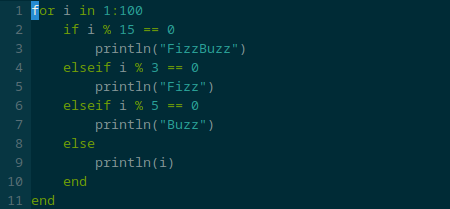
下面是小fizzbuzz julia片段,您可以将其与突出显示进行比较:
for i in 1:100
    if i % 15 == 0
        println("FizzBuzz")
    elseif i % 3 == 0
        println("Fizz")
    elseif i % 5 == 0
        println("Buzz")
    else
        println(i)
    end
end
因此,一步一步:
- 将
syntax on添加到.vimrc中 - 将
filetype plugin indent on添加到.vimrc中 - 安装相关插件
- 源您的
.vimrc或关闭vim。 - 打开一个扩展名正确的文件,即:
test.jl
https://stackoverflow.com/questions/65483040
复制相似问题
腾讯云开发者

Copyright © 2013 - 2026 Tencent Cloud. All Rights Reserved. 腾讯云 版权所有
深圳市腾讯计算机系统有限公司 ICP备案/许可证号:粤B2-20090059  粤公网安备44030502008569号
腾讯云计算(北京)有限责任公司 京ICP证150476号 | 京ICP备11018762号