
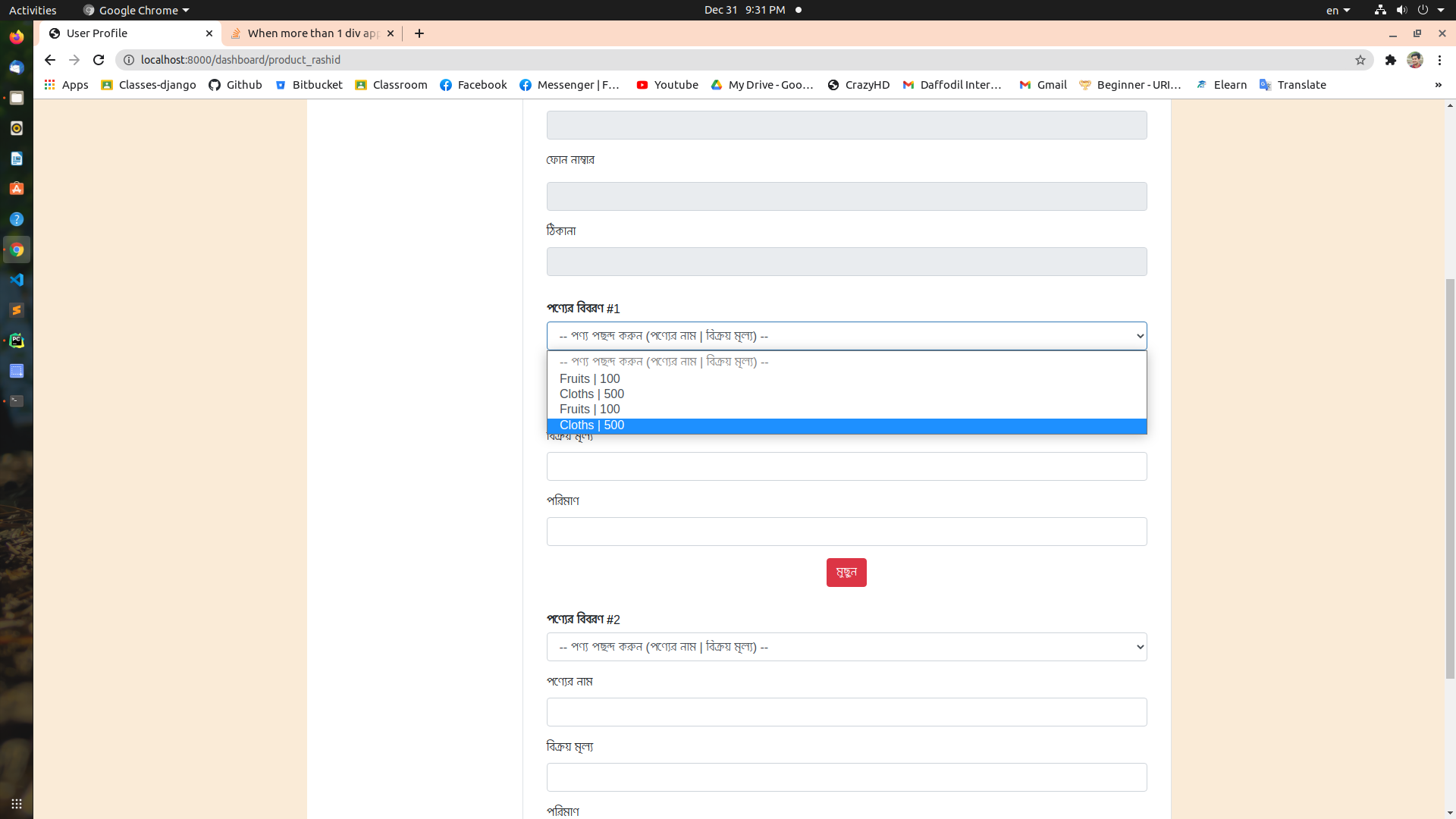
当附加超过1个div时,下拉选项将增加,我将从DB检索该选项。
当附加超过1个div时,下拉选项将增加,我将从DB检索该选项。
提问于 2020-12-31 16:03:57
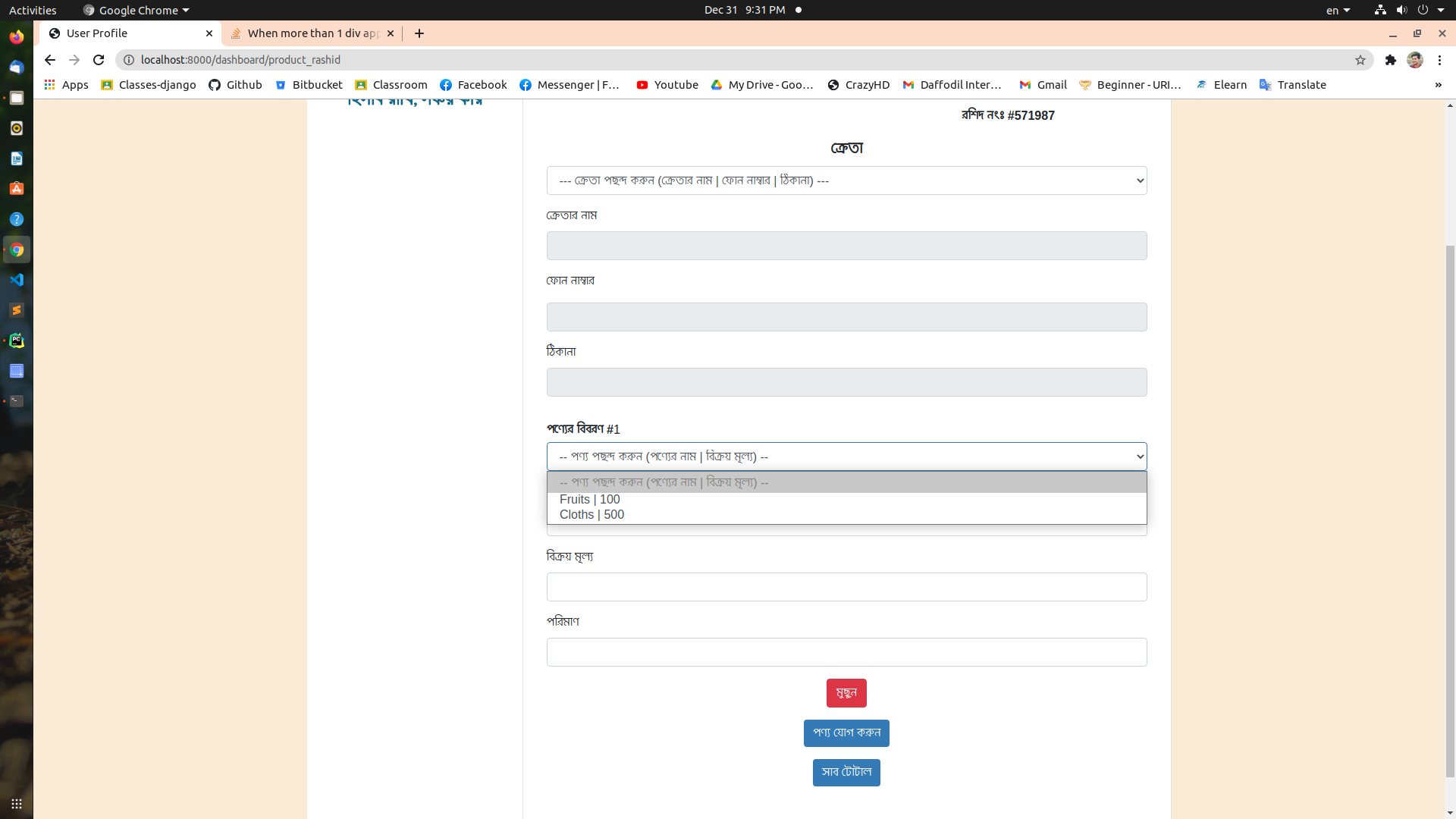
在追加2div之前,我的下拉列表如下:
但是,只要我单击这个按钮来追加另一个div,它就会像这样
下面是html中按钮的代码:
    <div class="productDiv"></div>
    <div class="mt-3 text-center"><button class="btn profile-button" style="color: white"
    type="button" id="btnAddtoList">পণ্য যোগ করুন</button></div>
和jquery代码:
    $(function() {
    let divCount = 0;
     $('#btnAddtoList').on('click', function(){
     divCount++;
     const div_title = divCount;
     var newDiv = $(
     `<div class=item-wrapper-${div_title}>` +
     '<div class="container rounded bg-white mt-3 mb-3">' +
      '<div class="row">' +
       '<div class="col-md-12">' +
        '<div class="row mt-3">' +
          '<span><strong>পণ্যের বিবরণ #</strong></span>'+ div_title +
         </div>' +
         '<div class="row mt-1">' +
           '<select class="product_option form-control" id="product" data-search="true">' +
              '<option disabled selected> -- পণ্য পছন্দ করুন (পণ্যের নাম | বিক্রয় মূল্য) -- </option>' +
           '</select>' +
         '</div>' +
         '<div class="row mt-3">' +
          '<label class="labels" style="font-size: 16px">পণ্যের নাম</label><input type="text"
           class="form-control" id="productName">' +
         '</div>' +
         '<div class="row mt-3">' +
          '<label class="labels" style="font-size: 16px">বিক্রয় মূল্য</label><input type="text"
           class="form-control" id="sellPrice">' +
         '</div>' +
         '<div class="row mt-3">' +
          '<label class="labels" style="font-size: 16px">পরিমাণ</label><input type="number"
           class="form-control" id="amount">' +
         '</div>' +
         '<div class="mt-3 d-flex flex-column align-items-center text-center">
           <button class="btn btn-danger deleteItem" type="button">মুছুন</button></div>' +
         '</div>' +
        '</div>' +
       '</div>' +
      '</div>');
      $('.productDiv').append(newDiv);
      console.log(div_title);
      firebase.auth().onAuthStateChanged(function(user) {
      console.log(user);
       if (user) {
          var user_id = user.uid;
          firebase.database().ref('Products/').child(user_id).once('value')
          .then(function(snapshot){
             snapshot.forEach(function(childSnapshot) {
               var product_name = childSnapshot.child("product_name").val();
               var buying_price = childSnapshot.child("buying_price").val();
               var selling_price = childSnapshot.child("selling_price").val();
               var total = product_name + " | " + selling_price;
               console.log(total);
               $(".product_option").append('<option>' + total + '</option');
               $(document).on("change", ".product_option", function () {
                 const valArr = $(`.item-wrapper-${div_title} .product_option
                  option:selected`).text().split(" | ");
                 console.log(valArr);
                 $(`div.item-wrapper-${div_title} #productName`).val(valArr[0]);
                 $(`div.item-wrapper-${div_title} #sellPrice`).val(valArr[1]);
                 });
               $(document).on("click", ".deleteItem", function() {
                 $(this).closest(`.item-wrapper-${div_title}`).remove();
                       });
                   });
               })
                 }
                else{
                    window.location.href="{% url 'login' %}";
                }
            });
        });
    });
这是我的代码,首先,我为一些孟加拉语的话道歉。这些只是标签上的名字。id和类名是用英语写的。提前谢谢。
回答 1
Stack Overflow用户
回答已采纳
发布于 2020-12-31 16:25:05
您正在使用$(".product_option"),这将针对使用该类的所有选择并向其追加新选项,这就是您看到重复的原因。相反,您可以使用$(".item-wrapper-" + div_title).find(..,这将找到需要添加选项的选择框。
演示代码:
$(function() {
  let divCount = 0;
  $('#btnAddtoList').on('click', function() {
    divCount++;
    const div_title = divCount;
    var newDiv = $(
      `<div class=item-wrapper-${div_title}>` +
      '<div class="container rounded bg-white mt-3 mb-3">' +
      '<div class="row">' +
      '<div class="col-md-12">' +
      '<div class="row mt-3">' +
      '<span><strong>পণ্যের বিবরণ #</strong></span>' + div_title +
      '</div>' +
      '<div class="row mt-1">' +
      '<select class="product_option form-control" id="product" data-search="true">' +
      '<option disabled selected> -- পণ্য পছন্দ করুন (পণ্যের নাম | বিক্রয় মূল্য) -- </option>' +
      '</select>' +
      '</div>' +
      '<div class="row mt-3">' +
      '<label class="labels" style="font-size: 16px">পণ্যের নাম</label><input type="text"  class = "form-control" id = "productName" > ' +
      '</div>' +
      '<div class="row mt-3">' +
      '<label class="labels" style="font-size: 16px">বিক্রয় মূল্য</label><input type="text"  class = "form-control" id = "sellPrice" > ' +
      '</div>' +
      '<div class="row mt-3">' +
      '<label class="labels" style="font-size: 16px">পরিমাণ</label><input type="number" class = "form-control"id = "amount" > ' +
      '</div>' +
      '<div class="mt-3 d-flex flex-column align-items-center text-center"> <button class = "btn btn-danger deleteItem" type = "button"> মুছুন </button></div > ' +
      '</div>' +
      '</div>' +
      '</div>' +
      '</div>');
    $('.productDiv').append(newDiv);
    /* firebase.auth().onAuthStateChanged(function(user) {
       console.log(user);
       if (user) {
         var user_id = user.uid;
         firebase.database().ref('Products/').child(user_id).once('value')
           .then(function(snapshot) {
             snapshot.forEach(function(childSnapshot) {*/
    var product_name = "ABC";
    var buying_price = 100;
    var selling_price = 50;
    var total = product_name + " | " + selling_price;
    //get the item div which is added then append options to that
    $(".item-wrapper-" + div_title).find(".product_option").append('<option>' + total + '</option');

    /*
    //some ..codes..
       });
          })
      } else {
        window.location.href = "{% url 'login' %}";
      }
    });*/
  });
});<script src="https://cdnjs.cloudflare.com/ajax/libs/jquery/3.3.1/jquery.min.js"></script>
<div class="productDiv"></div>
<div class="mt-3 text-center"><button class="btn profile-button" style="color: white" type="button" id="btnAddtoList">পণ্য যোগ করুন</button></div>
页面原文内容由Stack Overflow提供。腾讯云小微IT领域专用引擎提供翻译支持
原文链接:
https://stackoverflow.com/questions/65523108
复制相关文章
相似问题
腾讯云开发者

Copyright © 2013 - 2026 Tencent Cloud. All Rights Reserved. 腾讯云 版权所有
深圳市腾讯计算机系统有限公司 ICP备案/许可证号:粤B2-20090059  粤公网安备44030502008569号
腾讯云计算(北京)有限责任公司 京ICP证150476号 | 京ICP备11018762号