
按钮单击后的div删除不能正常工作。也不维护序列
当我一个接一个地添加div时,它就正常工作了。但是,当我删除第一个或任何一个从前一个,它没有正确删除。如果我再一次想追加另一个div号没有保持序列。实际上,我想要建立一个系统,用户可以添加产品,也可以删除产品在发票生成。所以请帮助我如何维护这些东西。此外,我需要计算单个产品的小计数量与个别的div。这是我的代码:
<script type="text/javascript">
               let divCount = 0;
               $(function() {
               $('#btnAddtoList').on('click', function(){
               divCount++;
               const div_title = divCount;
               var newDiv = $(
                `<div class=item-wrapper-${div_title}>` +
                  '<div class="container rounded bg-white mt-3 mb-3">' +
                    '<div class="row">' +
                      '<div class="col-md-12">' +
                        '<div class="row mt-3">' +
                          '<span><strong>পণ্যের বিবরণ #</strong></span>'+ div_title +
                        '</div>' +
                        '<div class="row mt-1 text-center">' +
                          '<select class="product_option form-control" id="product">' +
                            '<option disabled selected> -- পণ্য পছন্দ করুন (পণ্যের নাম | বিক্রয় মূল্য |
                               অ্যাভেলেবল আছে) --
                             </option>' +
                            '</select>' +
                         '</div>' +
                         '<div class="row mt-3">' +
                           '<label class="labels" style="font-size: 16px">পণ্যের নাম</label>
                             <input type="text" class="form-control" id="productName">' +
                           '</div>' +
                         '<div class="row mt-3">' +
                           '<label class="labels" style="font-size: 16px">বিক্রয় মূল্য</label>
                             <input type="number" class="form-control" id="sellPrice">' +
                         '</div>' +
                         '<div class="row mt-3">' +
                          '<label class="labels" style="font-size: 16px">পণ্য মজুদ আছে </label>
                           <input type="text" class="form-control" id="amount" ">' +
                         '</div>' +
                         '<div class="row mt-3">' +
                          '<label class="labels" style="font-size: 16px">পরিমাণ</label>
                           <input type="number" class="form-control quantity_pro" id="quantity" ">' +
                         '</div>' +
                         `<div class="mt-3 d-flex flex-column align-items-center text-center">
                           <button class="btn btn-danger deleteItem" id=del-${div_title}
                            type="button">মুছুন
                           </button>
                          </div>` +
                        '</div>' +
                      '</div>' +
                    '</div>' +
                '</div>');
           $('.productDiv').append(newDiv);
           console.log(div_title);
           $(".item-wrapper-" + div_title).find(".product_option").select2({
             theme: "classic"
           });
         firebase.auth().onAuthStateChanged(function(user) {
            console.log(user);
                 if (user) {
                    var user_id = user.uid;

                     firebase.database().ref('Products/').child(user_id).once('value')
                     .then(function(snapshot){
                        snapshot.forEach(function(childSnapshot) {
                              var product_name = childSnapshot.child("product_name").val();
                              var selling_price = childSnapshot.child("selling_price").val();
                              var amount = childSnapshot.child("product_quantity").val();
                              {#console.log(amount)#}
                              var total = product_name + " | " + selling_price + " | " + amount;
                              console.log(total);
                            $(".item-wrapper-" + div_title).find(".product_option").append('<option>'
                            + total + '</option');
                              $(document).on("change", ".product_option", function () {
                                  const valArr = $(`.item-wrapper-${div_title} .product_option
                       option:selected`).text().split(" | ");
                                  $(`div.item-wrapper-${div_title} #productName`).val(valArr[0]);
                                  $(`div.item-wrapper-${div_title} #sellPrice`).val(valArr[1]);
                                  $(`div.item-wrapper-${div_title} #amount`).val(valArr[2]);

                              });
                        });
                      })
                 }
                else{
                    window.location.href="{% url 'login' %}";
                }
            });
        });

        $("#subTotal").on('click', function (e) {
            var subTotalAmount = 0;
            for (var i = 1; i<=divCount; i++){
                var getProductName = $(`div.item-wrapper-${i} #productName`).val();
                var getSellingPrice = $(`div.item-wrapper-${i} #sellPrice`).val();
                var getAmount = $(`div.item-wrapper-${i} #amount`).val();
                var getQuantity = $(`div.item-wrapper-${i} #quantity`).val();
                subTotalAmount += getSellingPrice*getQuantity;
            }
            var SellingPriceFloat = parseFloat(getSellingPrice);

            var amountFloat = parseFloat(getAmount);
            console.log(amountFloat)

            var quantityFloat = parseFloat(getQuantity);
            console.log(quantityFloat);

            console.log(subTotalAmount)
            if (quantityFloat>amountFloat){
                alert("পর্যাপ্ত পরিমান পণ্য নেই ।");
            }
            else {
                // executes only once
                 var subDiv = $(
                 '<div class="item-wrapper">' +
                    '<div class="container rounded bg-white mt-3 mb-3">' +
                        '<div class="row">' +
                            '<div class="col-md-12">' +
                                '<div class="row mt-3">' +
                                  '<span class="col-md-12">সাব টোটালঃ</strong></span>'
                                   +subTotalAmount +
                                '</div>' +
                                    '<div class="row mt-3">' +
                                        '<label class="labels" style="font-size: 16px">ডিসকাউন্ট(%)
              </label><input type="text" class="form-control" id="productName">' +
                                    '</div>' +
                                    '<div class="row mt-3">' +
                                        '<label class="labels" style="font-size: 16px">ভ্যাট(%)
                            </label><input type="text" class="form-control" id="sellPrice">' +
                                    '</div>' +
                                    '<div class="row mt-3">' +
                                        '<span class="col-md-12"><strong>মোটঃ</strong></span>'+
                                    '</div>' +
                         '<div class="mt-3 d-flex flex-column align-items-center text- center">
                         <button class="btn btn-info" type="button">মোট</button></div>' +
                            '</div>' +
                        '</div>' +
                    '</div>' +
                '</div>');
                $('.subTotalDiv').html(subDiv);
            }
           });
           $(document).on("click", ".deleteItem", function() {
              $(this).closest(`.item-wrapper-${divCount}`).remove();
              divCount-=1;
           });

         });
      </script>
这是我的html:
<div class="productDiv"></div>
<div class="mt-3 text-center">
  <button class="btn profile-button" style="color: white" type="button"
  id="btnAddtoList">পণ্য যোগ করুন</button>
</div>
<div class="mt-3 text-center">
  <button class="btn profile-button" style="color: white" type="button"
   id="subTotal" >সাব টোটাল</button>
  </div>
<div class="subTotalDiv"></div>
您可以看到具有相同div号的两个div:
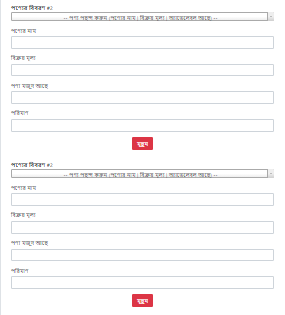
提前谢谢。
回答 1
Stack Overflow用户
发布于 2021-01-03 19:24:27
代码中有许多重要的问题。
- 您正在创建一些具有相同
id的动态元素。id必须是唯一的。不要在循环中或在附加元素的事件处理程序中使用id。 使用class代替。 - 当您有超过一或两行HTML连接在一个字符串中的一些附加.最好在隐藏在HTML中的“模板”上使用.clone()方法。 这使得您的代码更具可读性和可维护性,因为要克隆的“模板”将以常规HTML的形式出现在代码编辑器中,因此您可以立即看到排版。这样JS就更简洁了。
- 使用jQuery的主要优点是它易于使用简单和简短的方法“遍历”DOM。
来自用户操作(如
<select>元素上触发的事件).使用广泛的方法,如.parent(),.closest(),.find(),.siblings()等。瞄准你想要的元素。
提醒您将来的编码:每次您必须向类中添加一个数字才能使其唯一.把它当作一种不良编码的症状。虽然id必须是针对一个元素的唯一对象,但是类必须是“泛型”才能针对一组类似的元素。
我完全删除了您的“概念”,即在下面的代码段中有一个div_title变量。你的问题不是如何正确使用它..。但是如何不使用它。;)
- 功能嵌套。
您使用了事件委托:
$(document).on("change", ".product_option", function () {...}!,但是它在Firebase回调中。而Firebase请求位于btnAddtoList单击处理程序中。
因此,每当用户单击পণ্য যোগ করুন (Add products)按钮时,都会向数据库发出请求(很可能有相同的结果)。并为页面中的所有.product_option选择设置一个额外的委托处理程序。
看起来不太好对吧?
这是由于您(失败)试图使用一些“唯一”的item-wrapper-*类.
因此,下面是您的代码发生了很大变化。我没有深入您的Firebase请求,因为我真的不知道响应的结构。我使用对象的snapshot数组“假设”了一个响应。你可能有完全不同的东西。
仔细查看代码和所有注释。
console.clear();

$(function () {

  // Add a cloned div
  $("#btnAddtoList").on("click", function () {

    // Clone the template and toggle some classes
    let newDiv = $(".item-wrapper_template")
      .clone()
      .toggleClass("item-wrapper_template item-wrapper");

    // Append
    newDiv.find(".number").text($(".item-wrapper").length + 1);
    $(".productDiv").append(newDiv);

    // Instantiate Select2
    newDiv.find(".product_option").select2({
      theme: "classic"
    });
  });

  // Delete a cloned div
  $(document).on("click", ".deleteItem", function () {

    // Remove the whole wrapper div that holds the .deleteItem button
    $(this).closest(".item-wrapper").remove();

    // Update the numbers of the other items
    $(".item-wrapper").each(function (num) {
      $(this)
        .find(".number")
        .text(num + 1);
    });
  });

  // Calculate the sub total
  $("#subTotal").on("click", function (e) {

    // At each click event, start the calculation at zero
    let subTotalAmount = 0;

    // How many items now?
    let itemCount = $(".item-wrapper").length;

    // A flag to know if we break the loop
    let loopBreak = false;

    // Looping all the items
    for (let i = 0; i < itemCount; i++) {

      let getSellingPrice = parseFloat(
        $(".item-wrapper").eq(i).find(".sellPrice").val()
      );
      let getAmount = parseFloat(
        $(".item-wrapper").eq(i).find(".amount").val()
      );
      let getQuantity =
        parseFloat($(".item-wrapper").eq(i).find(".quantity").val()) || 0;

      // A condition check which may break the loop
      if (getQuantity > getAmount) {
        alert("পর্যাপ্ত পরিমান পণ্য নেই ।"); // There are not enough products.
        loopBreak = true;
        break;
      } else {
        subTotalAmount += getSellingPrice * getQuantity;
        console.log("subTotalAmount", subTotalAmount);
      }
    } // END for loop

    // If the loop was not broken
    if (!loopBreak) {
      $(".subTotalDiv").find(".subTotalAmount").text(subTotalAmount);
      $(".subTotalDiv").show();
    }
  });

  // Option change handler for ALL select element present on the page
  $(document).on("change", ".product_option", function () {
    const valArr = $(this).find("option:selected").text().split(" | ");
    $(this).closest(".item-wrapper").find(".productName").val(valArr[0]);
    $(this).closest(".item-wrapper").find(".sellPrice").val(valArr[1]);
    $(this).closest(".item-wrapper").find(".amount").val(valArr[2]);
  });


  // =====
  // Simulating the firebase database request

  // Let assume some data to make this example working
  let snapshot = [
    {
      product_name: "First Product",
      selling_price: 10.57,
      product_quantity: 42
    },
    {
      product_name: "Second Product",
      selling_price: 28.72,
      product_quantity: 17
    },
    {
      product_name: "Third Product",
      selling_price: 11.48,
      product_quantity: 8
    }
  ];

  /*
    firebase.auth().onAuthStateChanged(function(user) {
      console.log(user);
      if (user) {
        var user_id = user.uid;

        firebase.database().ref('Products/').child(user_id).once('value')
        .then(function(snapshot){

          snapshot.forEach(function(childSnapshot) {
            var product_name = childSnapshot.child("product_name").val();
            var selling_price = childSnapshot.child("selling_price").val();
            var amount = childSnapshot.child("product_quantity").val();

            {#console.log(amount)#}
            var total = product_name + " | " + selling_price + " | " + amount;
            console.log(total);

            $(".item-wrapper-" + div_title).find(".product_option").append('<option>'
            + total + '</option');

          });
          */

          // Here, I am simulating the option appending from the simulated snapshot array above
          // Notice I append it to the template!
          snapshot.forEach(function (item, index) {

            // Format the text of the option
            let optionText =
              item.product_name +
              " | " +
              item.selling_price +
              " | " +
              item.product_quantity;

            // Create the option and append
            let option = $("<option>").text(optionText);
            $(".item-wrapper_template").find(".product_option").append(option);
          });

          /*
        })
      }
      else{
        window.location.href="{% url 'login' %}";
      }
    });
    */
});.item-wrapper_template{
display: none;
}
.subTotalDiv{
display: none;
}<link href="https://stackpath.bootstrapcdn.com/bootstrap/4.3.1/css/bootstrap.min.css" rel="stylesheet"/>
<link href="https://cdnjs.cloudflare.com/ajax/libs/select2/4.0.13/css/select2.min.css" rel="stylesheet"/>
<script src="https://cdnjs.cloudflare.com/ajax/libs/jquery/3.3.1/jquery.min.js"></script>
<script src="https://stackpath.bootstrapcdn.com/bootstrap/4.3.1/js/bootstrap.bundle.min.js"></script>
<script src="https://cdnjs.cloudflare.com/ajax/libs/select2/4.0.13/js/select2.min.js"></script>
<div class="productDiv"></div>
<!-- That is a TEMPLATE -->
<div class=item-wrapper_template>
<div class="container rounded bg-white mt-3 mb-3">
<div class="row">
<div class="col-md-12">
<div class="row mt-3">
<span><strong>পণ্যের বিবরণ (Product Description) #</strong></span><span class="number">0</span>
</div>
<div class="row mt-1 text-center">
<select class="product_option form-control">
<option disabled selected> -- পণ্য পছন্দ করুন (পণ্যের নাম | বিক্রয় মূল্য | অ্যাভেলেবল আছে) -- </option>
<option disabled> -- Choose Product (Product Name | Sale Price | Available) -- </option>
</select>
</div>
<div class="row mt-3">
<label class="labels" style="font-size: 16px">পণ্যের নাম (Product name)</label> <input type="text" class="form-control productName">
</div>
<div class="row mt-3">
<label class="labels" style="font-size: 16px">বিক্রয় মূল্য (Sale price)</label> <input type="number" class="form-control sellPrice">
</div>
<div class="row mt-3">
<label class="labels" style="font-size: 16px">পণ্য মজুদ আছে (There are stockpiles of products)</label> <input type="text" class="form-control amount">
</div>
<div class="row mt-3">
<label class="labels" style="font-size: 16px">পরিমাণ (Amount)</label> <input type="number" class="form-control quantity_pro quantity">
</div>
<div class="mt-3 d-flex flex-column align-items-center text-center"> <button class="btn btn-danger deleteItem" type="button">মুছুন (Delete)</button> </div>
</div>
</div>
</div>
</div>
<!-- That is your "normal" HTML -->
<div class="mt-3 text-center">
<button id="btnAddtoList" class="btn profile-button" type="button">পণ্য যোগ করুন (Add products)</button>
</div>
<div class="mt-3 text-center">
<button id="subTotal" class="btn profile-button" type="button">সাব টোটাল (Sub Total)</button>
</div>
<!-- That is hidden by CSS but shown by JS -->
<div class="subTotalDiv">
<div class="container rounded bg-white mt-3 mb-3">
<div class="row">
<div class="col-md-12">
<div class="row mt-3">
<span class="col-md-12">সাব টোটালঃ (Sub Total:)</strong></span><span class="subTotalAmount">0</span>
</div>
<div class="row mt-3">
<label class="labels" style="font-size: 16px">ডিসকাউন্ট(%) (Discount (%))</label><input type="text" class="form-control">
</div>
<div class="row mt-3">
<label class="labels" style="font-size: 16px">ভ্যাট(%) (VAT (%))</label><input type="text" class="form-control sellPrice">
</div>
<div class="row mt-3">
<span class="col-md-12"><strong>মোটঃ (Total:)</strong></span>
</div>
<div class="mt-3 d-flex flex-column align-items-center text- center"> <button class="btn btn-info" type="button">মোট (Total)</button></div>
</div>
</div>
</div>
</div>
https://stackoverflow.com/questions/65547891
复制相似问题
腾讯云开发者

Copyright © 2013 - 2026 Tencent Cloud. All Rights Reserved. 腾讯云 版权所有
深圳市腾讯计算机系统有限公司 ICP备案/许可证号:粤B2-20090059  粤公网安备44030502008569号
腾讯云计算(北京)有限责任公司 京ICP证150476号 | 京ICP备11018762号