
如何从SMS自动填充中获取OTP
我想自动捕获或阅读短信的OTP。我做了一些测试,比如这样的代码:
import 'package:flutter/material.dart';

void main() {
  runApp(MyApp());
}

class MyApp extends StatelessWidget {
  // This widget is the root of your application.
  @override
  Widget build(BuildContext context) {
    return MaterialApp(
      title: 'Flutter Demo',
      theme: ThemeData(
        primarySwatch: Colors.blue,
      ),
      home: MyHomePage(title: 'Demo Auto OTP'),
    );
  }
}

class MyHomePage extends StatefulWidget {
  MyHomePage({Key key, this.title}) : super(key: key);

  final String title;

  @override
  _MyHomePageState createState() => _MyHomePageState();
}

class _MyHomePageState extends State<MyHomePage> {
  TextEditingController _textController = TextEditingController();
  String _error;

  @override
  Widget build(BuildContext context) {
    return Scaffold(
        appBar: AppBar(
          title: Text("Multi-Factor-Authentication"),
        ),
        body: Form(
          child: Column(
            mainAxisAlignment: MainAxisAlignment.center,
            mainAxisSize: MainAxisSize.min,
            children: [
              TextField(
                controller: _textController,
                autofillHints: [ AutofillHints.oneTimeCode ],
                keyboardType: TextInputType.visiblePassword,
                maxLength: 6,
                maxLengthEnforced: true,
                style: TextStyle(fontSize: 32),
              ),

              RaisedButton(
                child: Text("Verify"),
                onPressed: () => Navigator.of(context).pop(_textController.value.text),
              ),
            ],
          ),
        )
    );
  }
}这是测试短信:12345 is your code to log in.
oneTimeCode:https://api.flutter.dev/flutter/services/AutofillHints/oneTimeCode-constant.html的颤振文档
IOS:https://developer.apple.com/documentation/uikit/uitextcontenttype
安卓:OTP
回答 4
Stack Overflow用户
发布于 2021-11-23 06:01:12
我希望对那些还在寻找这个问题答案的人来说,我不会太晚。我使用了两个包自填和字段。将这两个包添加到pubspec.yaml文件中。运行“颤栗酒吧获取”下载软件包。
在otp屏幕中,导入两个包:
import 'package:alt_sms_autofill/alt_sms_autofill.dart';
import 'package:pin_code_fields/pin_code_fields.dart';
在您的AppState扩展状态之后,使用以下函数来获取传入的短消息:
  TextEditingController textEditingController1;

  String _comingSms = 'Unknown';

  Future<void> initSmsListener() async {

    String comingSms;
    try {
      comingSms = await AltSmsAutofill().listenForSms;
    } on PlatformException {
      comingSms = 'Failed to get Sms.';
    }
    if (!mounted) return;
    setState(() {
      _comingSms = comingSms;
      print("====>Message: ${_comingSms}");
      print("${_comingSms[32]}");
      textEditingController1.text = _comingSms[32] + _comingSms[33] + _comingSms[34] + _comingSms[35]
          + _comingSms[36] + _comingSms[37]; //used to set the code in the message to a string and setting it to a textcontroller. message length is 38. so my code is in string index 32-37.
    });
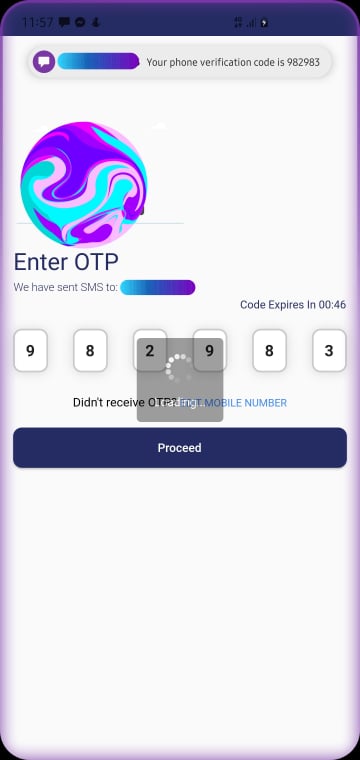
}我传入的OTP消息格式如下所示:您的电话验证代码是625742。在上面的函数中,它正在监听传入的短消息,并将其保存为字符串。收到短信后,我将“625742”代码设置为我的textEditing控制器,方法是给出代码在字符串中的索引位置,然后将值设置为我的PinFields,稍后您将看到该值。
在您的initState中调用函数:
  @override
  void initState() {
    super.initState();
    textEditingController1 = TextEditingController();
    initSmsListener();
  }
您应该在dispose函数中释放未使用的任何内容:
  @override
  void dispose() {
    textEditingController1.dispose();
    AltSmsAutofill().unregisterListener();
    super.dispose();
  }
然后,您需要在构建函数中或在这样的列中放置pinfields:
PinCodeTextField(
          appContext: context,
          pastedTextStyle: TextStyle(
            color: Colors.green.shade600,
            fontWeight: FontWeight.bold,
          ),
          length: 6,
          obscureText: false,
          animationType: AnimationType.fade,
          pinTheme: PinTheme(
            shape: PinCodeFieldShape.box,
            borderRadius: BorderRadius.circular(10),
            fieldHeight: 50,
            fieldWidth: 40,
            inactiveFillColor: Colors.white,
            inactiveColor: ColorUtils.greyBorderColor,
            selectedColor: ColorUtils.greyBorderColor,
            selectedFillColor: Colors.white,
            activeFillColor: Colors.white,
            activeColor: ColorUtils.greyBorderColor
          ),
          cursorColor: Colors.black,
          animationDuration: Duration(milliseconds: 300),
          enableActiveFill: true,
          controller: textEditingController1,
          keyboardType: TextInputType.number,
          boxShadows: [
            BoxShadow(
              offset: Offset(0, 1),
              color: Colors.black12,
              blurRadius: 10,
            )
          ],
          onCompleted: (v) {
            //do something or move to next screen when code complete
          },
          onChanged: (value) {
            print(value);
            setState(() {
              print('$value');
            });
          },
        ),
确保将控制器设置为pinfield小部件,并且在收到sms之后,使用string索引将代码设置为textfield。例如,请参见下面的图像。
Stack Overflow用户
发布于 2021-01-04 07:58:14
您可以使用这个包:自填
但请考虑以下限制:
用于接收代码的Android约束,它需要遵循如下描述的一些规则:https://developers.google.com/identity/sms-retriever/verify Be不超过140个字节,以前缀<#>开头,其中包含一个一次性代码,客户端发送回您的服务器来完成验证流程,最后使用一个11个字符的哈希字符串来标识您的应用程序,例如: <#> ExampleApp:您的代码是123456 FA+9qCX9VSu
Stack Overflow用户
发布于 2021-01-04 08:04:53
我用这个package接收短消息检查它
它所做的就是通过它的listner监听SMS,当SMS到达时,它会打印SMS。
这是Code,我之前写过(我不确定这个包是否做了一些更改或更新,因为我已经有一段时间没有使用它了,但它当时运行得很好),
SmsReceiver receiver = new SmsReceiver();
await receiver.onSmsReceived.listen((SmsMessage msg) => checkSMS(msg));用于打印SMS主体的方法,
  checkSMS(SmsMessage msg) async {
    print(msg.body);
}现在,您可以自动填充SMS,并使用一些regex从msg.body中取出OTP,并将其设置为用于自动填充的TextFieldController文本。
注意:它将获取每条短信,因此要获取所需的唯一短消息,您必须检查关键字或在您的侧设置一些Regex,以便在消息中只显示OTP消息或公司名称。。
https://stackoverflow.com/questions/65559187
复制相似问题
腾讯云开发者

Copyright © 2013 - 2026 Tencent Cloud. All Rights Reserved. 腾讯云 版权所有
深圳市腾讯计算机系统有限公司 ICP备案/许可证号:粤B2-20090059  粤公网安备44030502008569号
腾讯云计算(北京)有限责任公司 京ICP证150476号 | 京ICP备11018762号