
需要帮助动态调整文本大小以适应tkinter画布
需要帮助动态调整文本大小以适应tkinter画布
提问于 2021-01-05 15:48:17
最近,当我遇到这个问题时,我正在编写一个小python脚本。我试图创建一个条形画布,并将文本写入其中,希望文本能够自动适应画布的边界(类似于文字处理软件中文本框的工作方式)。但这篇文章显然超出了界限。
ScreenShot
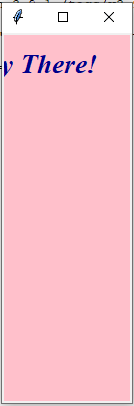
码
from tkinter import *
top = Tk()
top.geometry("130x370")
c = Canvas(top,bg = "pink",height = "370")
c.create_text(30,30,fill="darkblue",font="Times 20 italic bold",text="Hey There!")
c.pack()
top.mainloop() 回答 1
Stack Overflow用户
发布于 2021-01-06 16:30:09
首先,.create_text()方法的Canvas有一个width选项,该选项设置它所包装的文本的最大宽度。要在调整窗口大小时获得动态效果,可以在绑定到width事件的函数中更改此<Configure>选项(下面示例中的resize()函数)。
其次,为了检查文本是否垂直适合画布,我使用Canvas的Canvas方法来获取文本边框的坐标。然后,只要文本的底部低于画布底部,我就会减少字体大小。
下面是一个例子:
import tkinter as tk
top = tk.Tk()
top.geometry("130x370")

def resize(event):
    font = "Times %i italic bold"
    fontsize = 20
    x0 = c.bbox(text_id)[0] # x-coordinate of the left side of the text
    c.itemconfigure(text_id, width=c.winfo_width() - x0, font=font % fontsize)
    # shrink to fit
    height = c.winfo_height() # canvas height
    y1 = c.bbox(text_id)[3] # y-coordinate of the bottom of the text
    while y1 > height and fontsize > 1:
        fontsize -= 1
        c.itemconfigure(text_id, font=font % fontsize)
        y1 = c.bbox(text_id)[3]

c = tk.Canvas(top, bg="pink", height="370")
text_id = c.create_text(30, 30, anchor="nw", fill="darkblue", font="Times 20 italic bold", text="Hey There!")
c.pack(fill="both", expand=True)
c.bind("<Configure>", resize)

top.mainloop()还要注意,我在.create_text()中将文本的锚设为西北,以便(30,30)是文本左上角的坐标,而不是中间的坐标,以确保文本的开头是可见的。
页面原文内容由Stack Overflow提供。腾讯云小微IT领域专用引擎提供翻译支持
原文链接:
https://stackoverflow.com/questions/65582108
复制相关文章
相似问题
腾讯云开发者

Copyright © 2013 - 2026 Tencent Cloud. All Rights Reserved. 腾讯云 版权所有
深圳市腾讯计算机系统有限公司 ICP备案/许可证号:粤B2-20090059  粤公网安备44030502008569号
腾讯云计算(北京)有限责任公司 京ICP证150476号 | 京ICP备11018762号