
您如何截断html文本的反应?
我试图将以下html截断为5个字符:
<b>Hello</b> how are you today?我要找的结果是:
Hello
但是,如何忽略截断中的html标记,使其不会产生以下结果?
<b>He我使用的是html解析器,因此不能在使用该解析器后截断字符串。这是我的代码,不用说,不起作用!
import React from 'react';
import parse from 'html-react-parser';
import Typography from '@material-ui/core/Typography';


const Message= () => {
  const message= "<b>Hello</b> how are you today?"
  const messageParsed = parse(message);

  return (
          <Typography variant="body2">
            {messageParsed.substr(0, 5)}
          </Typography>
  );
};

export default Message;
正确的方法是什么?
非常感谢,
凯蒂
回答 4
Stack Overflow用户
发布于 2021-01-08 13:19:40
您可以使用s来保持html结构。
要获得具有一定长度的html,请调用下面的htmlToLength(html, length)。
您还可以通过调用DocumentFragment来获得htmlToNodeWithLength(html, length)。
这个算法的核心是findRangeWithLength(range, length),它将range从末尾(递归)缩小,直到它有给定的length。
function htmlToLength(html, length) {
  const trimmedNode = htmlToNodeWithLength(html, length);

  const container = document.createElement("div");
  container.appendChild(trimmedNode);
  return container.innerHTML;
}

function htmlToNodeWithLength(html, length) {
  // Only for measurement. Never added to DOM.
  const container = document.createElement("div");
  container.innerHTML = html;

  const fullRange = document.createRange();
  fullRange.setStart(container, 0);
  fullRange.setEnd(container, 1);

  const range = findRangeWithLength(fullRange, length);
  return range.cloneContents();
}

function findRangeWithLength(range, length) {
  if (rangeLength(range) < length) return range;

  // Find the childNode with at least length content.
  for (const childNode of range.endContainer.childNodes) {
    range.setEnd(childNode, lastEndOffset(childNode));
    if (rangeLength(range) >= length) {
      return findRangeWithLength(range, length);
    }
  }

  // There are no child nodes long enough. It's a text node.
  const diff = length - rangeLength(range) + range.endOffset;
  range.setEnd(range.endContainer, diff);
  return range;
}

function lastEndOffset(node) {
  return node.childNodes.length || node.textContent.length;
}

function rangeLength(range) {
  return range.toString().length;
}

const html = "<p>No <span></span><b>Hello</b> <i>World</i></p>";
const length = 7;
const trimmedNode = htmlToNodeWithLength(html, length);

document.querySelector(".raw-input").textContent = html;
document.querySelector(".trimmed").appendChild(trimmedNode);
document.querySelector(".length").textContent = length;
document.querySelector(".input").innerHTML = html;
document.querySelector(".raw-output").textContent = htmlToLength(html, length);<h2>Raw HTML input</h2>
<div class="raw-input"></div>
<h2>Rendered Input</h2>
<div class="input"></div>
<h2>Rendered output to length <span class="length">?</span></h2>
<div class="trimmed"></div>
<h2>Raw HTML output</h2>
<div class="raw-output"></div>
Stack Overflow用户
发布于 2022-10-04 23:08:31
如果您不想按字符大小截断,那么下面可以帮助您
- 1行:
p {
  overflow: hidden;
  text-overflow: ellipsis;
  white-space: nowrap;
}- 多行(例如: 3)
p {
  display: -webkit-box;
  overflow: hidden;
  text-overflow: ellipsis;
  -webkit-box-orient: vertical;
  -webkit-line-clamp: 3;
}
或
p {
  height: 4.5rem;
  line-height: 1.5rem;
  overflow: hidden;
}
如果要按字符大小截断
div {
  /* <div><p></p></div> */
  width: '50px'; /* equal pixels to characters width */
  overflow: hidden;
}Stack Overflow用户
发布于 2021-01-08 12:47:10
据我所知,您有一个HTML文本,需要执行以下操作
- 删除HTML标记
- 在步骤1到步骤5之后截断字符串。
在这种情况下,可以使用正则表达式来完成。
import React from "react";
import "./styles.css";

export default function App() {
  const message = "<b>Hello</b> how are you today?";
  const messageString = message.replace(/<(.|\n)*?>/g, '');

  const subText = messageString.substring(0, 5);

  return <div>{subText}</div>;
}检查这里中的工作样本。
查看这 & 这链接,了解更多关于如何从JS中的字符串中移除这标记的信息。
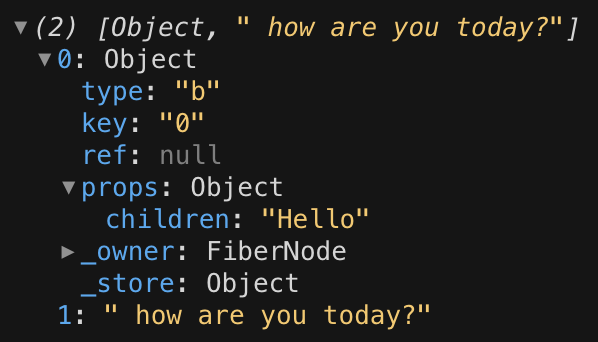
对于包html-react解析器,这不会返回字符串,因此substring方法将无法工作。它返回一个数组。在您的示例中,行parse(<b>Hello</b> how are you today?);将返回以下内容
https://stackoverflow.com/questions/65627253
复制相似问题
腾讯云开发者

Copyright © 2013 - 2026 Tencent Cloud. All Rights Reserved. 腾讯云 版权所有
深圳市腾讯计算机系统有限公司 ICP备案/许可证号:粤B2-20090059  粤公网安备44030502008569号
腾讯云计算(北京)有限责任公司 京ICP证150476号 | 京ICP备11018762号