
如何为matplotlib安装草书字体:字体系列[‘草书’]未找到
当试图在使用matplotlib中的草书字体的Ubuntu20.04上运行一个脚本(在下面的最小工作示例中给出)时,我得到了matplotlib警告:
findfont: Font family ['cursive'] not found. Falling back to DejaVu Sans.这告诉我,我没有matplotlib想要用于草书字体系列的任何草书字体。当matplotlib的字体管理器或fc-list找不到任何草书字体时,这一点似乎在下面的最小失败示例中得到了证实。
# on my local machine
$ fc-list : family | grep -i "chancery\|textile\|sand\|script\|felipa\|cursive"
URW Chancery L
Free Chancery如何在Ubuntu上以编程方式查找和安装这些字体?我知道我可以在互联网上找到免费版本,但是如果我想在Docker映像上找到它们,我如何通过像apt-get这样的CLI安装它们?
最小失败实例
对于下面的Dockerfile
FROM ubuntu:20.04

RUN apt-get update -y && \
    apt-get install -y \
        fontconfig \
        fonts-dejavu \
        fonts-freefont-ttf \
        python3 \
        python3-dev \
        python3-pip \
        python3-venv \
        vim && \
        apt-get -y autoclean && \
        apt-get -y autoremove && \
        rm -rf /var/lib/apt/lists/*

RUN python3 -m pip install --upgrade --no-cache-dir pip setuptools wheel && \
    python3 -m pip install --no-cache-dir "matplotlib~=3.3" && \
    python3 -m pip list && \
    python3 -c "import matplotlib.pyplot" # generate font list cache

ENV MPLCONFIGDIR /tmp/.config # make writeable to non-root user

WORKDIR /code

COPY example.py example.py使用example.py of
import numpy as np
import matplotlib.pyplot as plt
import matplotlib.font_manager


def make_plot(font_family):
    fig, ax = plt.subplots()
    x = np.linspace(0, 10, 101)
    y = np.square(x)
    ax.plot(x, y)
    ax.semilogy()

    ax.set_xlabel("$x$")
    ax.set_ylabel("$x^2$")
    ax.set_title(f"Default matplotlib settings for {font_family} font family")

    return fig, ax


def main():

    image_types = ["pdf", "png"]
    for font_family in ["sans-serif", "serif", "cursive"]:
        plt.rcParams.update({"font.family": font_family})
        fig, ax = make_plot(font_family=font_family)

        for type in image_types:
            fig.savefig(f"family_{font_family}.{type}")

    cursive_family = matplotlib.rcParams["font.cursive"]
    print(f"\nmatplotlib cursive family: {cursive_family}")
    tff_fonts = sorted(
        set([font.name for font in matplotlib.font_manager.fontManager.ttflist])
    )
    afm_fonts = sorted(
        set([font.name for font in matplotlib.font_manager.fontManager.afmlist])
    )
    all_fonts = sorted(set([*tff_fonts, *afm_fonts]))
    print(f"\ntff fonts: {tff_fonts}")
    print(f"\nafm fonts: {afm_fonts}")
    print(f"\nall fonts: {all_fonts}")
    found_cursive_fonts = [font for font in cursive_family if font in all_fonts]
    print(f"\nfound cursive fonts: {found_cursive_fonts}")


if __name__ == "__main__":
    main()
如果是用
docker build . \
--pull \
-f Dockerfile \
-t matplotlib-cursive-fonts-question:debug-local
然后一起跑
$ docker run --rm --user 1000:1000 -v $PWD:$PWD -w $PWD matplotlib-cursive-fonts-question:debug-local /bin/bash -c "python3 /code/example.py"
findfont: Font family ['cursive'] not found. Falling back to DejaVu Sans.
findfont: Font family ['cursive'] not found. Falling back to DejaVu Sans.

matplotlib cursive family: ['Apple Chancery', 'Textile', 'Zapf Chancery', 'Sand', 'Script MT', 'Felipa', 'cursive']

tff fonts: ['DejaVu Math TeX Gyre', 'DejaVu Sans', 'DejaVu Sans Display', 'DejaVu Sans Mono', 'DejaVu Serif', 'DejaVu Serif Display', 'FreeMono', 'FreeSans', 'FreeSerif', 'STIXGeneral', 'STIXNonUnicode', 'STIXSizeFiveSym', 'STIXSizeFourSym', 'STIXSizeOneSym', 'STIXSizeThreeSym', 'STIXSizeTwoSym', 'cmb10', 'cmex10', 'cmmi10', 'cmr10', 'cmss10', 'cmsy10', 'cmtt10']

afm fonts: ['Computer Modern', 'Courier', 'Helvetica', 'ITC Avant Garde Gothic', 'ITC Bookman', 'ITC Zapf Chancery', 'ITC Zapf Dingbats', 'New Century Schoolbook', 'Palatino', 'Symbol', 'Times', 'Utopia', 'ZapfDingbats']

all fonts: ['Computer Modern', 'Courier', 'DejaVu Math TeX Gyre', 'DejaVu Sans', 'DejaVu Sans Display', 'DejaVu Sans Mono', 'DejaVu Serif', 'DejaVu Serif Display', 'FreeMono', 'FreeSans', 'FreeSerif', 'Helvetica', 'ITC Avant Garde Gothic', 'ITC Bookman', 'ITC Zapf Chancery', 'ITC Zapf Dingbats', 'New Century Schoolbook', 'Palatino', 'STIXGeneral', 'STIXNonUnicode', 'STIXSizeFiveSym', 'STIXSizeFourSym', 'STIXSizeOneSym', 'STIXSizeThreeSym', 'STIXSizeTwoSym', 'Symbol', 'Times', 'Utopia', 'ZapfDingbats', 'cmb10', 'cmex10', 'cmmi10', 'cmr10', 'cmss10', 'cmsy10', 'cmtt10']

found cursive fonts: []
和
docker run --rm --user 1000:1000 -v $PWD:$PWD -w $PWD matplotlib-cursive-fonts-question:debug-local /bin/bash -c "fc-list : family | grep -i 'chancery\|textile\|sand\|script\|felipa\|cursive'"什么都不回。
问题
如何以编程方式查找和安装matplotlib所需的草书字体(在Ubuntu20.04上)?
相关链接
回答 1
Stack Overflow用户
发布于 2021-01-11 00:21:54
似乎没有明确的方法从任何Ubuntu获得这些字体,取而代之的是直接从谷歌字体下载草书字体家族字体之一的费利帕。这就是maptlotlib团队在检验码头形象中所做的工作。
因此,对于本地机器上的编程解决方案,我能做的只是
mkdir -p ~/.local/share/fonts/truetype/felipa
wget --no-clobber https://github.com/google/fonts/blob/master/ofl/felipa/Felipa-Regular.ttf?raw=true -O ~/.local/share/fonts/truetype/felipa/Felipa-Regular.ttf
fc-cache --force --verbose # rebuild font cache for system
rm -rf ~/.cache/matplotlib/* # remove the matplotlib cache to force rebuild
虽然它不是必需的,但我也做了一个符号链接,指向我的其他字体用于簿记的位置。
sudo ln -s "${HOME}/.local/share/fonts/truetype/felipa" /usr/share/fonts/truetype/felipa当然,虽然这是编程性的,但是如果您在本地机器上并且具有交互功能,那么最好/更容易访问用于Felipa的Google字体页面,在本地下载字体系列压缩文件并解压缩它,然后用Ubuntu字体管理器打开Felipa-Regular.ttf并让它为您安装。
为了给这个工作提供一个可重复的例子,我已经将原来的Dockerfile编辑为上面提到的wget Felipa,然后创建一个非根用户"docker“,在默认情况下将容器作为非根用户运行,并避免了在使用--user 1000:1000运行时让HOME-less用户运行的问题。有一些方法可以使这个Dockerfile更加紧凑,但在这个示例中,我要讨论的是可读性,而不是大小优化。
FROM ubuntu:20.04

RUN apt-get update -y && \
    apt-get install -y \
        fontconfig \
        fonts-dejavu \
        fonts-freefont-ttf \
        python3 \
        python3-dev \
        python3-pip \
        python3-venv \
        vim \
        wget && \
        apt-get -y autoclean && \
        apt-get -y autoremove && \
        rm -rf /var/lib/apt/lists/*

RUN python3 -m pip install --upgrade --no-cache-dir pip setuptools wheel && \
    python3 -m pip install --no-cache-dir "matplotlib~=3.3" && \
    python3 -m pip list

# Create user "docker"
RUN useradd -m docker && \
    cp /root/.bashrc /home/docker/
ENV HOME /home/docker

# felipa provides a cursive font
RUN mkdir -p "${HOME}/.local/share/fonts/truetype/felipa" && \
    wget --no-clobber "https://github.com/google/fonts/blob/master/ofl/felipa/Felipa-Regular.ttf?raw=true" -O "${HOME}/.local/share/fonts/truetype/felipa/Felipa-Regular.ttf" && \
    ln -s "${HOME}/.local/share/fonts/truetype/felipa" /usr/share/fonts/truetype/felipa && \
    fc-cache --force --verbose

WORKDIR /code

COPY example.py example.py

# give non-root user docker ownership of files
RUN chown -R --from=root docker /home/docker && \
    chown -R --from=root docker /code
USER docker

# Create font list cache and config dir
RUN python3 -c "import matplotlib.pyplot"
像以前一样重新生成这个Docker映像,这样就可以在没有警告或错误的情况下运行以下操作
$ docker run --rm -v $PWD:$PWD -w $PWD matplotlib-cursive-fonts-question:debug-local /bin/bash -c "python3 /code/example.py"

matplotlib cursive family: ['Apple Chancery', 'Textile', 'Zapf Chancery', 'Sand', 'Script MT', 'Felipa', 'cursive']

tff fonts: ['DejaVu Math TeX Gyre', 'DejaVu Sans', 'DejaVu Sans Display', 'DejaVu Sans Mono', 'DejaVu Serif', 'DejaVu Serif Display', 'Felipa', 'FreeMono', 'FreeSans', 'FreeSerif', 'STIXGeneral', 'STIXNonUnicode', 'STIXSizeFiveSym', 'STIXSizeFourSym', 'STIXSizeOneSym', 'STIXSizeThreeSym', 'STIXSizeTwoSym', 'cmb10', 'cmex10', 'cmmi10', 'cmr10', 'cmss10', 'cmsy10', 'cmtt10']

afm fonts: ['Computer Modern', 'Courier', 'Helvetica', 'ITC Avant Garde Gothic', 'ITC Bookman', 'ITC Zapf Chancery', 'ITC Zapf Dingbats', 'New Century Schoolbook', 'Palatino', 'Symbol', 'Times', 'Utopia', 'ZapfDingbats']

all fonts: ['Computer Modern', 'Courier', 'DejaVu Math TeX Gyre', 'DejaVu Sans', 'DejaVu Sans Display', 'DejaVu Sans Mono', 'DejaVu Serif', 'DejaVu Serif Display', 'Felipa', 'FreeMono', 'FreeSans', 'FreeSerif', 'Helvetica', 'ITC Avant Garde Gothic', 'ITC Bookman', 'ITC Zapf Chancery', 'ITC Zapf Dingbats', 'New Century Schoolbook', 'Palatino', 'STIXGeneral', 'STIXNonUnicode', 'STIXSizeFiveSym', 'STIXSizeFourSym', 'STIXSizeOneSym', 'STIXSizeThreeSym', 'STIXSizeTwoSym', 'Symbol', 'Times', 'Utopia', 'ZapfDingbats', 'cmb10', 'cmex10', 'cmmi10', 'cmr10', 'cmss10', 'cmsy10', 'cmtt10']

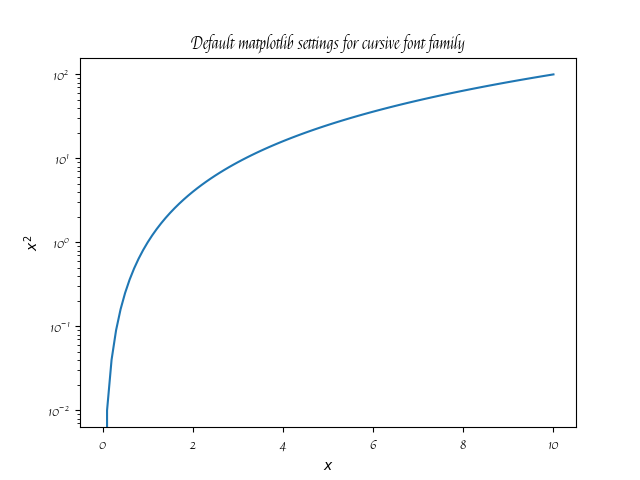
found cursive fonts: ['Felipa']为family_cursive.png生成此地块
https://stackoverflow.com/questions/65649122
复制相似问题
腾讯云开发者

Copyright © 2013 - 2026 Tencent Cloud. All Rights Reserved. 腾讯云 版权所有
深圳市腾讯计算机系统有限公司 ICP备案/许可证号:粤B2-20090059  粤公网安备44030502008569号
腾讯云计算(北京)有限责任公司 京ICP证150476号 | 京ICP备11018762号