
导航视图XML不允许我与其他任何东西交互
导航视图XML不允许我与其他任何东西交互
提问于 2021-01-12 19:34:45
我第一次在我的activityHome上实现了导航视图。当我运行该应用程序并输入家庭活动时,它的功能很好。问题是在android上的XML编辑器中,Nav View高于所有其他元素,不允许我单击它们。
除了这些我什么都没碰过。谢谢。
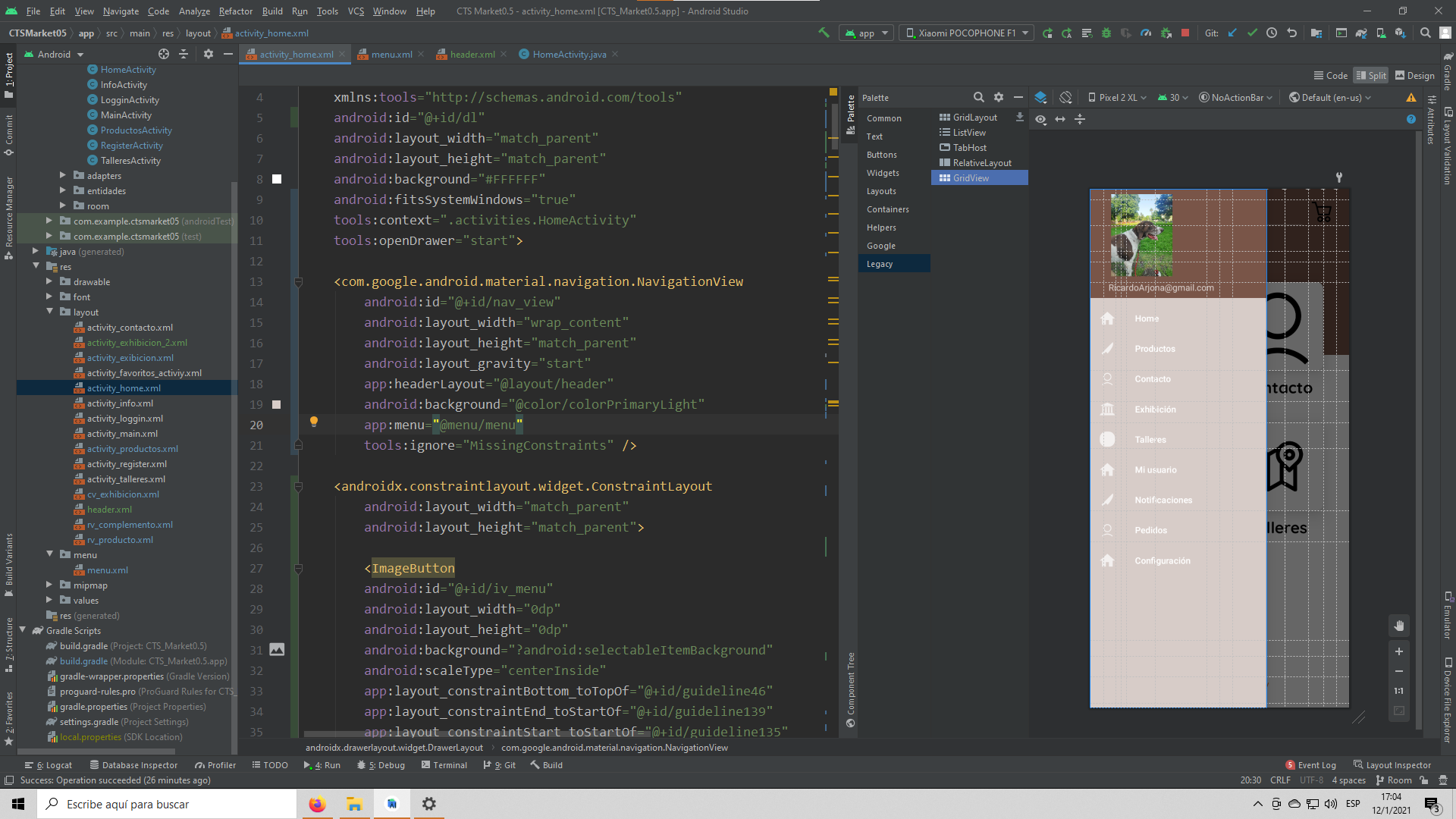
XML代码:
<?xml version="1.0" encoding="utf-8"?>
<androidx.drawerlayout.widget.DrawerLayout xmlns:android="http://schemas.android.com/apk/res/android"
    xmlns:app="http://schemas.android.com/apk/res-auto"
    xmlns:tools="http://schemas.android.com/tools"
    android:id="@+id/dl"
    android:layout_width="match_parent"
    android:layout_height="match_parent"
    android:background="#FFFFFF"
    android:fitsSystemWindows="true"
    tools:context=".activities.HomeActivity"
    tools:openDrawer="start">

    <com.google.android.material.navigation.NavigationView
        android:id="@+id/nav_view"
        android:layout_width="wrap_content"
        android:layout_height="match_parent"
        android:layout_gravity="start"
        app:headerLayout="@layout/header"
        android:background="@color/colorPrimary"
        app:menu="@menu/menu"
        tools:ignore="MissingConstraints" />

    <androidx.constraintlayout.widget.ConstraintLayout
        android:layout_width="match_parent"
        android:layout_height="match_parent">

        <ImageButton
        android:id="@+id/iv_menu"
        android:layout_width="0dp"
        android:layout_height="0dp"
        android:background="?android:selectableItemBackground"
        android:scaleType="centerInside"
        app:layout_constraintBottom_toTopOf="@+id/guideline46"
        app:layout_constraintEnd_toStartOf="@+id/guideline139"
        app:layout_constraintStart_toStartOf="@+id/guideline135"
        app:layout_constraintTop_toTopOf="@+id/guideline45"
        android:elevation="10dp"
        app:srcCompat="@drawable/menubuttonofthreelines_79781" />
...
并继续与其他元素。
回答 1
Stack Overflow用户
回答已采纳
发布于 2021-01-12 20:24:23
你的布局没什么问题..。
Android之所以在设计视图中显示处于开放状态的抽屉布局,是因为您在tools:openDrawer="start"中设置了DrawerLayout。如果要在设计模式中查看主布局(即使抽屉处于关闭状态),则需要删除此属性。
当您启动应用程序时,此属性不会影响其外观。
文档:
您可以在布局预览中插入示例数据,方法是使用tools:前缀而不是android:,并使用Android框架中的任意属性。当属性的值直到运行时才被填充时,但是您希望在布局预览中预先看到效果时,这是非常有用的。
XML tools命名空间仅用于显示Android上的一些行为,但在运行应用程序时却不是这样。请核对文件获取更多信息
页面原文内容由Stack Overflow提供。腾讯云小微IT领域专用引擎提供翻译支持
原文链接:
https://stackoverflow.com/questions/65690844
复制相关文章
相似问题
腾讯云开发者

Copyright © 2013 - 2026 Tencent Cloud. All Rights Reserved. 腾讯云 版权所有
深圳市腾讯计算机系统有限公司 ICP备案/许可证号:粤B2-20090059  粤公网安备44030502008569号
腾讯云计算(北京)有限责任公司 京ICP证150476号 | 京ICP备11018762号