
从Three.js v122更改为v123隐藏Mapbox自定义层上的阴影
我正在使用three.js,使用mapbox的官方示例向mapbox添加一个自定义层。我发现在v122中完美工作的阴影在v123中不起作用。在仔细阅读了释放变化量g for v123和v122中的迁移指南之后,我发现没有任何相关的提交或更改会使阴影消失。我还用three.js的最新版本进行了测试,结果是一样的,但我发现这两个版本之间发生了更改。除了ShadowMaterial之外,我用不同的材料测试过,但结果是一样的。
完全相同的代码,只需将包版本更改为:
https://unpkg.com/three@0.122.0/examples/js/loaders/GLTFLoader.js
https://unpkg.com/three@0.122.0/build/three.min.js
至
https://unpkg.com/three@0.123.0/examples/js/loaders/GLTFLoader.js
https://unpkg.com/three@0.123.0/build/three.min.js
由此:
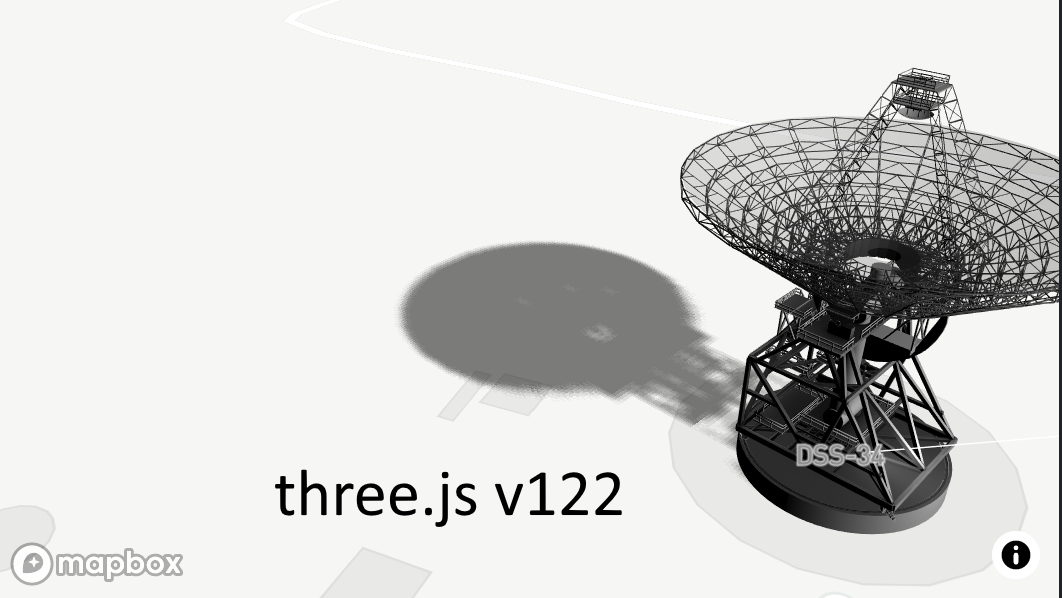
这是小提琴v122
为了这个..。
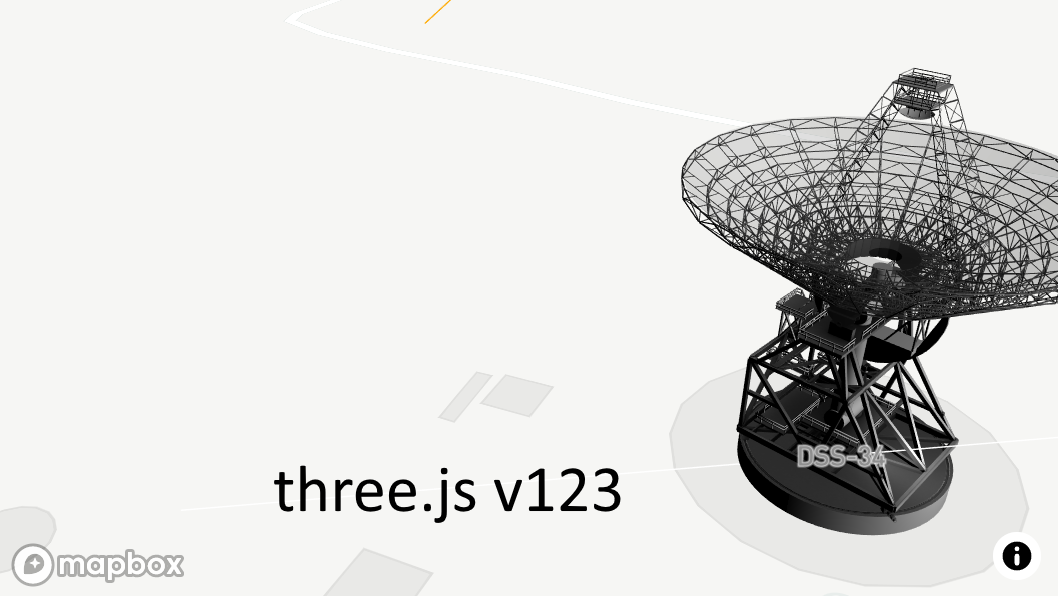
这是小提琴v123
代码完全相同:
mapboxgl.accessToken = 'pk.eyJ1IjoianNjYXN0cm8iLCJhIjoiY2s2YzB6Z25kMDVhejNrbXNpcmtjNGtpbiJ9.28ynPf1Y5Q8EyB_moOHylw';
var map = (window.map = new mapboxgl.Map({
  container: 'map',
  style: 'mapbox://styles/mapbox/light-v10',
  zoom: 18,
  center: [148.9819, -35.3981],
  pitch: 60,
  bearing: 45,
  antialias: true // create the gl context with MSAA antialiasing, so custom layers are antialiased
}));

// parameters to ensure the model is georeferenced correctly on the map
var modelOrigin = [148.9819, -35.39847];
var modelAltitude = 0;
var modelRotate = [Math.PI / 2, 0, 0];

var modelAsMercatorCoordinate = mapboxgl.MercatorCoordinate.fromLngLat(
  modelOrigin,
  modelAltitude
);

// transformation parameters to position, rotate and scale the 3D model onto the map
var modelTransform = {
  translateX: modelAsMercatorCoordinate.x,
  translateY: modelAsMercatorCoordinate.y,
  translateZ: modelAsMercatorCoordinate.z,
  rotateX: modelRotate[0],
  rotateY: modelRotate[1],
  rotateZ: modelRotate[2],
  /* Since our 3D model is in real world meters, a scale transform needs to be
   * applied since the CustomLayerInterface expects units in MercatorCoordinates.
   */
  scale: modelAsMercatorCoordinate.meterInMercatorCoordinateUnits()
};

var THREE = window.THREE;

// configuration of the custom layer for a 3D model per the CustomLayerInterface
var customLayer = {
  id: '3d-model',
  type: 'custom',
  renderingMode: '3d',
  onAdd: function(map, gl) {
    this.camera = new THREE.Camera();
    this.scene = new THREE.Scene();

    const dirLight = new THREE.DirectionalLight(0xffffff, 1);
    dirLight.position.set(0, 70, 100);
    let d = 100;
    let r = 2;
    let mapSize = 1024;
    dirLight.castShadow = true;
    dirLight.shadow.radius = r;
    dirLight.shadow.mapSize.width = mapSize;
    dirLight.shadow.mapSize.height = mapSize;
    dirLight.shadow.camera.top = dirLight.shadow.camera.right = d;
    dirLight.shadow.camera.bottom = dirLight.shadow.camera.left = -d;
    dirLight.shadow.camera.near = 1;
    dirLight.shadow.camera.far = 400;
    dirLight.shadow.camera.visible = true;

    this.scene.add(dirLight);
    this.scene.add(new THREE.DirectionalLightHelper(dirLight, 10));
    this.scene.add(new THREE.CameraHelper(dirLight.shadow.camera))

    // use the three.js GLTF loader to add the 3D model to the three.js scene
    var loader = new THREE.GLTFLoader();
    loader.load(
      'https://docs.mapbox.com/mapbox-gl-js/assets/34M_17/34M_17.gltf',
      function(gltf) {
        gltf.scene.traverse(function(model) {
          if (model.isMesh) {
            model.castShadow = true;
          }
        });
        this.scene.add(gltf.scene);
        // we add the shadow plane automatically
        const s = new THREE.Box3().setFromObject(gltf.scene).getSize(new THREE.Vector3(0, 0, 0));
        const sizes = [s.x, s.y, s.z];
        const planeSize = Math.max(...sizes) * 10;
        const planeGeo = new THREE.PlaneBufferGeometry(planeSize, planeSize);
        //const planeMat = new THREE.MeshStandardMaterial({ color: 0xffffff, side: THREE.DoubleSide});
        const planeMat = new THREE.ShadowMaterial();
        planeMat.opacity = 0.5;
        let plane = new THREE.Mesh(planeGeo, planeMat);
        plane.rotateX(-Math.PI / 2);
        //plane.layers.enable(1); plane.layers.disable(0); // it makes the object invisible for the raycaster
        plane.receiveShadow = true;
        this.scene.add(plane);
      }.bind(this)
    );
    this.map = map;

    // use the Mapbox GL JS map canvas for three.js
    this.renderer = new THREE.WebGLRenderer({
      canvas: map.getCanvas(),
      context: gl,
      antialias: true
    });

    this.renderer.autoClear = false;
    this.renderer.shadowMap.enabled = true;

  },
  render: function(gl, matrix) {
    var rotationX = new THREE.Matrix4().makeRotationAxis(
      new THREE.Vector3(1, 0, 0),
      modelTransform.rotateX
    );
    var rotationY = new THREE.Matrix4().makeRotationAxis(
      new THREE.Vector3(0, 1, 0),
      modelTransform.rotateY
    );
    var rotationZ = new THREE.Matrix4().makeRotationAxis(
      new THREE.Vector3(0, 0, 1),
      modelTransform.rotateZ
    );

    var m = new THREE.Matrix4().fromArray(matrix);
    var l = new THREE.Matrix4()
      .makeTranslation(
        modelTransform.translateX,
        modelTransform.translateY,
        modelTransform.translateZ
      )
      .scale(
        new THREE.Vector3(
          modelTransform.scale,
          -modelTransform.scale,
          modelTransform.scale
        )
      )
      .multiply(rotationX)
      .multiply(rotationY)
      .multiply(rotationZ);

    this.camera.projectionMatrix = m.multiply(l);
    this.renderer.state.reset();
    this.renderer.render(this.scene, this.camera);

    this.map.triggerRepaint();
  }
};

map.on('style.load', function() {
  map.addLayer(customLayer, 'waterway-label');
});
这似乎是一个bug,但老实说,我很想要的东西,我错过了,或我没有意识到。我甚至检查了来自不同CDN的文件是否发生了相同的情况,是的,情况也是一样的。希望Three.js贡献者或其他开发人员能够帮助我解决这个问题,因为我对此完全不感兴趣,并阻止我迁移
提前谢谢你的指点!
回答 2
Stack Overflow用户
发布于 2021-02-15 16:03:49
WebGLState.reset()的新实现将在r126中使用。它不仅重置引擎内部状态标志,而且调用WebGL命令来重置实际的WebGL状态。这种办法应能解决所报告的问题。
链接到GitHub:https://github.com/mrdoob/three.js/pull/21281的PR
Stack Overflow用户
发布于 2021-02-12 21:19:33
我在github https://github.com/mrdoob/three.js/pull/20732上对拉请求的评论中包括了这个建议,但是我也会在这里添加它,以防有人在搜索时发现这个堆栈溢出问题。
使用另一个共享WebGL上下文的库,我遇到了一个类似的问题。我发现另一个库(Imgui)将gl.BLEND设置为true,然后,随着上述拉请求的更改,WebGLState.Reset()现在将currentBlendingEnabled设置为null。
这导致我场景中的许多纹理被错误地显示,因为当setBlending随后在WebGLState上被调用时,它假设如果所需的混合方法为NoBlending,而currentBlendingEnabled为null,那么gl.BLEND已经被禁用:
function setBlending(blending, blendEquation, blendSrc, blendDst, blendEquationAlpha, blendSrcAlpha, blendDstAlpha, premultipliedAlpha) {
    if (blending === NoBlending) {
       if ( currentBlendingEnabled ) {
          disable(3042);
但是,由于每个帧的currentBlendingEnabled值都被重置为空,但没有将gl.BLEND设置为false,我认为这个假设不再正确。仔细看,即使删除了设置gl.BLEND值为真的外部库,我也发现拉请求中的更改对我场景中的一些纹理产生了负面影响。在我的例子中,我发现更新setBlending函数以满足NoBlending请求,包括当currentBlendingEnabled为null时,似乎已经纠正了这种情况。也许这在你的情况下也适用?
function setBlending(blending, blendEquation, blendSrc, blendDst, blendEquationAlpha, blendSrcAlpha, blendDstAlpha, premultipliedAlpha) {
    if (blending === NoBlending) {
       if (currentBlendingEnabled !== false) {
disable(3042);https://stackoverflow.com/questions/65707255
复制相似问题
腾讯云开发者

Copyright © 2013 - 2026 Tencent Cloud. All Rights Reserved. 腾讯云 版权所有
深圳市腾讯计算机系统有限公司 ICP备案/许可证号:粤B2-20090059  粤公网安备44030502008569号
腾讯云计算(北京)有限责任公司 京ICP证150476号 | 京ICP备11018762号