
特定本地存储库的git配置没有工作。
我的开发环境:
PS D:\github\jqxwidgets> git --version
git version 2.30.0.windows.1
Windows 10 x64版本2004。我的存储库https://github.com/donhuvy/jqxwidgets (只是为了学习jQuery插件框架)。在我的个人电脑中有用于Windows的Github桌面,但我将它用于其他项目。
(1)我尝试了本地git存储库的配置。
git config user.name "Do Nhu Vy"
git config user.email "donhuvy@outlook.com"
它不起作用。
(2)我尝试了本地git存储库的配置。
git config user.name "Do Nhu Vy"
git config user.email donhuvy@outlook.com
它不起作用。
(3)我尝试使用Windows PowerShell (管理员)
git config user.name "Do Nhu Vy"
git config user.email "donhuvy@outlook.com"
它不起作用。
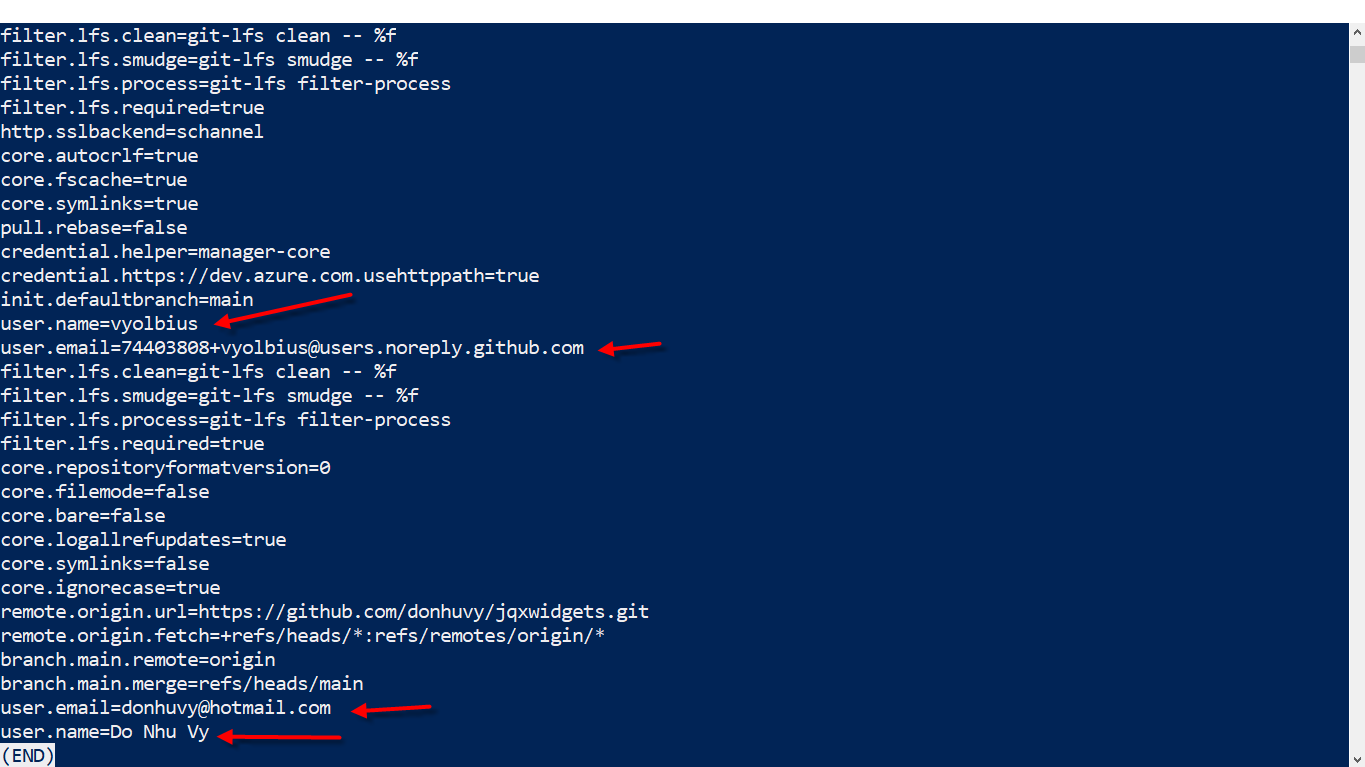
我不想使用git config --global ...,因为我的PC上有很多项目,有不同的远程服务器和不同的用户。
Windows PowerShell
Copyright (C) Microsoft Corporation. All rights reserved.

Try the new cross-platform PowerShell https://aka.ms/pscore6

PS C:\WINDOWS\system32> cd d:
PS D:\> cd .\github\
PS D:\github> cd .\jqxwidgets\
PS D:\github\jqxwidgets> ls


    Directory: D:\github\jqxwidgets


Mode                 LastWriteTime         Length Name
----                 -------------         ------ ----
d-----         1/19/2021   2:48 PM                .idea
d-----         1/19/2021   2:41 PM                jqxGrid
-a----         1/19/2021   2:39 PM           1714 .gitignore
-a----         1/19/2021   2:39 PM           1544 LICENSE
-a----         1/19/2021   2:39 PM             12 README.md


PS D:\github\jqxwidgets> git config user.name "Do Nhu Vy"
PS D:\github\jqxwidgets> git config --list
diff.astextplain.textconv=astextplain
filter.lfs.clean=git-lfs clean -- %f
filter.lfs.smudge=git-lfs smudge -- %f
filter.lfs.process=git-lfs filter-process
filter.lfs.required=true
http.sslbackend=schannel
core.autocrlf=true
core.fscache=true
core.symlinks=true
pull.rebase=false
credential.helper=manager-core
credential.https://dev.azure.com.usehttppath=true
init.defaultbranch=main
user.name=vyolbius
user.email=74403808+vyolbius@users.noreply.github.com
filter.lfs.clean=git-lfs clean -- %f
filter.lfs.smudge=git-lfs smudge -- %f
filter.lfs.process=git-lfs filter-process
filter.lfs.required=true
core.repositoryformatversion=0
core.filemode=false
core.bare=false
core.logallrefupdates=true
core.symlinks=false
core.ignorecase=true
remote.origin.url=https://github.com/donhuvy/jqxwidgets.git
remote.origin.fetch=+refs/heads/*:refs/remotes/origin/*
branch.main.remote=origin
branch.main.merge=refs/heads/main
user.email=donhuvy@hotmail.com
user.name=Do Nhu Vy
PS D:\github\jqxwidgets>
PS D:\github\jqxwidgets>
PS D:\github\jqxwidgets> git --version
git version 2.30.0.windows.1
PS D:\github\jqxwidgets>
PS D:\github\jqxwidgets>
怎么修呢?
回答 3
Stack Overflow用户
发布于 2021-01-19 08:08:24
本地配置将覆盖任何全局配置。
检查你的:
cd /path/to/my/repo
git config --show-origin --show-scope -l
尝试并提交一个新的提交:它应该使用正确的用户名/电子邮件编写。
我总是使用(作为documented here):
git config --global user.useConfigOnly true这样,我就不得不在每个新的本地Git存储库上设置正确的user.name/email。
Stack Overflow用户
发布于 2021-01-19 08:09:27
你试过git config --local了吗?此外,全局设置并不覆盖所有其他项目,而是创建一个默认配置,除非本地设置不同,否则将使用该配置。
所以如果你设置了你的全球电子邮件
git config --global user.email "donhuvy@outlook.com"这只会影响没有在本地设置电子邮件的存储库。在本地设置电子邮件
git config --local user.email "donhuvy@outlook.com"全局和本地标志适用于所有人,对于所有设置都是必要的。
Stack Overflow用户
发布于 2021-01-19 08:11:19
它没坏。
PS D:\github\jqxwidgets> git config -list snippage user.name=vyolbius snippage user.name=Do Nhu
第一个值来自“更高”或“更全局级别”/更不适用的设置,第二个值来自“更本地级别”/更适用的设置。第二个值重写第一个值。
(有一些Git设置是累积的。为此,必须检查git config --list或git config --get-all列出的所有值。但user.name和user.email并不是累积的;它们是最后一次上市的赢家。)
https://stackoverflow.com/questions/65787425
复制相似问题
腾讯云开发者

Copyright © 2013 - 2026 Tencent Cloud. All Rights Reserved. 腾讯云 版权所有
深圳市腾讯计算机系统有限公司 ICP备案/许可证号:粤B2-20090059  粤公网安备44030502008569号
腾讯云计算(北京)有限责任公司 京ICP证150476号 | 京ICP备11018762号