
为什么CameraX图像被保存在安卓手机Redmi9T中?
为什么CameraX图像被保存在安卓手机Redmi9T中?
提问于 2021-01-21 06:45:07
我正在使用新设备Redmi 9T。根据这个职位的基本设置,我设法使用CameraX启动并运行一个应用程序。所有操作都很好,直到我想将帧保存到setAnalyzer函数中的本地
private void bindImageAnalysis(@NonNull ProcessCameraProvider cameraProvider) {
    ImageAnalysis imageAnalysis =
            new ImageAnalysis.Builder().setTargetResolution(new Size(720, 1280))
                    .setBackpressureStrategy(ImageAnalysis.STRATEGY_KEEP_ONLY_LATEST).build();

    imageAnalysis.setAnalyzer(ContextCompat.getMainExecutor(this), new ImageAnalysis.Analyzer() {
        @Override
        public void analyze(@NonNull ImageProxy imageProxy) {
            @SuppressLint("UnsafeExperimentalUsageError") Image image = imageProxy.getImage();
            Bitmap finalBitmap = getFinalScaledRotatedBitmap(image,270); //rotate it properly (portrait)
            saveBitmap(finalBitmap, "test"); //save with a dummy name
            imageProxy.close();
        }
    });
    OrientationEventListener orientationEventListener = new OrientationEventListener(this) {
        @Override
        public void onOrientationChanged(int orientation) {
            textView.setText(Integer.toString(orientation));
        }
    };
    orientationEventListener.enable();
    Preview preview = new Preview.Builder().build();
    CameraSelector cameraSelector = new CameraSelector.Builder()
            .requireLensFacing(CameraSelector.LENS_FACING_FRONT).build();
    preview.setSurfaceProvider(previewView.createSurfaceProvider());
    cameraProvider.bindToLifecycle((LifecycleOwner)this, cameraSelector,
            imageAnalysis, preview);
}

 /*
 *  Rotate the image with a rotation degree
 */
 private Bitmap getFinalScaledRotatedBitmap(Image imageData, int viewRotation){
    Bitmap originalBitmap = toBitmap(imageData);
    Matrix matrix = new Matrix();
    matrix.postRotate(viewRotation);
    matrix.postScale(-1.0f, 1.0f);
    Bitmap scaledBitmap = Bitmap.createScaledBitmap(originalBitmap, originalBitmap.getWidth(), originalBitmap.getHeight(), true);
    Bitmap finalRotatedBitmap = Bitmap.createBitmap(scaledBitmap, 0, 0, scaledBitmap.getWidth(), scaledBitmap.getHeight(), matrix, true);
    return finalRotatedBitmap;
}

/*
*  Convert Image format to Bitmap
*/
private Bitmap toBitmap(Image image) {
    Image.Plane[] planes = image.getPlanes();
    ByteBuffer yBuffer = planes[0].getBuffer();
    ByteBuffer uBuffer = planes[1].getBuffer();
    ByteBuffer vBuffer = planes[2].getBuffer();

    int ySize = yBuffer.remaining();
    int uSize = uBuffer.remaining();
    int vSize = vBuffer.remaining();

    byte[] nv21 = new byte[ySize + uSize + vSize];
    //U and V are swapped
    yBuffer.get(nv21, 0, ySize);
    vBuffer.get(nv21, ySize, vSize);
    uBuffer.get(nv21, ySize + vSize, uSize);

    YuvImage yuvImage = new YuvImage(nv21, ImageFormat.NV21, image.getWidth(), image.getHeight(), null);
    ByteArrayOutputStream out = new ByteArrayOutputStream();
    yuvImage.compressToJpeg(new Rect(0, 0, yuvImage.getWidth(), yuvImage.getHeight()), 100, out);

    byte[] imageBytes = out.toByteArray();
    return BitmapFactory.decodeByteArray(imageBytes, 0, imageBytes.length);
}

/*
*  Save Bitmap to local
*/
public void saveBitmap(Bitmap bitmap, String personName) {
    String ROOT =
            Environment.getExternalStorageDirectory().getAbsolutePath() + File.separator + "cameraX";

    File myDir = new File(ROOT + File.separator + personName);
    if (!myDir.mkdirs()) {
        Log.e("FileUtil", "save dir fails");
    }

    String fileName = (new SimpleDateFormat("yyyyMMdd_HHmmss_SSS")).format(Calendar.getInstance().getTime()) + ".jpeg";
    File file = new File(myDir, fileName);
    if (file.exists()) {
        file.delete();
    }

    try {
        FileOutputStream out = new FileOutputStream(file);
        bitmap.compress(Bitmap.CompressFormat.JPEG, 100, out);

        out.flush();
        out.close();
    } catch (Exception var6) {
        Log.e("fileUtil", var6.getMessage());
    }

}
输出?(不论镜头前后)
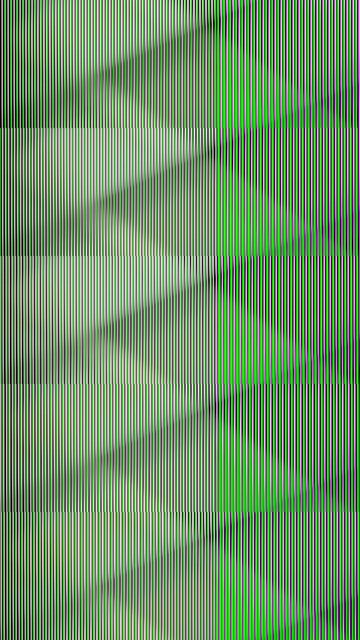
问题是,它在其他设备中工作得很好,比如荣誉8x,或realme。那么,有什么可能出错呢?
回答 1
Stack Overflow用户
回答已采纳
发布于 2021-01-21 17:14:39
问题可能在于您的转换方法toBitmpa(),它假设图像的格式是NV21,但不幸的是,并不是每个YUV_888_420缓冲区都是NV21格式。它也可以是NV12、YU12或YV12格式。
官方的CameraX文档已经提供了一种将YUV图像转换为您应该使用的RGB位图的方法,它位于文档的本节底部。
有关演示如何将Media.Image对象从YUV_420_888格式转换为RGB位图对象的示例代码,请参见YuvToRgbConverter.kt。
页面原文内容由Stack Overflow提供。腾讯云小微IT领域专用引擎提供翻译支持
原文链接:
https://stackoverflow.com/questions/65822326
复制相关文章
相似问题
腾讯云开发者

Copyright © 2013 - 2026 Tencent Cloud. All Rights Reserved. 腾讯云 版权所有
深圳市腾讯计算机系统有限公司 ICP备案/许可证号:粤B2-20090059  粤公网安备44030502008569号
腾讯云计算(北京)有限责任公司 京ICP证150476号 | 京ICP备11018762号