
ReCaptcha下载音频文件?
ReCaptcha下载音频文件?
提问于 2021-01-20 16:42:58
请告诉我我做错了什么
使用来自:How to interact with the reCAPTCHA audio element using Selenium and Python的代码
接下来,我希望获得音频下载的src文件,所以我在提供的代码结束后编写了以下代码:
# get the mp3 audio file
src = driver.find_element_by_id("audio-source").get_attribute("src")
但是Python返回运行时错误:
selenium.common.exceptions.NoSuchElementException: Message: no such element: Unable to locate element: {"method":"css selector","selector":"[id="audio-source"]"}
  (Session info: chrome=88.0.4324.96)
注意:我按原样复制了代码,只添加了最后一行
让你相信这是我的全部代码:
def tmp():
    from selenium.webdriver.common.keys import Keys

    # recaptcha libraries
    import speech_recognition as sr
    import urllib
    # import pydub

    from selenium import webdriver
    from selenium.webdriver.support.ui import WebDriverWait
    from selenium.webdriver.common.by import By
    from selenium.webdriver.support import expected_conditions as EC

    options = webdriver.ChromeOptions()
    options.add_argument("start-maximized")
    options.add_experimental_option("excludeSwitches", ["enable-automation"])
    options.add_experimental_option('useAutomationExtension', False)
    driver = webdriver.Chrome(options=options, executable_path='/Users/ahmad/Desktop/chromedriver')
    driver.get("https://www.google.com/recaptcha/api2/demo")
    WebDriverWait(driver, 10).until(EC.frame_to_be_available_and_switch_to_it(
        (By.CSS_SELECTOR, "iframe[src^='https://www.google.com/recaptcha/api2/anchor']")))
    WebDriverWait(driver, 10).until(EC.element_to_be_clickable((By.CSS_SELECTOR, "span#recaptcha-anchor"))).click()
    driver.switch_to.default_content()
    WebDriverWait(driver, 10).until(
        EC.frame_to_be_available_and_switch_to_it((By.CSS_SELECTOR, "iframe[title='recaptcha challenge']")))
    WebDriverWait(driver, 10).until(
        EC.element_to_be_clickable((By.CSS_SELECTOR, "button#recaptcha-audio-button"))).click()

    # get the mp3 audio file
    src = driver.find_element_by_id("audio-source").get_attribute("src")
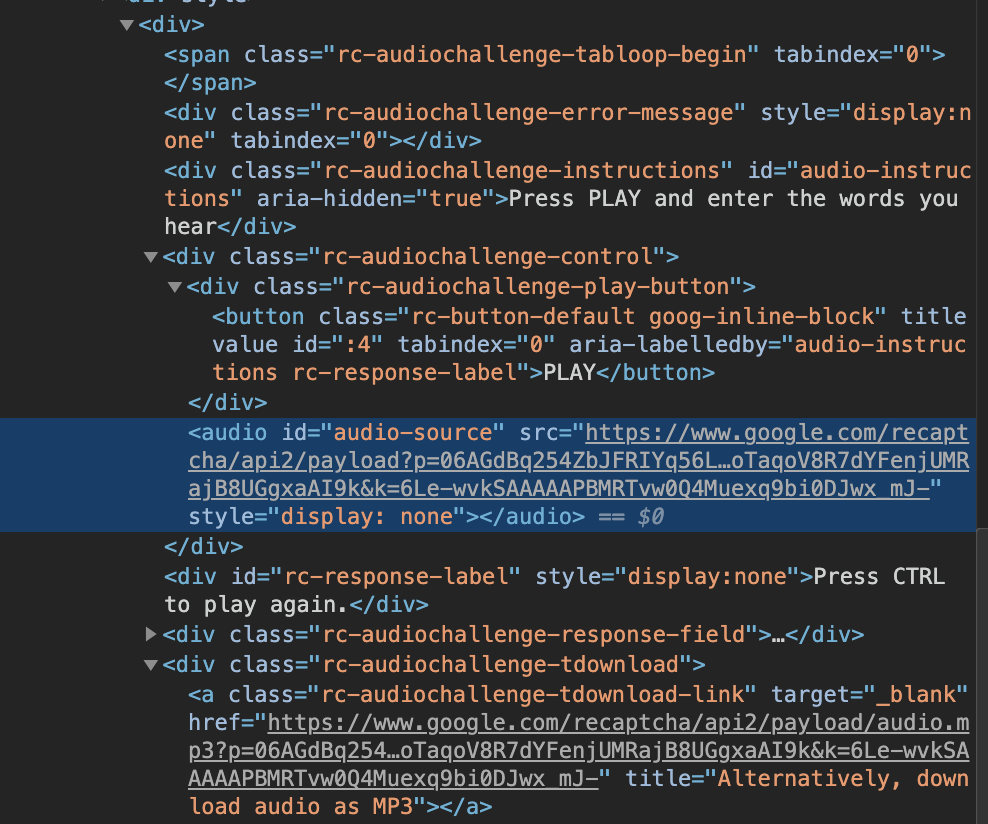
为了获得href值,我对附近的元素进行了如下尝试,并且它成功了,我唯一的问题是上面的内容:
src=WebDriverWait(driver, 10).until(
    EC.element_to_be_clickable((By.CSS_SELECTOR, "a.rc-audiochallenge-tdownload-link"))).text

src=src.get_attribute('href')

print(src)
它所研究的内容是:
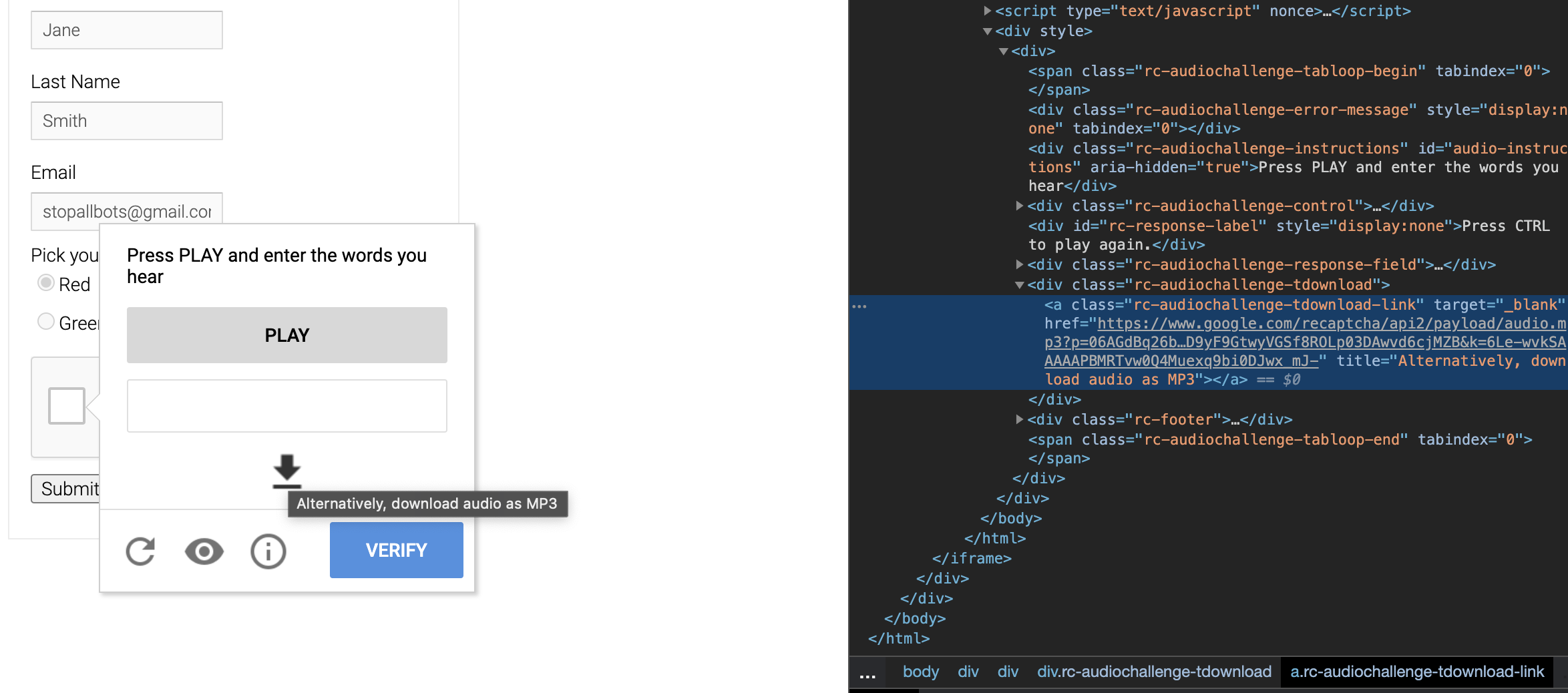
我也试过这个:
src=WebDriverWait(driver, 10).until(
    EC.invisibility_of_element((By.XPATH, "//*[@id=\"audio-source\"]")))

src=src.get_attribute('src')
但我发现了一个错误:
src=src.get_attribute('src')AttributeError:'bool‘对象没有属性'get_attribute’
回答 1
Stack Overflow用户
回答已采纳
发布于 2021-01-20 20:45:31
WebDriverWait(driver, 10).until(EC.element_to_be_clickable(
    (By.CSS_SELECTOR, "span#recaptcha-anchor"))).click()
driver.switch_to.default_content()
WebDriverWait(driver, 10).until(
    EC.frame_to_be_available_and_switch_to_it((By.CSS_SELECTOR, "iframe[title='recaptcha challenge']")))
WebDriverWait(driver, 10).until(
    EC.element_to_be_clickable((By.CSS_SELECTOR, "button#recaptcha-audio-button"))).click()
WebDriverWait(driver, 10).until(
    EC.presence_of_element_located((By.CSS_SELECTOR, ".rc-audiochallenge-play-button button")))

# get the mp3 audio file

src = driver.find_element_by_id("audio-source").get_attribute("src")
print(src)
只需为..rc音频挑战-播放按钮再添加一个wiat即可
要下载,您应该使用:
import urllib.request
urllib.request.urlretrieve(src, "src.mp3")页面原文内容由Stack Overflow提供。腾讯云小微IT领域专用引擎提供翻译支持
原文链接:
https://stackoverflow.com/questions/65813792
复制相关文章
相似问题
腾讯云开发者

Copyright © 2013 - 2026 Tencent Cloud. All Rights Reserved. 腾讯云 版权所有
深圳市腾讯计算机系统有限公司 ICP备案/许可证号:粤B2-20090059  粤公网安备44030502008569号
腾讯云计算(北京)有限责任公司 京ICP证150476号 | 京ICP备11018762号