
定位Widget重叠我的CustomScrollView
定位Widget重叠我的CustomScrollView
提问于 2021-01-21 17:42:04
我有一个CustomScrollView,在底部需要一个固定的文本输入字段。一个post here建议--一个带有定位Widget的堆栈,它工作得很好:
Scaffold(
  appBar: appBarBuilder == null ? null : appBarBuilder(context),
  body: RefreshIndicator(
    onRefresh: onRefresh,
    child: Stack(
      children: <Widget>[
        CustomScrollView(
          controller: controller,
          slivers: <Widget>[
            if (showImage)
              SliverAppBar(
                expandedHeight: showImage ? 100 : 50,
                title: showImage ? image : null,
                centerTitle: true,
                floating: true,
                pinned: false,
              ),
            sliverList,
          ],
        ),
        Positioned(
          bottom: 0,
          left: 0,
          right: 0,
          child: TextFormField(),
        ),
      ],
    ),
  ),
);
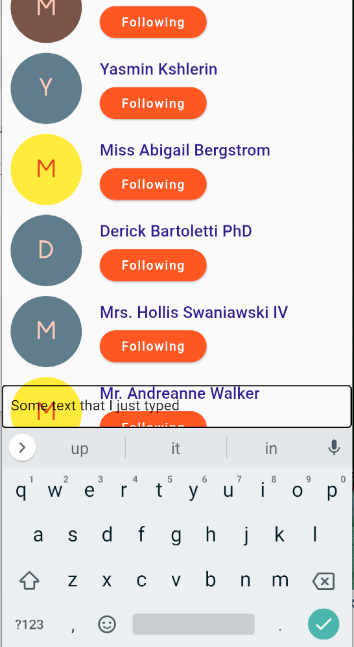
只不过定位的小部件与我的CustomScrollView重叠。我可以添加一个白色的背景,但我宁愿CustomScrollView停止我的TextFormField。我该怎么做?下面是当前的呈现:
回答 1
Stack Overflow用户
回答已采纳
发布于 2021-01-21 19:16:36
截图:
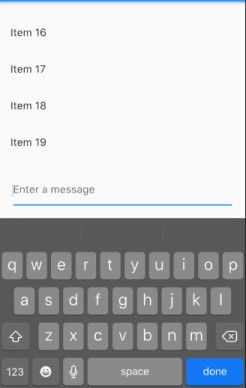
我正在与您分享一个Column的简单实现,ListView (用CustomScrollView替换它)和底部的TextField。当您单击TextField时,键盘会自动滑动到ListView上,您的所有内容都将保持可见。
代码:
@override
Widget build(BuildContext context) {
  return Scaffold(
    body: Column(
      children: [
        Expanded(
          child: ListView.builder( // <-- Replace it with your CustomScrollView
            itemCount: 20,
            itemBuilder: (_, i) => ListTile(title: Text('Item $i')),
          ),
        ),
        Padding(
          padding: const EdgeInsets.all(20),
          child: TextField(decoration: InputDecoration(hintText: 'Enter a message')),
        )
      ],
    ),
  );
}页面原文内容由Stack Overflow提供。腾讯云小微IT领域专用引擎提供翻译支持
原文链接:
https://stackoverflow.com/questions/65832903
复制相关文章
相似问题
腾讯云开发者

Copyright © 2013 - 2026 Tencent Cloud. All Rights Reserved. 腾讯云 版权所有
深圳市腾讯计算机系统有限公司 ICP备案/许可证号:粤B2-20090059  粤公网安备44030502008569号
腾讯云计算(北京)有限责任公司 京ICP证150476号 | 京ICP备11018762号