
角11 tsconfig路径别名未被识别
我正在使用角11,并且尝试使用像import {smthg} from '@common'这样的短导入,而不是import {smthg} from '../../../common'。
但是我的想法总是有错误:TS2307: Cannot find module '@common' or its corresponding type declarations.
在试图编译.ts文件(ng serve)时控制台中也有相同的错误
有趣的是,当我将/index添加到导入时,IDEA停止了诅咒,但是错误并没有消失在控制台中。
myAngularProject
│   package.json
│   tsconfig.json
│   tsconfig.app.json
│   angular.json
│
└───src
    │   main.ts
    │   index.html
    │
    └───app
        │
        └───common
        │
        └───features
tsconfig.json:
/* To learn more about this file see: https://angular.io/config/tsconfig. */
{
  "compileOnSave": false,
  "compilerOptions": {
    "baseUrl": "./src",
    "paths": {
      "@common/*": ["app/common/*"],
      "@features/*": ["app/features/*"],
      "@platform/*": ["app/platform/*"],
      "@env": ["environments/environment"]
    },
    "outDir": "./dist/out-tsc",
    "forceConsistentCasingInFileNames": true,
    "strict": true,
    "noImplicitReturns": true,
    "noFallthroughCasesInSwitch": true,
    "sourceMap": true,
    "declaration": false,
    "downlevelIteration": true,
    "experimentalDecorators": true,
    "moduleResolution": "node",
    "importHelpers": true,
    "target": "es2015",
    "module": "es2020",
    "lib": [
      "es2018",
      "dom"
    ]
  },
  "angularCompilerOptions": {
    "strictInjectionParameters": true,
    "strictInputAccessModifiers": true,
    "strictTemplates": true
  }
}
tsconfig.app.json:
{
  "extends": "./tsconfig.json",
  "compilerOptions": {
    "outDir": "./out-tsc/app",
    "types": ["node"]
  },
  "files": [
    "src/main.ts",
    "src/polyfills.ts"
  ],
  "include": [
    "src/**/*.d.ts"
  ]
}
想法错误:
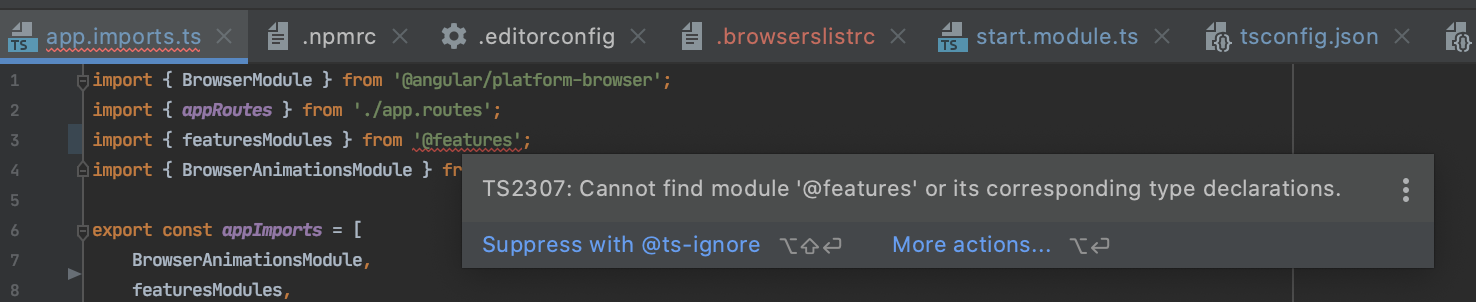
控制台tsc错误:

版本:
Angular CLI: 11.0.7
Node: 14.2.0
OS: darwin x64

Angular: 11.0.9
... animations, common, compiler, compiler-cli, core, forms
... platform-browser, platform-browser-dynamic, router
Ivy Workspace: Yes

Package                         Version
---------------------------------------------------------
@angular-devkit/architect       0.1100.7
@angular-devkit/build-angular   0.1100.7
@angular-devkit/core            11.0.7
@angular-devkit/schematics      11.0.7
@angular/cli                    11.0.7
@schematics/angular             11.0.7
@schematics/update              0.1100.7
rxjs                            6.6.3
typescript 4.0.5回答 6
Stack Overflow用户
发布于 2021-01-25 07:46:27
因此,角引擎允许根据tsconfig中的“路径”中指定的内容为路径创建别名。
但是,为了能够访问模块的子文件夹和模块顶层从index.ts导出的内容,您需要指定如下“路径”:
{
  ...
  "compilerOptions": {
    "baseUrl": "src",
    "paths": {
      "@common/*": ["app/common/*"],
      "@common": ["app/common/index.ts"]
    }
  ...
  }
}Stack Overflow用户
发布于 2021-03-26 14:45:58
我也有过同样的问题。我试图将一个使用角10生成的项目迁移到角11,处理./src/app文件夹,但这不起作用.
但是在新项目中,路径别名是这样工作的:
- 更新您的角cli:
PS C:\Projects> npm uninstall --g @angular/cli
PS C:\Projects> npm i --g @angular/cli- 创建一个新项目,将严格模式设置为
true
PS C:\Projects> ng new <<name-project>>
PS C:\Projects> cd <<name-project>>- 当CLI结束时,按以下方式编辑
tsconfig.app.json:
/* To learn more about this file see: https://angular.io/config/tsconfig. */
{
    "extends": "./tsconfig.json",
    "compilerOptions": {
        "outDir": "./out-tsc/app",
        "types": [],

        // ADD THIS ↓↓↓
        "baseUrl": "./",
        "paths": {
            "@tool/*": [ "src/app/tool/*" ],
            "@models/*": [ "src/app/models/*" ],
            "@services/*": [ "src/app/services/*" ],
            "@components/*": [ "src/app/components/*" ],
            "@interfaces/*": [ "src/app/interfaces/*" ]
        }
        // ADD THIS ↑↑↑
    },
    "files": [
        "src/main.ts",
        "src/polyfills.ts"
    ],
    "include": [
        "src/**/*.d.ts"
    ]
}- ...and
tsconfig.json如下所示:
/* To learn more about this file see: https://angular.io/config/tsconfig. */
{
    "compileOnSave": false,
    "compilerOptions": {
        "outDir": "./dist/out-tsc",
        "forceConsistentCasingInFileNames": true,
        "strict": true,
        "noImplicitReturns": true,
        "noFallthroughCasesInSwitch": true,
        "sourceMap": true,
        "declaration": false,
        "downlevelIteration": true,
        "experimentalDecorators": true,
        "moduleResolution": "node",
        "importHelpers": true,
        "target": "es2015",
        "module": "es2020",
        "lib": [
            "es2018",
            "dom"
        ],

        // ADD THIS ↓↓↓
        "baseUrl": "./",
        "paths": {
            "@tool/*": [ "src/app/tool/*" ],
            "@models/*": [ "src/app/models/*" ],
            "@services/*": [ "src/app/services/*" ],
            "@components/*": [ "src/app/components/*" ],
            "@interfaces/*": [ "src/app/interfaces/*" ]
        }
        // ADD THIS ↑↑↑
    },
    "angularCompilerOptions": {
        "enableI18nLegacyMessageIdFormat": false,
        "strictInjectionParameters": true,
        "strictInputAccessModifiers": true,
        "strictTemplates": true
    }
}- ...and最后,按以下方式编辑
tsconfig.spec.json:
/* To learn more about this file see: https://angular.io/config/tsconfig. */
{
    "extends": "./tsconfig.json",
    "compilerOptions": {
        "outDir": "./out-tsc/spec",
        "types": [
            "jasmine"
        ],
        "baseUrl": "./",
        "paths": {
            "@tool/*": [ "src/app/tool/*" ],
            "@models/*": [ "src/app/models/*" ],
            "@services/*": [ "src/app/services/*" ],
            "@components/*": [ "src/app/components/*" ],
            "@interfaces/*": [ "src/app/interfaces/*" ]
        }
    },
    "files": [
        "src/test.ts",
        "src/polyfills.ts"
    ],
    "include": [
        "src/**/*.spec.ts",
        "src/**/*.d.ts"
    ]
}Stack Overflow用户
发布于 2021-06-12 21:13:57
首先,您需要重新启动代码编辑器,以确保linter没有问题。
我有类似的问题,在我的情况下,吐露是正确的,虽然我当时不知道,因为缺乏经验,所以我继续尝试不同的解决方案,我可以找到。结果发现问题在于,在IDE重新启动之前,linter无法看到配置更改(添加了路径定义)。
https://stackoverflow.com/questions/65846630
复制相似问题
腾讯云开发者

Copyright © 2013 - 2026 Tencent Cloud. All Rights Reserved. 腾讯云 版权所有
深圳市腾讯计算机系统有限公司 ICP备案/许可证号:粤B2-20090059  粤公网安备44030502008569号
腾讯云计算(北京)有限责任公司 京ICP证150476号 | 京ICP备11018762号