
自定义包含django.forms.BooleanField()的django.forms.CheckboxInput()的样式
自定义包含django.forms.BooleanField()的django.forms.CheckboxInput()的样式
提问于 2021-01-22 10:02:02
我在我的网页上添加了一个联系人表单,看起来如下:
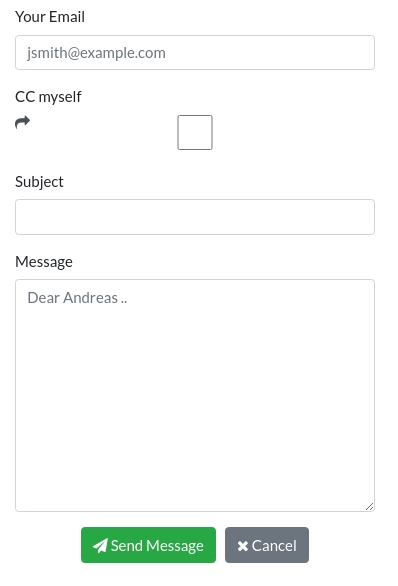
我想用以下方式设置"CC本人“复选框的样式:
- 文本"CC本人“垂直居中于其框内。
- 复选框应紧挨着文本"CC本人”。
- “前进”-symbol应介于文本和复选框之间,但直接位于文本旁边,并与复选框有更多的水平距离(在其右侧)。
这就是我如何在forms.py中定义联系人表单的方式
from django import forms

class ContactForm(forms.Form):
    # * Sender
    from_email = forms.EmailField(
        required=True,
        label='Your Email',
        widget=forms.TextInput(attrs={'placeholder': 'jsmith@example.com'}))

    # * Optional CC to sender
    cc_myself = forms.BooleanField(
        required=False,
        label='CC myself',
        widget=forms.CheckboxInput(attrs={'class': 'fa fa-share'}))

    # * Subject
    subject = forms.CharField(required=True, label='Subject')

    # * Message
    message = forms.CharField(
        widget=forms.Textarea(attrs={'placeholder': 'Dear Andreas ..'}),
        required=True,
label='Message')然后,在home.html模板中,表单显示如下:
<form style="margin-left: auto;margin-right: 0;" method="post" action="{% url 'contact' %}">
{% csrf_token %}
<!-- * Neat autoformatting of the django-form via "pip install django-widget-tweaks"
Docs: https://simpleisbetterthancomplex.com/2015/12/04/package-of-the-week-django-widget-tweaks.html -->
{% for hidden in sendemail_form.hidden_fields %}
{{ hidden }}
{% endfor %}
{% for field in sendemail_form.visible_fields %}
<div class="form-group">
<label for="{{ field.id_for_label }}">{{ field.label }}</label>
{{ field|add_class:'form-control' }}
{% for error in field.errors %}
<span class="help-block">{{ error }}</span>
{% endfor %}
</div>
{% endfor %}
<div style="text-align:center" class="form-actions">
<button type="submit" class="btn btn-success">
<!-- Search icons: https://fontawesome.com/icons?s=solid (syntax: class="fa fa-name-of-icon"))
Docs on how to implement: https://stackoverflow.com/questions/32612690/bootstrap-4-glyphicons-migration/41281304#41281304-->
<span class="fa fa-paper-plane"></span> Send Message
</button>
<!-- Add horizontal space: https://stackoverflow.com/questions/31198170/want-to-add-spacing-between-buttons/31199399#31199399 -->
<!-- Add cancel-button redirecting to "home" according to the following docs: https://simpleisbetterthancomplex.com/2015/12/04/package-of-the-week-django-widget-tweaks.html -->
<a href="{% url 'home' %}" class="btn btn-secondary">
<span class="fa fa-times"></span> Cancel
</a>
</div>
</form>编辑CSS-样式(引导4.x)在我的项目:
在包装在所有模板的base.html中,包括以下内容:
<!-- Bootstrap CSS -->
<link rel="stylesheet" href="https://stackpath.bootstrapcdn.com/bootstrap/4.4.1/css/bootstrap.min.css"
    integrity="sha384-Vkoo8x4CGsO3+Hhxv8T/Q5PaXtkKtu6ug5TOeNV6gBiFeWPGFN9MuhOf23Q9Ifjh" crossorigin="anonymous">

<!-- Docs for including fontawesome: https://stackoverflow.com/a/41281304/12298276 -->
<link href="https://maxcdn.bootstrapcdn.com/font-awesome/4.7.0/css/font-awesome.min.css" rel="stylesheet">编辑在试用@Danoram:的第一个建议之后
结果如下(只修改了复选框中“前进”符号的位置:
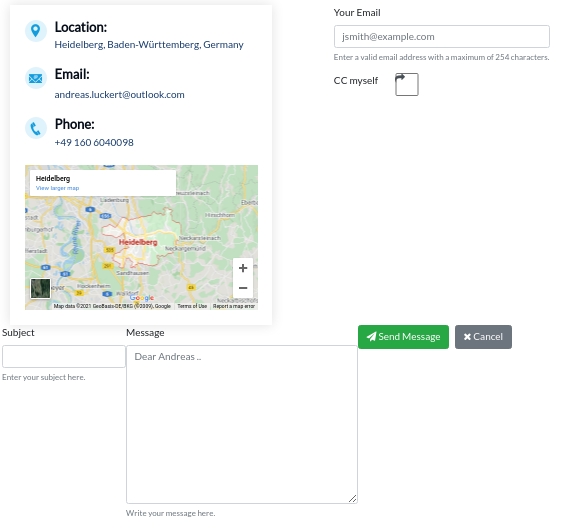
我想显示help_text=‘决定是否应该将消息转发给您。’下面的复选框为灰色,就像其他字段一样。此外,与标签文本"CC本人“相比,复选框的高度要大得多。最后但并非最不重要的是,整个接触式列的格式被扭曲了。特别是后者应该是固定的,否则我不能用这种方式来实现。
回答 1
Stack Overflow用户
发布于 2021-01-22 15:28:19
这是我最好的尝试(保留复选框的大小)。
使用if检查分别呈现cc字段。
虽然为了做到这一点,我不得不从checkboxinput中删除类,并将它们直接放到html中。
forms.py
cc_myself = forms.BooleanField(
        required=False,
        label='CC myself',
        widget=forms.CheckboxInput())
home.html
<form style="margin-left: auto;margin-right: 0;" method="post" action="{% url 'contact' %}">
{% csrf_token %}
<!-- * Neat autoformatting of the django-form via "pip install django-widget-tweaks"
Docs: https://simpleisbetterthancomplex.com/2015/12/04/package-of-the-week-django-widget-tweaks.html -->
{% for hidden in sendemail_form.hidden_fields %}
{{ hidden }}
{% endfor %}
{% for field in sendemail_form.visible_fields %}
{% if field.label == 'CC myself'%}
<div class="row form-group">
<div class="col-3 col-lg-2 col-xl-auto">
<label>{{ field.label }} <label for="{{ field.id_for_label }}" class="fa fa-share"></label></label>
</div>
<div class="col-2">
{{ field|add_class:'form-control' }}
</div>
</div>
{% else %}
<div class="form-group">
<label for="{{ field.id_for_label }}">{{ field.label }}</label>
{{ field|add_class:'form-control' }}
{% for error in field.errors %}
<span class="help-block">{{ error }}</span>
{% endfor %}
</div>
{% endif %}
{% endfor %}
<div style="text-align:center" class="form-actions">
<button type="submit" class="btn btn-success">
<!-- Search icons: https://fontawesome.com/icons?s=solid (syntax: class="fa fa-name-of-icon"))
Docs on how to implement: https://stackoverflow.com/questions/32612690/bootstrap-4-glyphicons-migration/41281304#41281304-->
<span class="fa fa-paper-plane"></span> Send Message
</button>
<!-- Add horizontal space: https://stackoverflow.com/questions/31198170/want-to-add-spacing-between-buttons/31199399#31199399 -->
<!-- Add cancel-button redirecting to "home" according to the following docs: https://simpleisbetterthancomplex.com/2015/12/04/package-of-the-week-django-widget-tweaks.html -->
<a href="{% url 'home' %}" class="btn btn-secondary">
<span class="fa fa-times"></span> Cancel
</a>
</div>
</form>页面原文内容由Stack Overflow提供。腾讯云小微IT领域专用引擎提供翻译支持
原文链接:
https://stackoverflow.com/questions/65843001
复制相关文章
相似问题
腾讯云开发者

Copyright © 2013 - 2026 Tencent Cloud. All Rights Reserved. 腾讯云 版权所有
深圳市腾讯计算机系统有限公司 ICP备案/许可证号:粤B2-20090059  粤公网安备44030502008569号
腾讯云计算(北京)有限责任公司 京ICP证150476号 | 京ICP备11018762号