
这是在PHPicker中使用SwiftUI的正确方式吗?因为我得到了很多泄密
我正在试图找出我的代码是否导致了这个问题,或者我是否应该向Apple提交一个bug报告。
在一个新项目中,我有以下代码:
ContentView()
import SwiftUI

struct ContentView: View {

    @State private var showingImagePicker = false
    @State private var inputImage: UIImage?
    @State private var image: Image?

    var body: some View {
        ZStack {
            Rectangle()
                .fill(Color.secondary)
            if image != nil {
                image?
                    .resizable()
                    .scaledToFit()
            } else {
                Text("Tap to select a picture")
                    .foregroundColor(.white)
                    .font(.headline)
            }
        }
        .onTapGesture {
            self.showingImagePicker = true
        }

        .sheet(isPresented: $showingImagePicker, onDismiss: loadImage){
            SystemImagePicker(image: self.$inputImage)

        }
    }
    func loadImage() {
        guard let inputImage = inputImage else { return }
        image = Image(uiImage: inputImage)

    }
}
SystemImagePicker.swift
import SwiftUI

struct SystemImagePicker: UIViewControllerRepresentable {

    @Environment(\.presentationMode) private var presentationMode

    @Binding var image: UIImage?

    func makeUIViewController(context: Context) -> PHPickerViewController {
        var configuration = PHPickerConfiguration()
        configuration.selectionLimit = 1
        configuration.filter = .images

        let picker = PHPickerViewController(configuration: configuration)
        picker.delegate = context.coordinator
        return picker
    }

    func updateUIViewController(_ uiViewController: PHPickerViewController, context: Context) {

    }

    func makeCoordinator() -> Coordinator {
        return Coordinator(parent: self)
    }

    class Coordinator: NSObject, PHPickerViewControllerDelegate {
        let parent: SystemImagePicker

        init(parent: SystemImagePicker) {
            self.parent = parent
        }

        func picker(_ picker: PHPickerViewController, didFinishPicking results: [PHPickerResult]) {
            for img in results {
                guard img.itemProvider.canLoadObject(ofClass: UIImage.self) else { return }
                img.itemProvider.loadObject(ofClass: UIImage.self) { image, error in
                    if let error = error {
                        print(error)
                        return
                    }

                    guard let image = image as? UIImage else { return }
                    self.parent.image = image
                    self.parent.presentationMode.wrappedValue.dismiss()
                }
            }
        }
    }
}
但是,当选择一个映像(按照我的代码,而不是选择,然后“改变我的想法”,然后选择另一个不同的映像)时,我在运行Xcode中的内存图时会发现这些漏洞。

是我的代码,还是苹果的密码?
无论它的价值是什么,Cancel按钮在图像转换器上也不工作。因此,用户不能只是关闭选择工作表,必须选择一个图像来关闭该工作表。
关于旧UIImagePickerController的进一步说明
以前,我已经为旧的UIImagePickerController使用了这段代码
import SwiftUI

struct ImagePicker: UIViewControllerRepresentable {

    @Environment(\.presentationMode) var presentationMode
    @Binding var image: UIImage?

    class Coordinator: NSObject, UINavigationControllerDelegate, UIImagePickerControllerDelegate {
        let parent: ImagePicker

        init(_ parent: ImagePicker) {
           self.parent = parent
        }

        func imagePickerController(_ picker: UIImagePickerController, didFinishPickingMediaWithInfo info: [UIImagePickerController.InfoKey : Any]) {
            if let uiImage = info[.originalImage] as? UIImage {
                parent.image = uiImage
            }
            parent.presentationMode.wrappedValue.dismiss()
        }

        deinit {
            print("deinit")
        }
    }

    func makeCoordinator() -> Coordinator {
        Coordinator(self)
    }

    func makeUIViewController(context: UIViewControllerRepresentableContext<ImagePicker>) -> UIImagePickerController {
        let picker = UIImagePickerController()
        picker.delegate = context.coordinator
        return picker
    }

    func updateUIViewController(_ uiViewController: UIImagePickerController, context: UIViewControllerRepresentableContext<ImagePicker>) {

    }
}
这也会导致选择图像时出现泄漏,但它们中的漏洞要少得多:
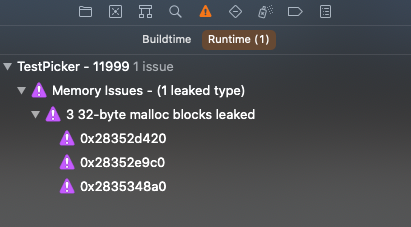
回答 1
Stack Overflow用户
发布于 2022-05-10 00:03:05
我知道你问这个问题已经一年多了,但希望这能帮助你或其他人寻找答案。
我在一个助手文件中使用了以下代码:
import SwiftUI
import PhotosUI

struct ImagePicker: UIViewControllerRepresentable {

let configuration: PHPickerConfiguration
@Binding var selectedImage: UIImage?
@Binding var showImagePicker: Bool

func makeCoordinator() -> Coordinator {

    Coordinator(self)
}

func makeUIViewController(context: Context) -> PHPickerViewController {

    let picker = PHPickerViewController(configuration: configuration)
    picker.delegate = context.coordinator
    return picker
}

func updateUIViewController(_ uiViewController: UIViewControllerType, context: Context) {


}
}

extension ImagePicker {

class Coordinator: NSObject, PHPickerViewControllerDelegate {

    private let parent: ImagePicker

    init(_ parent: ImagePicker) {

        self.parent = parent
    }

    func picker(_ picker: PHPickerViewController, didFinishPicking results: [PHPickerResult]) {

        picker.dismiss(animated: true) {

            self.parent.showImagePicker = false
        }

        guard let provider = results.first?.itemProvider else { return }

        if provider.canLoadObject(ofClass: UIImage.self) {

            provider.loadObject(ofClass: UIImage.self) { image, _ in

                self.parent.selectedImage = image as? UIImage
            }
        }

        parent.showImagePicker = false
    }
}
}
这符合您的观点(我在这里设置了配置,以便根据我所使用的选择器的不同,可以传递自定义版本,提供2):
@State private var showImagePicker = false
@State private var selectedImage: UIImage?
@State private var profileImage: Image?

var profileConfig: PHPickerConfiguration {

    var config = PHPickerConfiguration()
    config.filter = .images
    config.selectionLimit = 1
    config.preferredAssetRepresentationMode = .current
    return config
}

var mediaConfig: PHPickerConfiguration {

    var config = PHPickerConfiguration()
    config.filter = .any(of: [.images, .videos])
    config.selectionLimit = 1
    config.preferredAssetRepresentationMode = .current
    return config
}
这个会进入你的身体。您可以根据自己的需要定制它,但这就是我所拥有的,所以我不想试着把它说出来:
                HStack {

                    Button {

                        showImagePicker.toggle()
                    } label: {

                        Text("Select Photo")
                            .foregroundColor(Color("AccentColor"))
                    }
                    .sheet(isPresented: $showImagePicker) {

                        loadImage()
                    } content: {

                        ImagePicker(configuration: profileConfig, selectedImage: $selectedImage, showImagePicker: $showImagePicker)

                    }
                }

                if profileImage != nil {

                    profileImage?
                        .resizable()
                        .scaledToFill()
                        .frame(width: 100, height: 100)
                        .clipShape(Circle())
                        .shadow(radius: 5)
                        .overlay(Circle().stroke(Color.black, lineWidth: 2))
                }
                else {

                    Image(systemName: "person.crop.circle")
                        .resizable()
                        .foregroundColor(Color("AccentColor"))
                        .frame(width: 100, height: 100)
                }
我也会给你加载图像的功能(我将重放:
func loadImage() {

    guard let selectedImage = selectedImage else { return }
    profileImage = Image(uiImage: selectedImage)
}
我也在我的表单上使用这个来更新图像,如果它被更改了,但是你可以在你身体使用的任何东西上使用它(列表,表单,等等。任何需要.onChange的东西):
.onChange(of: selectedImage) { _ in

            loadImage()
        }
在许多教程中,我注意到几乎没有提到这一行,这是取消按钮函数的原因(我不知道闭包是否必要,但我添加了它,并且工作了,所以我把它留在了示例中):
picker.dismiss(animated: true)我希望我增加了所有东西来帮助你。它似乎没有泄漏任何东西,并允许您使用取消按钮。
祝好运!
https://stackoverflow.com/questions/65857468
复制相似问题
腾讯云开发者

Copyright © 2013 - 2026 Tencent Cloud. All Rights Reserved. 腾讯云 版权所有
深圳市腾讯计算机系统有限公司 ICP备案/许可证号:粤B2-20090059  粤公网安备44030502008569号
腾讯云计算(北京)有限责任公司 京ICP证150476号 | 京ICP备11018762号