
使用AsyncTask定义基于值的文本颜色
使用AsyncTask定义基于值的文本颜色
提问于 2021-01-26 07:37:42
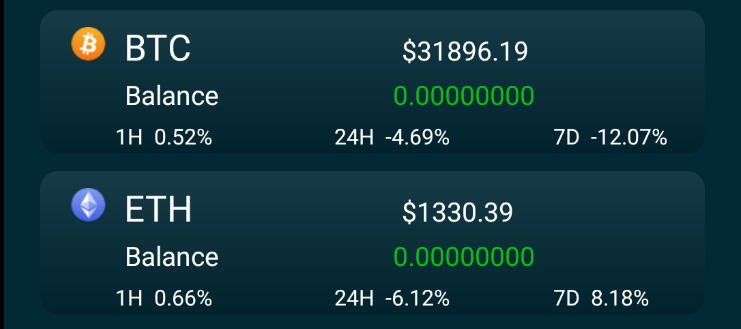
因此,基本上,我的AsyncTask从url获取值,当我执行时,如果包含("-"),我想显示绿色文本或红色文本。我到处找,没有一个选择对我有效。我确实有一个RecyclerView.ViewHolder,但在执行之前不知道如何合并。一切正常,除了颜色。提前谢谢你
活性
public class BTCData extends AsyncTask<Void,RecyclerView.ViewHolder,Void> {
    String data = "";
    String dataParsed1h ="";
    String dataParsed24h ="";
    String dataParsed7d ="";
    String percent_change_1h = "";
    String percent_change_24h = "";
    String percent_change_7d = "";
    Activity activity;
    List<Model> items;

    public BTCData() {

    }

    @Override
    protected Void doInBackground(Void... voids) {
        try {
            URL url = new URL ("https://...");
            HttpURLConnection httpURLConnection = (java.net.HttpURLConnection) url.openConnection();
            InputStream inputStream = httpURLConnection.getInputStream();
            BufferedReader bufferedReader = new BufferedReader(new InputStreamReader(inputStream));
            String line = "";
            while (line != null){
                line = bufferedReader.readLine();
                data = data+line;
            }

            JSONArray JA = new JSONArray(data);
            for(int i=0 ;i< JA.length(); i++){
                JSONObject JO = (JSONObject) JA.get(i);
                percent_change_1h =  "1H  " + JO.getString("percent_change_1h") + "%";
                percent_change_24h = "24H  " + JO.getString("percent_change_24h") + "%";
                percent_change_7d = "7D  " + JO.getString("percent_change_7d") + "%" ;

                dataParsed1h = dataParsed1h + percent_change_1h;
                dataParsed24h = dataParsed24h + percent_change_7d;
                dataParsed7d = dataParsed7d + percent_change_24h;


            }

        } catch (MalformedURLException e) {
            e.printStackTrace();
        } catch (IOException e) {
            e.printStackTrace();
        } catch (JSONException e) {
            e.printStackTrace();
        }
        return null;
    }

    @Override
    protected void onPostExecute(Void aVoid) {
        super.onPostExecute(aVoid);
        MainActivity.btc_percent_change_1h.setText(this.dataParsed1h);
        MainActivity.btc_percent_change_24h.setText(this.dataParsed24h);
        MainActivity.btc_percent_change_7d.setText(this.dataParsed7d);
    }
}```

**View Holder**public class CoinAdapter extends RecyclerView.Adapter<RecyclerView.ViewHolder> {
Adapter adapter;
boolean isLoading;
Activity activity;
List<Model> items;
int visibleThreshold = 5,lastVisibleItem, totalItemcount;
public void setAdapter(Adapter adapter) {
this.adapter = adapter;
}
@NonNull
@Override
public RecyclerView.ViewHolder onCreateViewHolder(@NonNull ViewGroup parent, int viewType) {
View view = LayoutInflater.from(activity)
.inflate(R.layout.activity_main,parent,false);
return new CoinViewHolder(view);
}
@Override
public void onBindViewHolder(@NonNull RecyclerView.ViewHolder holder, int position) {
Model item = items.get(position);
CoinViewHolder holderItem = (CoinViewHolder)holder;
holderItem.btc_percent_change_1h.setTextColor(item.getPercentage_change_1h().contains("-")?
Color.parseColor("#FF0000"):Color.parseColor("#32CD32"));
holderItem.btc_percent_change_24h.setTextColor(item.getPercentage_change_24h().contains("-")?
Color.parseColor("#FF0000"):Color.parseColor("#32CD32"));
holderItem.btc_percent_change_7d.setTextColor(item.getPercentage_change_7d().contains("-")?
Color.parseColor("#FF0000"):Color.parseColor("#32CD32"));
}
@Override
public int getItemCount() {
return items.size();
}
public void setLoader() {isLoading = true;}
public void updateData (List<Model> models)
{
this.items = models;
notifyDataSetChanged();
}**on Activity**
public static TextView btc_percent_change_1h;
public static TextView btc_percent_change_24h;
public static TextView btc_percent_change_7d;
//Percentage
btc_percent_change_1h = (TextView) findViewById(R.id.btc_percent_change_1h);
btc_percent_change_24h = (TextView) findViewById(R.id.btc_percent_change_24h);
btc_percent_change_7d = (TextView) findViewById(R.id.btc_percent_change_7d);
and finally call...
BTCData process = new BTCData();
process.execute();
回答 3
Stack Overflow用户
回答已采纳
发布于 2021-01-26 11:48:35
也许不是最好的选择,但有效。
@Override
    protected void onPostExecute(CoinAdapter aVoid) {
        super.onPostExecute(aVoid);
        MainActivity.btc_percent_change_1h.setTextColor((this.dataParsed1h.contains("-")?
                Color.parseColor("#FF0000"):Color.parseColor("#32CD32")));
        MainActivity.btc_percent_change_1h.setText(this.dataParsed1h);
        MainActivity.btc_percent_change_24h.setTextColor((this.dataParsed24h.contains("-")?
                Color.parseColor("#FF0000"):Color.parseColor("#32CD32")));
        MainActivity.btc_percent_change_24h.setText(this.dataParsed24h);
        MainActivity.btc_percent_change_7d.setTextColor((this.dataParsed7d.contains("-")?
                Color.parseColor("#FF0000"):Color.parseColor("#32CD32")));
        MainActivity.btc_percent_change_7d.setText(this.dataParsed7d);
}Stack Overflow用户
发布于 2021-01-26 09:48:50
这是因为对于在onBindViewHolder中设置颜色而言,在这种情况下,数据将仅为0,没有红色符号,而稍后则是设置数据,但在此之后,不调用onBindViewHolder,因此更改不会反映。
这样做的方式并不理想,并建议您阅读设计模式,以适当的方式实现它。
Stack Overflow用户
发布于 2021-01-26 12:51:15
你可以做到就像。根据位置获取适配器的值,并将其颜色更改如下。然后把这两根线合在一起,然后显示出来。您可以在多个设备上测试它,它将运行并在每个设备中显示准确。
String status = getColoredSpanned(act.getResources().getString(R.string.order_status),"#3EA7BD");
               String variable_status =getColoredSpanned(act.getResources().getString(R.string.status_order_pending),"#E23941");
               String text = status+variable_status;
                if (Build.VERSION.SDK_INT >= Build.VERSION_CODES.N) {
                    myViewHolder.tv_order_product_status.setText(Html.fromHtml(text,  Html.FROM_HTML_MODE_LEGACY), TextView.BufferType.SPANNABLE);
                } else {
                    myViewHolder.tv_order_product_status.setText(Html.fromHtml(text), TextView.BufferType.SPANNABLE);
}页面原文内容由Stack Overflow提供。腾讯云小微IT领域专用引擎提供翻译支持
原文链接:
https://stackoverflow.com/questions/65897417
复制相关文章
相似问题
腾讯云开发者

Copyright © 2013 - 2026 Tencent Cloud. All Rights Reserved. 腾讯云 版权所有
深圳市腾讯计算机系统有限公司 ICP备案/许可证号:粤B2-20090059  粤公网安备44030502008569号
腾讯云计算(北京)有限责任公司 京ICP证150476号 | 京ICP备11018762号