
离子-“`slot`”属性被弃用- eslint-plugin-vue
下面是VS代码中的错误:
[vue/no-deprecated-slot-attribute]
`slot` attributes are deprecated. eslint-plugin-vue
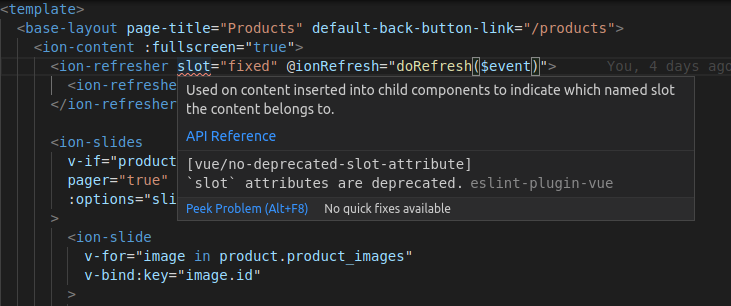
我在.eslintrc.js中安装了这两个插件
  'extends': [
    'plugin:vue/vue3-essential',
    'eslint:recommended'
  ],
这在规则中是:
'vue/no-deprecated-slot-attribute': 'off',为了避免这个问题,应该做些什么?
回答 5
Stack Overflow用户
发布于 2021-04-02 04:46:55
这个插槽实际上是指webcomponent插槽;
https://github.com/ionic-team/ionic-framework/issues/22236
Ionic Framework使用的插槽与Vue 2插槽不一样。我们使用的插槽是Web组件插槽,是有效的用法:插槽。开发人员应该使用Web插槽按照文档:https://ionicframework.com/docs/api/range#usage来定位元素
检查以确保您的eslint.js有以下规则:
  rules: {
    'vue/no-deprecated-slot-attribute': 'off',
  }
接下来,打开..vscode/setings.json,并添加以下内容:
"vetur.validation.template": false,Stack Overflow用户
发布于 2021-01-27 06:45:07
关于插槽的警告
vue/no-deprecated-slot-attribute警告实际上是关于Vue模板中的的,它被v-slot取代了。但是,由于Ionic Web组件使用本机属性,您可以安全地忽略警告或禁用警告:
// .eslintrc.js
module.exports = {
  rules: {
    'vue/no-deprecated-slot-attribute': 'off',
  }
}如果将VS代码与Vetur一起使用,则禁用Vetur的模板验证,这会忽略.eslintrc.js。用于配置自己的docs推荐使用ESLint插件规则的Vetur ESLint:
如果要配置ESLint规则,请执行以下操作:
- 用
vetur.validation.template: false关闭Vetur的模板验证 - 确保你有ESLint插件。这些错误将来自ESLint插件,而不是Vetur。
- 您的工作区根目录中的
yarn add -D eslint eslint-plugin-vue - 在ESLint中设置
.eslintrc规则。
未使用的fixed
关于'fixed' is defined but never used错误you 评论,您的<script>部分可能有一个未使用的变量,名为fixed。只需删除该变量以解决错误。
Stack Overflow用户
发布于 2021-03-24 04:31:45
您可以尝试将其添加到..vscode/setings.json中。
{
    "vetur.validation.template": false
}https://stackoverflow.com/questions/65913547
复制相似问题
腾讯云开发者

Copyright © 2013 - 2026 Tencent Cloud. All Rights Reserved. 腾讯云 版权所有
深圳市腾讯计算机系统有限公司 ICP备案/许可证号:粤B2-20090059  粤公网安备44030502008569号
腾讯云计算(北京)有限责任公司 京ICP证150476号 | 京ICP备11018762号