
如何在团队中创建具有滚动条的列表卡,机器人与谁的机器人相似?
如何在团队中创建具有滚动条的列表卡,机器人与谁的机器人相似?
提问于 2021-01-27 14:14:44
我正在开发使用.NET核心的MS团队机器人。来自微软的机器人拥有这张带有滚动条的列表卡。
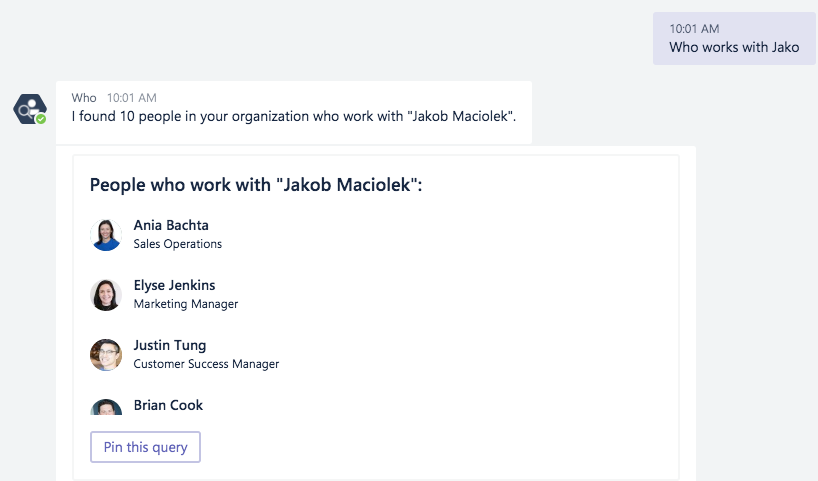
我没有找到实现它的代码,就像我们有缩略卡、英雄卡等。请提前帮助和感谢。
回答 2
Stack Overflow用户
回答已采纳
发布于 2021-01-29 22:34:45
不要担心是否有一个内置的C#类来表示您正在使用的模式。有许多REST和JSON模式,并不是所有的模式都将C#类预先构建到NuGet包中供您安装。每个Bot最终都在幕后使用Bot框架REST,所以您发送的每一个活动都会被转换为JSON字符串。在创建与JSON相对应的C#对象时,以下是一些选项:
您需要了解的关于列表卡的所有信息都在已经链接到的文档 Manish中。下面是一些使用选项2发送列表卡的示例代码:
var json = File.ReadAllText("Resources/listCard.json");

var attachment = new Attachment
{
    ContentType = "application/vnd.microsoft.teams.card.list",
    Content = JObject.Parse(json),
};

await turnContext.SendActivityAsync(MessageFactory.Attachment(attachment));我根据文档中的JSON示例创建了一个JSON文件。请注意,您不能只是复制整个示例并期望它工作,因为它是一个附件对象,您只需要卡片。您希望只使用该示例中的“内容”,因此如下所示:
{
  "title": "Card title",
  "items": [
    . . .
  ]
}Stack Overflow用户
发布于 2021-01-28 06:55:44
我想你应该试试列表卡。因为它是json卡,所以您需要将它作为附件发送。
 private static Attachment CreateListCardAttachment()
    {
        // combine path for cross platform support
        string[] paths = { ".", "Resources", "listCard.json" };
        var listCardJson = File.ReadAllText(Path.Combine(paths));

        var listCardAttachment = new Attachment()
        {
            ContentType = "application/vnd.microsoft.teams.card.list",
            Content = JsonConvert.DeserializeObject(listCardJson),
        };

        return listCardAttachment;
}请使用这 json代码作为参考。
页面原文内容由Stack Overflow提供。腾讯云小微IT领域专用引擎提供翻译支持
原文链接:
https://stackoverflow.com/questions/65920919
复制相关文章
相似问题
腾讯云开发者

Copyright © 2013 - 2026 Tencent Cloud. All Rights Reserved. 腾讯云 版权所有
深圳市腾讯计算机系统有限公司 ICP备案/许可证号:粤B2-20090059  粤公网安备44030502008569号
腾讯云计算(北京)有限责任公司 京ICP证150476号 | 京ICP备11018762号