
在KeyError中使用数据数据的布尔选择结果
在KeyError中使用数据数据的布尔选择结果
提问于 2021-01-28 17:20:19
我遵循一个绘制虹膜数据集的代码,但它对我不起作用。我的数据集如下:两个特征年龄和性别
import pandas as pd
from numpy.random import randint
import random

sexe=[]
for i in range(0,150):
    sexe.append(randint(0,1))
age=[]
for i in range(0,150):
    age.append(randint(18,65))

totaldata= {'age':age,
      'sexe': sexe,
      }

data=pd.DataFrame(totaldata, columns=['age','sexe'])
标签是4:
target_names=['danse', 'musique','cinema','theatre']
type_spectacle = list()
for i in range(0,150):
    type_spectacle.append(random.choice(target_names))

type_spectacle2=[]
for i in type_spectacle:
    if(i=="musique" ):
        type_spectacle2.append(0)
    elif (i=="cinema"):
        type_spectacle2.append(1)
    elif (i=="danse"):
        type_spectacle2.append(2)
    else :
        type_spectacle2.append(3)
下面是我尝试过的情节代码
colors = ['blue', 'red', 'green', 'yellow']

fig, ax = plt.subplots()
x_index = 4
for label, color in zip(range(len(target_names)), colors):
    ax.hist(data[type_spectacle2==label, x_index],
            label=target_names[label],
            color=color)

ax.legend(loc='upper right')
fig.show()
我发现了一个错误:
---------------------------------------------------------------------------
KeyError                                  Traceback (most recent call last)
e:\Anaconda3\lib\site-packages\pandas\core\indexes\base.py in get_loc(self, key, method, tolerance)
   3079             try:
-> 3080                 return self._engine.get_loc(casted_key)
   3081             except KeyError as err:

pandas\_libs\index.pyx in pandas._libs.index.IndexEngine.get_loc()

pandas\_libs\index.pyx in pandas._libs.index.IndexEngine.get_loc()

pandas\_libs\hashtable_class_helper.pxi in pandas._libs.hashtable.PyObjectHashTable.get_item()

pandas\_libs\hashtable_class_helper.pxi in pandas._libs.hashtable.PyObjectHashTable.get_item()

KeyError: (False, 4)

The above exception was the direct cause of the following exception:

KeyError                                  Traceback (most recent call last)
<ipython-input-12-5bd6b0a0f9d3> in <module>
      5 x_index = 4
      6 for label, color in zip(range(len(target_names)), colors):
----> 7     ax.hist(data[type_spectacle2==label, x_index],
      8             label=target_names[label],
      9             color=color)

e:\Anaconda3\lib\site-packages\pandas\core\frame.py in __getitem__(self, key)
   3022             if self.columns.nlevels > 1:
   3023                 return self._getitem_multilevel(key)
-> 3024             indexer = self.columns.get_loc(key)
   3025             if is_integer(indexer):
   3026                 indexer = [indexer]

e:\Anaconda3\lib\site-packages\pandas\core\indexes\base.py in get_loc(self, key, method, tolerance)
   3080                 return self._engine.get_loc(casted_key)
   3081             except KeyError as err:
-> 3082                 raise KeyError(key) from err
   3083
   3084         if tolerance is not None:

KeyError: (False, 4)回答 1
Stack Overflow用户
回答已采纳
发布于 2021-01-28 18:29:37
有两个核心问题:
type_spectacle2 == label有一个type_spectacle2列表,只给出一个值False。将type_spectacle2转换为numpy数组使np.array(type_spectacle2) == label提供一个完整的True和False值数组。您可能想了解一下粗俗广播的魔力。- 要提取数据的一列,您可以使用
data[filter][columnname],其中filter可以是前一点的布尔数组。和要提取的列的名称columnname。
除此之外,在用Python编程时,熟悉列表组合是非常有帮助的。这样,可以更容易地构造列表。
下面是代码的最小适应性(使用gold而不是yellow,因为gold要暗一些):
import pandas as pd
import numpy as np
import matplotlib.pyplot as plt
from random import randint, choice

sexe = [randint(0, 1) for _ in range(0, 150)]
age = [randint(18, 65) for _ in range(0, 150)]
data = pd.DataFrame({'age': age, 'sexe': sexe, })

target_names = ['danse', 'musique', 'cinema', 'theatre']
type_spectacle = [choice(target_names) for _ in range(0, 150)]

spectacle_dict = {"musique": 0, "cinema": 1, "danse": 2, "theatre": 3}
type_spectacle2 = [spectacle_dict[spec] for spec in type_spectacle]

colors = ['blue', 'red', 'green', 'gold']

fig, ax = plt.subplots()
for label, color in zip(range(len(target_names)), colors):
    ax.hist(data[np.array(type_spectacle2) == label]['age'], label=target_names[label], color=color, alpha=0.3)

ax.legend(loc='upper right')
fig.show()
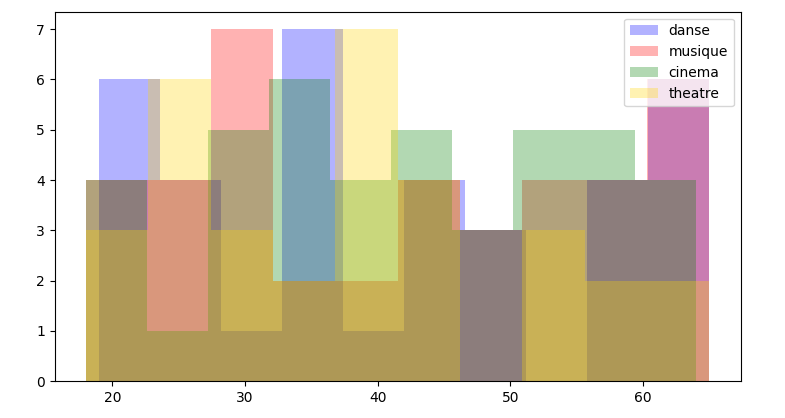
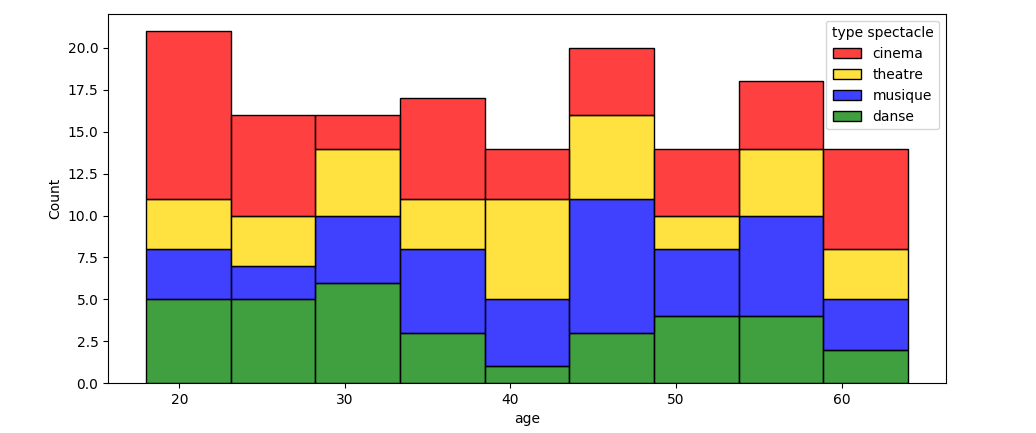
如果还使用numpy创建随机数组,则代码可以进一步简化,因为numpy通过一个简单的函数一次创建这样一个数组。此外,海航还可以用于创建直方图并自动拆分每种眼镜类型。sns.histplot()有一个选项multiple=,该选项可以设置为"stacked",以便将公共回收箱相互叠加在一起。或者multiple="layer"来获取与原始示例类似的层。还有一些选项可以生成类似于概率密度函数(kde=True)的曲线。
在这种情况下,代码可能如下所示:
import pandas as pd
import numpy as np
import matplotlib.pyplot as plt
import seaborn as sns

sexe = np.random.randint(0, 1, 150)
age = np.random.randint(18, 65, 150)
data = pd.DataFrame({'age': age, 'sexe': sexe, })

target_names = ['danse', 'musique', 'cinema', 'theatre']
type_spectacle = np.random.choice(target_names, 150)

spectacle_color_dict = {"musique": 'blue', "cinema": 'red', "danse": 'green', "theatre": 'gold'}
data['type spectacle'] = type_spectacle  # add a new column

fig, ax = plt.subplots()
sns.histplot(data, x='age', hue='type spectacle', palette=spectacle_color_dict, multiple='stack', ax=ax)
fig.show()
页面原文内容由Stack Overflow提供。腾讯云小微IT领域专用引擎提供翻译支持
原文链接:
https://stackoverflow.com/questions/65942098
复制相关文章
相似问题
腾讯云开发者

Copyright © 2013 - 2026 Tencent Cloud. All Rights Reserved. 腾讯云 版权所有
深圳市腾讯计算机系统有限公司 ICP备案/许可证号:粤B2-20090059  粤公网安备44030502008569号
腾讯云计算(北京)有限责任公司 京ICP证150476号 | 京ICP备11018762号