
试图更新云防火墙中的字段
试图更新云防火墙中的字段
提问于 2021-02-03 23:29:01
我对Firebase/Firestore非常陌生。
我创建了一个函数modifyRole,它接受两个参数,uid和role,应该通过更改角色来更新我的数据库,用户从下拉列表中选择该角色。
但是我得到了一个错误,如下所示:
错误:未知(承诺):projects/headstart-imm/databases/(default)/documents/users/role : FirebaseError: code=not:没有要更新的文档:
错误:没有要更新的文档: projects/headstart-imm/databases/(default)/documents/users/role.
这是我的代码:
import { animate, state, style, transition, trigger } from '@angular/animations';
import { ChangeDetectionStrategy, Component, OnInit, ViewEncapsulation } from '@angular/core';
import { AngularFirestore } from '@angular/fire/firestore';
import { tap } from 'rxjs/operators';
import { fuseAnimations } from '../../../@fuse/animations';

@Component({
  selector: 'app-users',
  templateUrl: './users.component.html',
  styleUrls: ['./users.component.scss'],
  changeDetection: ChangeDetectionStrategy.OnPush,
  encapsulation: ViewEncapsulation.None,
  animations: [
    fuseAnimations,
    trigger('detailExpand', [
      state('void', style({ height: '0px', minHeight: '0', visibility: 'hidden' })),
      state('*', style({ height: '*', visibility: 'visible' })),
      transition('void <=> *', animate('225ms cubic-bezier(0.4, 0.0, 0.2, 1)')),
    ]),
  ],
})
export class UsersComponent implements OnInit {
  userColumns = ['photoURL', 'name', 'email', 'providerId', 'role'];

  users$ = this.afs.collection<Users[]>('users').valueChanges().pipe(tap(console.log));

  constructor(private afs: AngularFirestore) {}

  ngOnInit(): void {}

  modifyRole(uid: string | any, role: string) {
    return this.afs.collection('users').doc('role').update({
      role,
      uid,
    });
  }
}

export interface Users {
  displayName: string;
  email: string;
  phoneNumber: null;
  photoURL: string;
  providerId: string;
  role: string;
  uid: string;
}
这是模板
<mat-table #table *ngIf="users$ | async as users" [dataSource]="users" multiTemplateDataRows=true>
  < id="users-project" class="page-layout simple right-sidebar" fxLayout="row" fxLayoutAlign="space-around center">
    <ng-container matColumnDef="photoURL">
      <mat-header-cell *matHeaderCellDef></mat-header-cell>
      <mat-cell *matCellDef="let user"><div *ngIf="user?.photoURL">
        <img alt="profilePic" src="{{user?.photoURL}}"></div></mat-cell>
    </ng-container>
    <ng-container matColumnDef="name">
      <mat-header-cell *matHeaderCellDef>Name</mat-header-cell>
      <mat-cell *matCellDef="let user">{{user?.displayName}}</mat-cell>
    </ng-container>
    <ng-container matColumnDef="email">
      <mat-header-cell *matHeaderCellDef>Email Address</mat-header-cell>
      <mat-cell *matCellDef="let user">{{user?.email}}</mat-cell>
    </ng-container>
    <ng-container matColumnDef="providerId">
      <mat-header-cell *matHeaderCellDef>Provider</mat-header-cell>
      <mat-cell *matCellDef="let user">{{user?.providerId}}</mat-cell>
    </ng-container>
<!--    <ng-container matColumnDef="role">-->
<!--      <mat-header-cell *matHeaderCellDef>Role</mat-header-cell>-->
<!--      <mat-cell *matCellDef="let user"><p>{{user?.role}}</p></mat-cell>-->
<!--    </ng-container>-->
    <ng-container matColumnDef="role">
      <mat-header-cell *matHeaderCellDef>Role</mat-header-cell>
        <mat-cell *matCellDef="let user">
          <mat-form-field>
            <mat-select (selectionChange)="modifyRole(user.uid, user.role)" name="modifyRole">
              <mat-option *ngFor="let user of users"
                      [value]=user.role>{{user.role}}</mat-option>
            </mat-select>
          </mat-form-field>
        </mat-cell>
    </ng-container>
    <ng-template #tpl let-user>
      <div class="mat-row detail-row" [@detailExpand] style="overflow: hidden"></div>
    </ng-template>
    <mat-header-row *matHeaderRowDef="userColumns; sticky: true"></mat-header-row>
    <mat-row *matRowDef="let row; columns: userColumns;" matRipple class="element-row"
             [cdkDetailRow]="row" [cdkDetailRowTpl]="tpl"></mat-row>
</mat-table>
回答 1
Stack Overflow用户
回答已采纳
发布于 2021-02-04 03:04:28
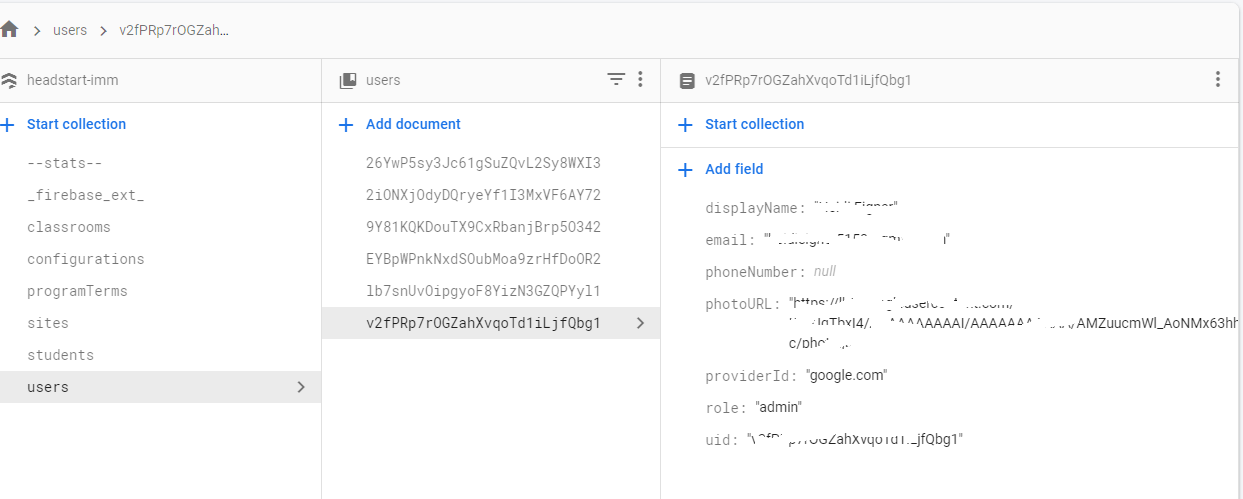
在对防火墙文档执行任何操作之前,我们需要掌握有效的DocumentReference。当比较您的防火墙结构和代码时,怀疑文档路径设置错误。
this.afs.collection('users').doc('role').update({})在users集合中,不存在id role持久化的文档。若要解决错误,必须提供有效的ID,如v2fPR.....g1 (无法从图像中获取完整的id )。
this.afs.collection('users').doc('v2fPR.....g1').update({})页面原文内容由Stack Overflow提供。腾讯云小微IT领域专用引擎提供翻译支持
原文链接:
https://stackoverflow.com/questions/66037260
复制相关文章
相似问题
腾讯云开发者

Copyright © 2013 - 2026 Tencent Cloud. All Rights Reserved. 腾讯云 版权所有
深圳市腾讯计算机系统有限公司 ICP备案/许可证号:粤B2-20090059  粤公网安备44030502008569号
腾讯云计算(北京)有限责任公司 京ICP证150476号 | 京ICP备11018762号