
使用QAxObject计算合并单元格的行数
使用QAxObject计算合并单元格的行数
提问于 2021-02-07 17:19:19
我需要读取一个包含多个合并单元格的Excel文件。假设第一列包含“类别”值,第二列包含“sub_category”值。问题是,每个类别单元可能是第二列中具有多个sub_categories的合并单元格。我需要知道合并后的单元格所占的行数。我的图表是这样的:
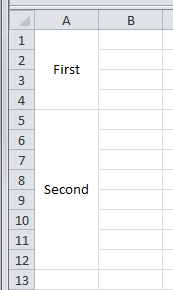
已经提出了类似的问题,但使用了不同的语言:
QString category = "";
QString sub_category = "";

auto excel     = new QAxObject("Excel.Application");
auto workbooks = excel->querySubObject("Workbooks");
auto workbook  = workbooks->querySubObject("Open(const QString&)" ,"C:\\Users\\Orkideh\\Documents\\build-MyApp-Desktop_Qt_5_12_9_MSVC2017_64bit-Debug\\Book1.xlsx");
auto sheets    = workbook->querySubObject("Worksheets");
auto sheet     = sheets->querySubObject("Item(int)", 1);

// Read the rows 2..150
for (int r = 2; (r <= 150); ++r)
{
    auto cCell = sheet->querySubObject("Cells(int,int)",r,1);
    category = cCell->dynamicCall("Value()").toString().simplified();

    // if each row in the excel file had only 1 category and 1 sub-category,
    // I could use the below code to get sub_category:

    // cCell = sheet->querySubObject("Cells(int,int)",r, 2);
    // sub_category = cCell->dynamicCall("Value()").toString().simplified();

    // But in fact, the cell with category value might be a merged cell with
    // unknown number of rows.
    // I need to know the number of rows that this merged cell occupies to connect
    // each sub_category to its own category.
}回答 1
Stack Overflow用户
回答已采纳
发布于 2021-02-08 16:35:48
我终于从这里得到了答案:https://blog.csdn.net/u18004660201/article/details/80350164
可以得到目标单元格的第一行和下一个单元格的第一行。通过获取细胞的“范围”和“MergeArea”,这是可行的。
    for (int row = 2; row <= 150; ++row)
{
    QAxObject *range = sheet->querySubObject("Cells(int,int)", row, 1);
    range =  range->querySubObject("MergeArea");
    const int nRowStart = range->property("Row").toInt();
    const int nRowEnd = range->property("Column").toInt();
    range =  sheet->querySubObject("Cells(int,int)", nRowStart, nRowEnd);

    cout << "Value: " << range->property("Value").toString() << endl
                    << "The first line of this cell: " << nRowStart << endl << endl;
    // Do some other tasks...
}
此代码读取所有行,但不再将null打印为第一列中合并单元格的值。nRowStart保存第一行的编号。现在,我可以设置一个计数器并增加它,直到nRowStart的值得到新的值,这意味着我已经到达下一个单元格。那个计数器的价值就是我所需要的。
页面原文内容由Stack Overflow提供。腾讯云小微IT领域专用引擎提供翻译支持
原文链接:
https://stackoverflow.com/questions/66090823
复制相关文章
相似问题
腾讯云开发者

Copyright © 2013 - 2026 Tencent Cloud. All Rights Reserved. 腾讯云 版权所有
深圳市腾讯计算机系统有限公司 ICP备案/许可证号:粤B2-20090059  粤公网安备44030502008569号
腾讯云计算(北京)有限责任公司 京ICP证150476号 | 京ICP备11018762号