
JsonValueProviderFactory: System.ArgumentException:已经添加了一个具有相同键的项
我有一个用于Shopify的web钩子api处理程序,它用一个json主体调用下面的控制器操作。它立即失败,因为没有到达并记录任何log4net日志记录,只有OnException方法中的日志记录错误如下。
问题1:
Elmah日志中的Stack跟踪没有帮助,因为它不足以显示代码中的哪一行引发了错误。为什么会这样呢?我注意到async errors...they似乎很难确定代码中的根本原因行。也许我现在应该把它变成一个同步的方法?也许我应该摆脱OnException方法,因为它可能掩盖了更多的信息?
问题2:
在执行任何代码之前,一旦执行控制器操作,什么可能会导致这个错误?该控制器继承了asp.net mvc Controller,构造函数中唯一的代码是创建DBContext和log4net _logger的实例。
堆栈跟踪:
Controllers.ShopWebhooksController.OnException(C:\inetpub\wwwroot\Controllers\ShopWebhooksController.cs:44)
System.ArgumentException: An item with the same key has already been added.
       at System.ThrowHelper.ThrowArgumentException(ExceptionResource resource)
       at System.Collections.Generic.Dictionary`2.Insert(TKey key, TValue value, Boolean add)
       at System.Web.Mvc.JsonValueProviderFactory.AddToBackingStore(EntryLimitedDictionary backingStore, String prefix, Object value)
       at System.Web.Mvc.JsonValueProviderFactory.AddToBackingStore(EntryLimitedDictionary backingStore, String prefix, Object value)
       at System.Web.Mvc.JsonValueProviderFactory.AddToBackingStore(EntryLimitedDictionary backingStore, String prefix, Object value)
       at System.Web.Mvc.JsonValueProviderFactory.AddToBackingStore(EntryLimitedDictionary backingStore, String prefix, Object value)
       at System.Web.Mvc.JsonValueProviderFactory.AddToBackingStore(EntryLimitedDictionary backingStore, String prefix, Object value)
       at System.Web.Mvc.JsonValueProviderFactory.AddToBackingStore(EntryLimitedDictionary backingStore, String prefix, Object value)
       at System.Web.Mvc.JsonValueProviderFactory.AddToBackingStore(EntryLimitedDictionary backingStore, String prefix, Object value)
       at System.Web.Mvc.JsonValueProviderFactory.GetValueProvider(ControllerContext controllerContext)
       at System.Web.Mvc.ValueProviderFactoryCollection.GetValueProvider(ControllerContext controllerContext)
       at System.Web.Mvc.ControllerBase.get_ValueProvider()
       at System.Web.Mvc.ControllerActionInvoker.GetParameterValue(ControllerContext controllerContext, ParameterDescriptor parameterDescriptor)
       at System.Web.Mvc.ControllerActionInvoker.GetParameterValues(ControllerContext controllerContext, ActionDescriptor actionDescriptor)
       at System.Web.Mvc.Async.AsyncControllerActionInvoker.<>c__DisplayClass3_1.<BeginInvokeAction>b__0(AsyncCallback asyncCallback, Object asyncState)
       at System.Web.Mvc.Async.AsyncResultWrapper.WrappedAsyncResultBase`1.Begin(AsyncCallback callback, Object state, Int32 timeout)
       at System.Web.Mvc.Async.AsyncControllerActionInvoker.BeginInvokeAction(ControllerContext controllerContext, String actionName, AsyncCallback callback, Object state)
       at System.Web.Mvc.Controller.<>c.<BeginExecuteCore>b__152_0(AsyncCallback asyncCallback, Object asyncState, ExecuteCoreState innerState)
       at System.Web.Mvc.Async.AsyncResultWrapper.WrappedAsyncVoid`1.CallBeginDelegate(AsyncCallback callback, Object callbackState)
       at System.Web.Mvc.Async.AsyncResultWrapper.WrappedAsyncResultBase`1.Begin(AsyncCallback callback, Object state, Int32 timeout)
       at System.Web.Mvc.Controller.BeginExecuteCore(AsyncCallback callback, Object state)
       at System.Web.Mvc.Async.AsyncResultWrapper.WrappedAsyncResultBase`1.Begin(AsyncCallback callback, Object state, Int32 timeout)
       at System.Web.Mvc.Controller.BeginExecute(RequestContext requestContext, AsyncCallback callback, Object state)
       at System.Web.Mvc.MvcHandler.<>c.<BeginProcessRequest>b__20_0(AsyncCallback asyncCallback, Object asyncState, ProcessRequestState innerState)
       at System.Web.Mvc.Async.AsyncResultWrapper.WrappedAsyncVoid`1.CallBeginDelegate(AsyncCallback callback, Object callbackState)
       at System.Web.Mvc.Async.AsyncResultWrapper.WrappedAsyncResultBase`1.Begin(AsyncCallback callback, Object state, Int32 timeout)
       at System.Web.Mvc.MvcHandler.BeginProcessRequest(HttpContextBase httpContext, AsyncCallback callback, Object state)
       at System.Web.HttpApplication.CallHandlerExecutionStep.System.Web.HttpApplication.IExecutionStep.Execute()
       at System.Web.HttpApplication.<>c__DisplayClass285_0.<ExecuteStepImpl>b__0()
       at System.Web.HttpApplication.ExecuteStepImpl(IExecutionStep step)
       at System.Web.HttpApplication.ExecuteStep(IExecutionStep step, Boolean& completedSynchronously)
下面是控制器,OrderUpdate是被调用的操作:
public class ShopWebhooksController : Controller
{
private readonly ILog _logger;
private readonly InventoryMgmtContext _dbContext;

public ShopWebhooksController()
{
    _logger = LogManager.GetLogger(GetType());
    _dbContext = new InventoryMgmtContext();
}

protected override void OnException(ExceptionContext filterContext)
{
    Exception ex = filterContext.Exception;
    var action = filterContext.RouteData.Values["action"];
    // TODO: Log or report your exception.
    string msg = $"Exception in shopify webhook controller action: {action}. Message: {ex.Message}. Stack: {ex.StackTrace}.";
    _logger.Error(msg); **<---- this is being logged**

    filterContext.Result = new HttpStatusCodeResult(HttpStatusCode.OK, msg);

    //Let the base controller finish this execution
    base.OnException(filterContext);
}


[HttpPost]
public async Task<ActionResult> OrderUpdated (int storefrontId)
{
    string msg = "Successfully submitted update request to Mozzo.";
    string webhook = "orders/updated";
    _logger.Debug($"Shopify {webhook} request received."); **<-- not being logged**

    try
    {
        var validationResult = await ValidateStorefrontWebhook(webhook, storefrontId);
        if (!validationResult.WasSuccessful) return new HttpStatusCodeResult(HttpStatusCode.OK, validationResult.Message);

        var orderSyncAppServ = new SyncErpWithPlacedOrdersTask();
        Hangfire.BackgroundJob.Enqueue(() => orderSyncAppServ.UpdateOrderFromWebhook(validationResult.Value, storefrontId));
    }
    catch (Exception e)
    {
        msg = $"Exception webhook: {webhook} for storefront Id: {storefrontId}. {e.Message}.";
        _logger.Error(msg);
    }
    return new HttpStatusCodeResult(HttpStatusCode.OK, msg);
}

#endregion

#region Private Methods


/// <summary>
/// Validates the webhook is authentic and returns the body of the request as a string
/// </summary>
/// <param name="webhook"></param>
/// <param name="storefrontId"></param>
/// <returns>request body (string version of an order, etc.</returns>
private async Task<ActionConfirmation<string>> ValidateStorefrontWebhook(string webhook, int storefrontId)
{
    string returnMessage = "";

    //log request
    //get the request body (a json string of an order, product, etc coming from shopify.
    string jsonObject = await GetRequestBody();

    //wrap in brackets to make it an array of one because our import takes an array or orders
    jsonObject = $"[ {jsonObject} ]";

    //get storefront
    var storefront = await _dbContext.StoreFronts.Where(s => s.Id == storefrontId).SingleOrDefaultAsync();
    if (storefront == null) {
        returnMessage = $"Shopify {webhook} webhook request for Storefront Id: {storefront.Id} - storefront not found!";
        _logger.Error($"{LogHelper.GetCurrentMethodName()}: {returnMessage}");
        return ActionConfirmation<string>.CreateFailureConfirmation(returnMessage, "", false);
    }

    log4net.LogicalThreadContext.Properties["AccountId"] = storefront.Company.AccountId;
    log4net.LogicalThreadContext.Properties["CompanyId"] = storefront.CompanyId;
    log4net.LogicalThreadContext.Properties["FacilityId"] = null;
    log4net.LogicalThreadContext.Properties["UserId"] = null;

    string shopDomain = storefront.APIUrl;
    string shopSecretKey = storefront.StoreFrontTypeId == (int)StoreFront.StoreFrontTypes.ShopifyPrivate
        ? storefront.AccessToken
        : AppSettings.ShopifySecretKey;

    _logger.Debug("About to check if webhook is authentic");

    var isValidRequest = await AuthorizationService.IsAuthenticWebhook(
        Request.Headers.ToKvps(),
        Request.InputStream,
        shopSecretKey);

    if (!isValidRequest)
    {
        returnMessage = $"Shopify {webhook} webhook request for Storefront Id: {storefront.Id} is not authentic!";
        _logger.Error($"{LogHelper.GetCurrentMethodName()}: {returnMessage}");
        return ActionConfirmation<string>.CreateFailureConfirmation(returnMessage, "", false);
    }

    returnMessage = $"Shopify {webhook} webhook request for Storefront Id: {storefront.Id} is authentic!";
    _logger.Info($"{LogHelper.GetCurrentMethodName()}: {returnMessage}");

    return ActionConfirmation<string>.CreateSuccessConfirmation(returnMessage, jsonObject, false);
}

private async Task<string> GetRequestBody()
{
    _logger.Debug($"{LogHelper.GetCurrentMethodName()}: Attempting to get request body.");

    //ShopifySharp has just read the input stream. We must always reset the inputstream
    //before reading it again.
    Request.InputStream.Position = 0;

    //Do not dispose the StreamReader or input stream. The controller will do that itself.
    string bodyText = await new StreamReader(Request.InputStream).ReadToEndAsync();

    _logger.Debug($"{LogHelper.GetCurrentMethodName()}: Request body: {bodyText}.");

    return bodyText;
}
#endregion
更新-问题和解决方案
问题确实是,Shopify Order webhook JSON对象包含重复的键,因为它们在同一个对象包装器中有一个lowercase和TitleCase版本的4个键。
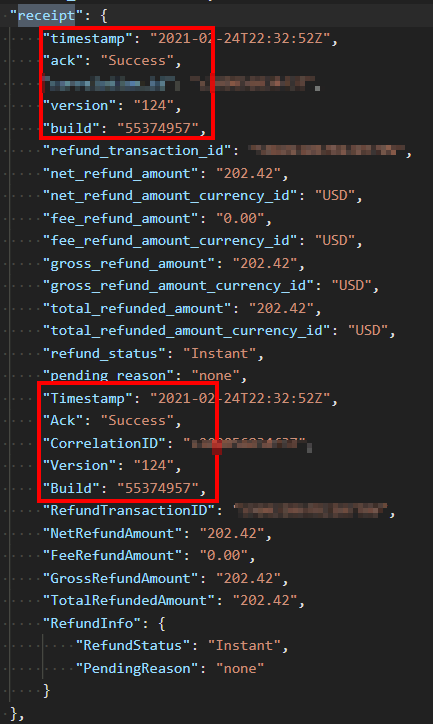
这些密钥的完整路径是:
order,refunds,0,transactions,0,receipt,version
order,refunds,0,transactions,0,receipt,timestamp
order,refunds,0,transactions,0,receipt,ack
order,refunds,0,transactions,0,receipt,build我所做的确切的代码修改如下。在添加自己的JsonValueProviderFactory类时,我确实遵循了下面提供的答案,但没有提供的是对make...because的确切更改--这取决于您想要如何处理它。在我的示例中,此更改将导致抛出同名的任何后续键。因此,如果您想要以不同的方式处理它,您需要按您的意愿来处理:
/// <summary>
/// Modified this to handle duplicate keys
/// </summary>
/// <param name="key"></param>
/// <param name="value"></param>
public void Add(string key, object value)
{
    if (++_itemCount > _maximumDepth)
    {
        throw new InvalidOperationException("The JSON request was too large to be deserialized.");
    }

    // Add the following if block so if the key already exists, just return instead of trying to add it to the dictionary which will throw an error.
    if (_innerDictionary.ContainsKey(key))
    {
        return;
    }

    _innerDictionary.Add(key, value);
}回答 3
Stack Overflow用户
发布于 2021-02-17 03:29:08
我认为您的设计没有什么问题,但是您的一个类可能有重复的属性,这会导致运行时异常。
例如
public int storefrontId {get; set;}
public int StorefrontId {get; set;}
您需要配置log4net来记录您的操作调用。前任:
2021-02-16 10:24:17.5632|2|INFO|Microsoft.AspNetCore.Hosting.Diagnostics|Request finished in 141.7419ms 200 |url: http://myapp/OrderUpdated|action:这里是如何使用DelegatingHandler进行请求日志的编辑
public class RequestLogHandler : DelegatingHandler
{
    private static readonly ILog log = log4net.LogManager.GetLogger(System.Reflection.MethodBase.GetCurrentMethod().DeclaringType);

    protected override async Task<HttpResponseMessage> SendAsync(HttpRequestMessage request, CancellationToken cancellationToken)
    {
        if (request.Content != null)
        {
            string requestBody = await request.Content.ReadAsStringAsync();
            log.Info($"url {request.RequestUri} body = {requestBody}");
        }
        //// let other handlers process the request
        var result = await base.SendAsync(request, cancellationToken);

        return result;
    }
}
配置中的寄存器处理程序
config.MessageHandlers.Add(new RequestLogHandler());这会给你以下的东西。

此外,我将告诉您重写JsonValueProviderFactory AddToBackingStore方法的步骤。您可以使用它来查找导致此问题的属性。
- 从这里获取源代码。
- 添加类MyJsonValueProviderFactory.cs
- 在JsonValueProviderFactoruy之前在Global.asax.cs中注册新类 ValueProviderFactories.Factories.Insert(0,新MyJsonValueProviderFactory());
或者先删除原版,然后使用你的。
ValueProviderFactories.Factories.Remove(ValueProviderFactories.Factories.OfType<JsonValueProviderFactory>().FirstOrDefault());
ValueProviderFactories.Factories.Add(new MyJsonValueProviderFactory());
使用这个类进行异常捕获,您将能够找到问题所在,您可以从EntryLimitedDictionary类中的Add方法开始。
再次使用下面的链接注册错误处理全局。https://learn.microsoft.com/en-us/aspnet/web-api/overview/error-handling/exception-handling
Stack Overflow用户
发布于 2021-02-14 05:38:05
我不确定我是否理解您是否正确,但是尝试使用带有日志记录的附加方法临时包装后台调用,然后尝试catch:
BackgroundJob.Enqueue(() => UpdateOrderFromWebhookWithLogging(_logger, validationResult.Value, storefrontId));并将此方法添加到控制器中:
// I don't know types to write correct signature
private void UpdateOrderFromWebhookWithLogging(_logger, orderSyncAppServ, validationResult.Value, storefrontId)
        {
            try
            {
                orderSyncAppServ.UpdateOrderFromWebhook(validationResult.Value, storefrontId)
            }
            catch (Exception ex)
            {
                _logger.Error(ex);
                throw;
            }
}Stack Overflow用户
发布于 2021-02-20 08:16:55
看起来,JsonValueProviderFactory.AddToBackingStore正在遍历JSON输入并将每个叶值放入字典中。字典的关键是叶节点的路径。如果遍历遇到两个具有相同路径的叶节点,则会发生此异常。
我认为您需要检查JSON输入数据--也许它有重复的键。例如,这是有效的JSON:
{
    "id": 1,
    "name": "Some Name"
}
而这并不是:
{
    "id": 1,
    "name": "Some Name",
    "id": 2
}
因为"id“键出现不止一次。这可能会导致你看到的错误。
https://stackoverflow.com/questions/66149477
复制相似问题
腾讯云开发者

Copyright © 2013 - 2026 Tencent Cloud. All Rights Reserved. 腾讯云 版权所有
深圳市腾讯计算机系统有限公司 ICP备案/许可证号:粤B2-20090059  粤公网安备44030502008569号
腾讯云计算(北京)有限责任公司 京ICP证150476号 | 京ICP备11018762号