
如何将所有内容隐藏在<hr> html标签下?
如何将所有内容隐藏在<hr> html标签下?
提问于 2021-02-12 14:13:28
我有以下html模板:
<!-- You must include this JavaScript file -->
<script src="https://assets.crowd.aws/crowd-html-elements.js"></script>

<!-- For the full list of available Crowd HTML Elements and their input/output documentation,
      please refer to https://docs.aws.amazon.com/sagemaker/latest/dg/sms-ui-template-reference.html -->

<!-- You must include crowd-form so that your task submits answers to MTurk -->
<crowd-form answer-format="flatten-objects">

  <crowd-instructions link-text="View instructions" link-type="button">
    <short-summary>
      <p>Provide a brief instruction here</p>
    </short-summary>

    <detailed-instructions>
      <h3>Provide more detailed instructions here</h3>
      <p>Include additional information</p>
    </detailed-instructions>

    <positive-example>
      <p>Provide an example of a good answer here</p>
      <p>Explain why it's a good answer</p>
    </positive-example>

    <negative-example>
      <p>Provide an example of a bad answer here</p>
      <p>Explain why it's a bad answer</p>
    </negative-example>
  </crowd-instructions>

  <div>
    <p>What is your favorite color for a bird?</p>
    <crowd-input name="favoriteColor" placeholder="example: pink" required></crowd-input>
  </div>

  <div>
    <p>Check this box if you like birds</p>
    <crowd-checkbox name="likeBirds" checked="true" required></crowd-checkbox>
  </div>

  <div>
    <p>On a scale of 1-10, how much do you like birds?</p>
    <crowd-slider name="howMuch" min="1" max="10" step="1" pin="true" required></crowd-slider>
  </div>

  <div>
    <p>Write a short essay describing your favorite bird</p>
    <crowd-text-area name="essay" rows="4" placeholder="Lorem ipsum..." required></crowd-text-area>
  </div>

<hr>

</crowd-form>
我想隐藏提交按钮。但是,由于我使用的是一些预先定义的html元素,所以我无法控制submit按钮。因此,如何在<hr> 标签下隐藏所有内容?
更新
根据其中一个答案,我尝试了以下几点:
<!-- begin snippet: js hide: false console: true babel: false -->

<!-- language: lang-html -->

    <!-- You must include this JavaScript file -->
    <script src="https://assets.crowd.aws/crowd-html-elements.js">

    let elements = document.querySelector('[data-testid=crowd-submit]');
elements.style.display="none";

    </script>

    <!-- For the full list of available Crowd HTML Elements and their input/output documentation,
          please refer to https://docs.aws.amazon.com/sagemaker/latest/dg/sms-ui-template-reference.html -->

    <!-- You must include crowd-form so that your task submits answers to MTurk -->
    <crowd-form answer-format="flatten-objects">

      <crowd-instructions link-text="View instructions" link-type="button">
        <short-summary>
          <p>Provide a brief instruction here</p>
        </short-summary>

        <detailed-instructions>
          <h3>Provide more detailed instructions here</h3>
          <p>Include additional information</p>
        </detailed-instructions>

        <positive-example>
          <p>Provide an example of a good answer here</p>
          <p>Explain why it's a good answer</p>
        </positive-example>

        <negative-example>
          <p>Provide an example of a bad answer here</p>
          <p>Explain why it's a bad answer</p>
        </negative-example>
      </crowd-instructions>

      <div>
        <p>What is your favorite color for a bird?</p>
        <crowd-input name="favoriteColor" placeholder="example: pink" required></crowd-input>
      </div>

      <div>
        <p>Check this box if you like birds</p>
        <crowd-checkbox name="likeBirds" checked="true" required></crowd-checkbox>
      </div>

      <div>
        <p>On a scale of 1-10, how much do you like birds?</p>
        <crowd-slider name="howMuch" min="1" max="10" step="1" pin="true" required></crowd-slider>
      </div>

      <div>
        <p>Write a short essay describing your favorite bird</p>
        <crowd-text-area name="essay" rows="4" placeholder="Lorem ipsum..." required></crowd-text-area>
      </div>

    <hr>

    </crowd-form>
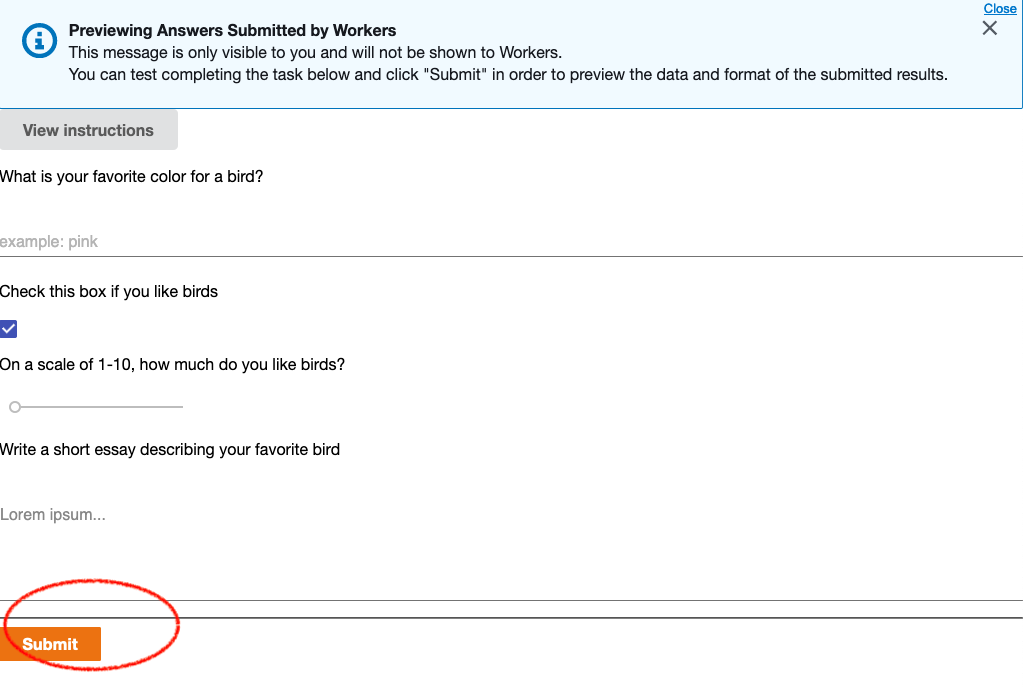
然而,“提交”按钮仍然呈现在页面的视图中:
回答 2
Stack Overflow用户
回答已采纳
发布于 2021-02-13 07:02:26
您可以通过css使用display:none添加[data-testid=crowd-submit]。
演示代码:
[data-testid=crowd-submit] {
  display: none;
}<script src="https://assets.crowd.aws/crowd-html-elements.js"></script>
<crowd-form answer-format="flatten-objects">
<crowd-instructions link-text="View instructions" link-type="button">
<short-summary>
<p>Provide a brief instruction here</p>
</short-summary>
<detailed-instructions>
<h3>Provide more detailed instructions here</h3>
<p>Include additional information</p>
</detailed-instructions>
<positive-example>
<p>Provide an example of a good answer here</p>
<p>Explain why it's a good answer</p>
</positive-example>
<negative-example>
<p>Provide an example of a bad answer here</p>
<p>Explain why it's a bad answer</p>
</negative-example>
</crowd-instructions>
<div>
<p>What is your favorite color for a bird?</p>
<crowd-input name="favoriteColor" placeholder="example: pink" required></crowd-input>
</div>
<div>
<p>Check this box if you like birds</p>
<crowd-checkbox name="likeBirds" checked="true" required></crowd-checkbox>
</div>
<div>
<p>On a scale of 1-10, how much do you like birds?</p>
<crowd-slider name="howMuch" min="1" max="10" step="1" pin="true" required></crowd-slider>
</div>
<div>
<p>Write a short essay describing your favorite bird</p>
<crowd-text-area name="essay" rows="4" placeholder="Lorem ipsum..." required></crowd-text-area>
</div>
<hr>
</crowd-form>
Stack Overflow用户
发布于 2021-02-12 14:52:56
您可以尝试这种方法(用上面定义的结构进行测试):
let elements = document.querySelector('[data-testid=crowd-submit]');
elements.style.display="none";页面原文内容由Stack Overflow提供。腾讯云小微IT领域专用引擎提供翻译支持
原文链接:
https://stackoverflow.com/questions/66173389
复制相关文章
相似问题
腾讯云开发者

Copyright © 2013 - 2026 Tencent Cloud. All Rights Reserved. 腾讯云 版权所有
深圳市腾讯计算机系统有限公司 ICP备案/许可证号:粤B2-20090059  粤公网安备44030502008569号
腾讯云计算(北京)有限责任公司 京ICP证150476号 | 京ICP备11018762号