
如何执行输入框占位符动画
如何执行输入框占位符动画
提问于 2021-02-14 03:39:53
我在一个网站上看到了这个,其中占位符文本“磅”仍然在输入框的顶部。示例:
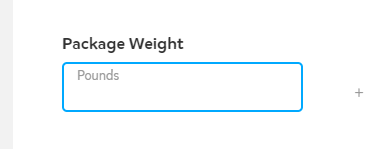
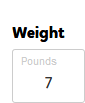
这到底是怎么做到的?
  <div id="my-ajax-filter-search">
        <form action="" method="post">
            <label id="label-lg">Weight</label>
            <input type="text" name="search" id="search" value="" >
            <input type="submit" id="submit" name="submit" value="See shipping rates" />
        </form>
        <ul ></ul>
<section class="elementor-section elementor-inner-section elementor-element elementor-element-784a76e1 elementor-section-boxed elementor-section-height-default elementor-section-height-default" data-id="784a76e1" data-element_type="section">
        <div id="ajax_filter_search_results" class="elementor-container elementor-column-gap-no np-wrap">

            </div>
</section>
    </div>
CSS:
.input-text {
    min-width: 84px;
}div#my-ajax-filter-search input#search , label#label-lg {
    max-width: 250px;
    margin: 0 auto;
    display: block;
    border-radius: 5px;
}
label#label-lg {
    color: #fff;
    margin-bottom: 6px;
    font-weight: bold;
}
div#my-ajax-filter-search input#submit:focus {
    outline: none;
}
div#my-ajax-filter-search input#submit {
    max-width: 192px;
    display: block;
    width: 100%;
    margin: 15px auto;
    background: #fff;
    font-family: "Montserrat", Sans-serif;
    fill: #373278;
    color: #373278;
    background-color: #ffffff;
    border-style: solid;
    border-width: 1px 1px 1px 1px;
    border-color: #ffffff;
    border-radius: 50px 50px 50px 50px;
    box-shadow: 0px 10px 30px -8px rgb(0 0 0 / 16%);
}

div#my-ajax-filter-search input#submit:hover {
    color: #ffffff;
    background-color: rgba(255,255,255,0);
    border-color: #ffffff;
}


.elementor-price-table__feature-inner input {
    min-width: 1px;
}

.elementor-2 .elementor-element.elementor-element-1257087d .elementor-price-table__feature-inner {
    margin: 0;
}

.elementor-2 .elementor-element.elementor-element-1257087d .elementor-price-table__feature-inner .quantity {
    max-width: 67px;
    margin: 0 auto;
}

.elementor-2 .elementor-element.elementor-element-1257087d .elementor-price-table__feature-inner a.add_cart.button.product_type_simple {
    max-width: 106px;
    margin: 12px auto;
    display: block;
    padding: 17px;
    border-radius: 10px;
    border: 1px solid;
    background: #00a8ff;
    color: #fff;
}回答 1
Stack Overflow用户
回答已采纳
发布于 2021-02-14 04:21:38
您可以使用以下代码
body {
  font-family: sans-serif;
}

.label-before, .field input:focus + label::before, .field input:valid + label::before {
  line-height: 15px;
  font-size: 12px;
  top: 5px;
  background: #fff;
  padding: 0 6px;
  left: 9px;
}


.field {
  position: relative;
  margin-bottom: 15px;
  margin-top:10px;
  display:inline-block;
}
.field label::before {
  content: attr(title);
  position: absolute;
  top: 10px;
  left: 15px;
  line-height: 30px;
  font-size: 14px;
  color: #777;
  transition: 300ms all;
}
.field input {
  width: auto;
  height: 50px;
  padding: 0px 15px;
  padding-top:12px;
  box-sizing: border-box;
  font-size: 14px;
  color: #222;
  border: 1px solid #ccc;
  border-radius: 3px;
  text-align: center;
}
.field input:focus {
  outline: 0;
  border-color: blue;
}
.field input:valid + label::before {
  content: attr(data-title);
}
.field input:focus + label::before {
  color: blue;
}<div id="my-ajax-filter-search">
<form action="" method="post">
<div class="control-group">
<div>
<label id="label-lg">Weight</label>
</div>
<div class="field">
<input type="text" required autocomplete="off" name="search" id="search" value="" >
<label for="search" title="Pounds" data-title="Pounds"></label>
</div>
</div>
<input type="submit" id="submit" name="submit" value="See shipping rates" />
</form>
<ul ></ul>
<section class="elementor-section elementor-inner-section elementor-element elementor-element-784a76e1 elementor-section-boxed elementor-section-height-default elementor-section-height-default" data-id="784a76e1" data-element_type="section">
<div id="ajax_filter_search_results" class="elementor-container elementor-column-gap-no np-wrap">
</div>
</section>
</div>
页面原文内容由Stack Overflow提供。腾讯云小微IT领域专用引擎提供翻译支持
原文链接:
https://stackoverflow.com/questions/66192236
复制相关文章
相似问题
腾讯云开发者

Copyright © 2013 - 2026 Tencent Cloud. All Rights Reserved. 腾讯云 版权所有
深圳市腾讯计算机系统有限公司 ICP备案/许可证号:粤B2-20090059  粤公网安备44030502008569号
腾讯云计算(北京)有限责任公司 京ICP证150476号 | 京ICP备11018762号