
在ajax POST中将文件列表发送给控制器
在ajax POST中将文件列表发送给控制器
提问于 2021-02-18 12:43:35
我试图上传文档,但我无法通过列出我的控制器参数。我的设想是:
- 用户单击“选择文件”按钮,选择文件并按“已完成”。
- 然后,我的一些函数获得文件列表并通过POST merhod传递给控制器进行本地保存,如下所示:
视图端:(获取文件列表)
   function saveDocuments(documentList) {
        if (documentList.length > 0)
        {
            var formList = new Array;
            for (var i = 0; i < documentList.length; i++) {
                var form = new FormData();
                var file = documentList[i];

                form.append('FormFile', file);
                formList.push(form);
                }
                 savePhysicalFile(formList);
              }
         }
视图侧:(post文件列表)
 function savePhysicalFile(formData)
    {
        if (formData != null)
        {
            $.ajax({
                url: "Installation/SavePhysicalPath",
                type: 'POST',
                dataType: "json",
                contentType: "multipart/form-data",
                data:formData,
                processData: false,
                contentType: false,
                success: function (result) {
                    console.log("Success", result);
                },
                error: function (data) {
                    console.log(data);
                }
            });
        }
    }
在我的控制器端;参数"model“总是空的。我不能在这里通过视图侧列表。我怎么才能弄清楚?
控制器侧
public JsonResult SavePhysicalPath([FromForm] List<FileModel> model)
        {
            var savingRootPath = @"C:\MyDocuments";

            //I'm doing save locally

            return Json(savingRootPath);
        }
模型侧
    public class FileModel
    {
        public string Files { get; set; }

        public IFormFile FormFile { get; set; }
}回答 1
Stack Overflow用户
回答已采纳
发布于 2021-02-19 05:38:13
从您的代码中,您可以注意以下两件事:
1.对于复杂类型的每个属性,模型绑定都会查看名称模式prefix.property_name的源。如果什么都没有找到,它只查找没有后端接收到的property_name .For model的列表,您需要给出类似于:[index].FormFile或model[index].FormFile的名称。
2.您的模型有一个IFormFile,您的操作接收一个列表模型,如果您只传递需要删除FromForm属性的IFormFile,并且确保没有[ApiController].It是一个已知的github问题,并且这已经移到了Next sprint planning里程碑。
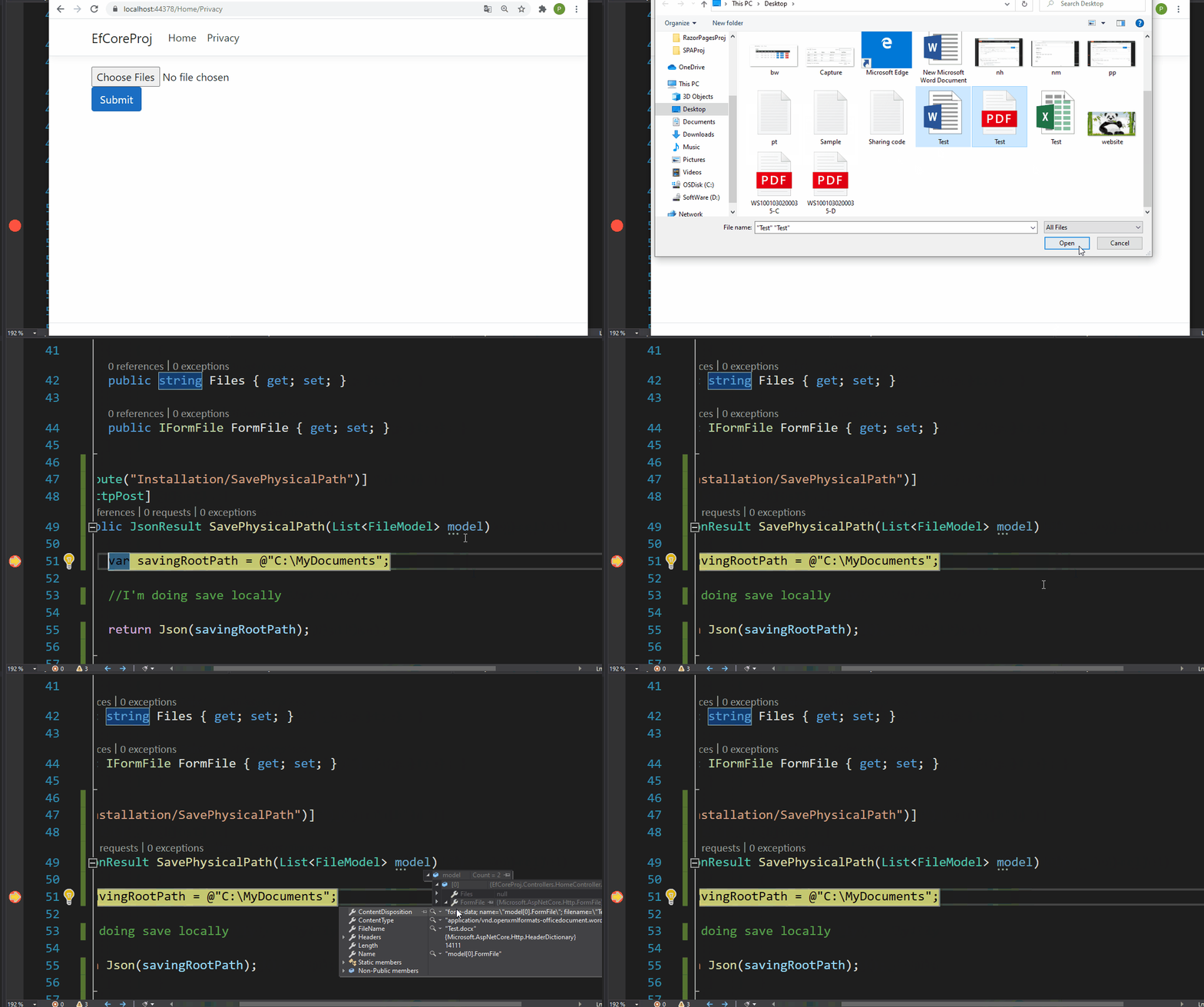
下面是一个完整的工作演示:
查看:
<input type="file" multiple onchange="saveDocuments(this.files)"/>
<div class="form-group">
    <input type="button" value="Submit" id="submit" class="btn btn-primary" />
</div>

@section Scripts
{
    <script>
        function saveDocuments(documentList) {
            if (documentList.length > 0) {
                var form = new FormData();
                for (var i = 0; i < documentList.length; i++) {
                    var file = documentList[i];
                    //change here
                    form.append('model['+i+'].FormFile', file);
                }
                savePhysicalFile(form);
            }
        }
        function savePhysicalFile(formData) {
            if (formData != null) {
                $.ajax({
                    url: "/Installation/SavePhysicalPath",
                    type: 'POST',
                    dataType: "json",
                    contentType: "multipart/form-data",
                    data: formData,
                    processData: false,
                    contentType: false,
                    success: function (result) {
                        console.log("Success", result);
                    },
                    error: function (data) {
                        console.log(data);
                    }
                });
            }
        }
    </script>
}
主计长:
[HttpPost]
public JsonResult SavePhysicalPath(List<FileModel> model)
{
    var savingRootPath = @"C:\MyDocuments";

    //I'm doing save locally

    return Json(savingRootPath);
}
结果:
页面原文内容由Stack Overflow提供。腾讯云小微IT领域专用引擎提供翻译支持
原文链接:
https://stackoverflow.com/questions/66260214
复制相关文章
相似问题
腾讯云开发者

Copyright © 2013 - 2026 Tencent Cloud. All Rights Reserved. 腾讯云 版权所有
深圳市腾讯计算机系统有限公司 ICP备案/许可证号:粤B2-20090059  粤公网安备44030502008569号
腾讯云计算(北京)有限责任公司 京ICP证150476号 | 京ICP备11018762号