
具有DropShadow背景的ItemDelegate
具有DropShadow背景的ItemDelegate
提问于 2021-02-18 08:54:11
加入DropShadow后会出现失真。为什么会出现扭曲?
QML ListView失真:
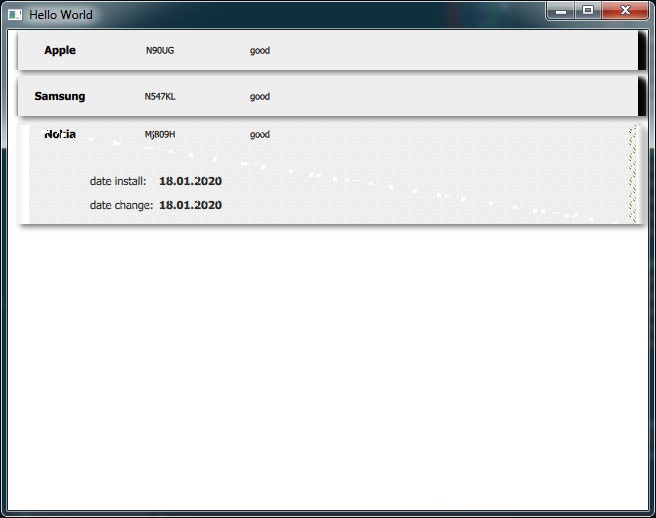
或者还有另外一种方法来给元素添加阴影?下面是应用程序的完整代码: main.qml - main委托- 产权观
delegate: PropertiesView {
            id: delegateElement
            anchors.left: parent.left
            anchors.leftMargin: 10
            anchors.right: parent.right
            anchors.rightMargin: 10

            background: Rectangle {
                id: elementDevice
                implicitWidth: 100
                implicitHeight: 40
                opacity: enabled ? 1 : 0.3
                color: delegateElement.down ? "#dddedf" : "#eeeeee"
            }

            DropShadow {
                anchors.fill: parent
                cached: true
                horizontalOffset: 3
                verticalOffset: 3
                radius: 8.0
                samples: 16
                color: "#80000000"
                source: parent
            }
        }
}回答 1
Stack Overflow用户
回答已采纳
发布于 2021-02-18 09:59:30
尝尝这个
delegate: Item{
        anchors.left: parent.left
        anchors.leftMargin: 10
        anchors.right: parent.right
        anchors.rightMargin: 10
        implicitHeight: delegateElement.implicitHeight

        PropertiesView {
            id: delegateElement
            anchors.fill: parent
            smooth: true
            opacity:  0
            background: Rectangle {
                implicitHeight: 40
                opacity: enabled ? 1 : 0.3
                color: delegateElement.down ? "#dddedf" : "#eeeeee"
            }
        }

        DropShadow {
            anchors.fill: delegateElement
            source: delegateElement
            cached: true
            horizontalOffset: 3
            verticalOffset: 3
            radius: 8.0
            samples: 16
            color: "#80000000"

        }

}页面原文内容由Stack Overflow提供。腾讯云小微IT领域专用引擎提供翻译支持
原文链接:
https://stackoverflow.com/questions/66256571
复制相关文章
相似问题
腾讯云开发者

Copyright © 2013 - 2026 Tencent Cloud. All Rights Reserved. 腾讯云 版权所有
深圳市腾讯计算机系统有限公司 ICP备案/许可证号:粤B2-20090059  粤公网安备44030502008569号
腾讯云计算(北京)有限责任公司 京ICP证150476号 | 京ICP备11018762号