
在AzurePowerShellV5内联脚本中引用yaml变量
在AzurePowerShellV5内联脚本中引用yaml变量
提问于 2021-02-20 06:37:25
我有一个Azure DevOps yaml管道,它看起来(有点像)如下:
variables:
  MyVar: Test

Steps:
  - task: AzurePowerShell@5
    displayName: 'Test variables from yml file'
    inputs:
      azureSubscription: MyServiceConnection
      ScriptType: InLineScript
      InLine: |
        Write-Host "I really want to see the values from the variables in the yml file here"
        Write-Host "parameters from the yml file would be great too"
        Write-Host "But what would I write to do that?"
        Write-Host "$(MyVar) <- Nothing here"
        Write-Host "$(variables.MyVar) <- Nothing here"
        Write-Host "$DoesThisWork <- Nothing here"
        Write-Host "$OrThis <- Nothing here"
      env:
        DoesThisWork: $(MyVar)
        OrThis: $(variables.MyVar)
如何在MyVar脚本中使用InLine?
回答 2
Stack Overflow用户
回答已采纳
发布于 2021-02-20 16:12:05
我把它简化到尽可能简单的程度,它运行得很好:
pool:
  vmImage: 'windows-latest'

variables:
  myVar: test value

steps:
  - powershell: Write-Host "$(myVar)"
生成:
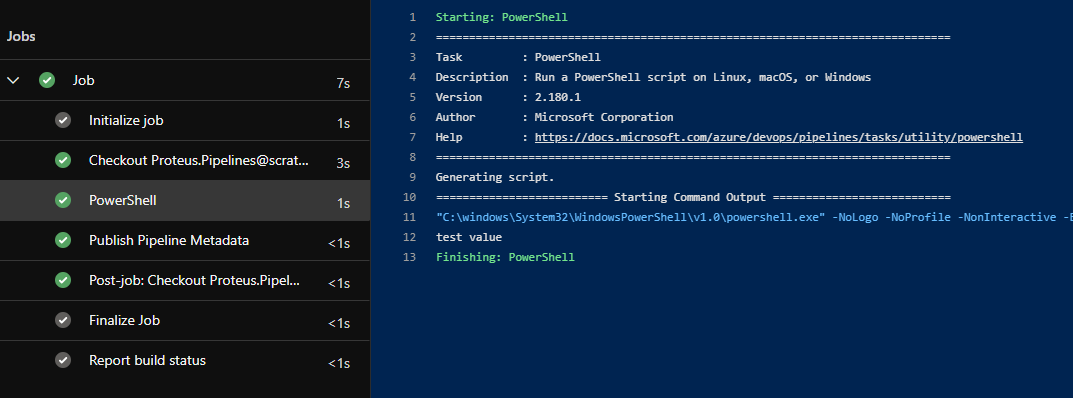
我修改了您的示例以删除未编译的env块,并删除不正确的变量引用:
pool:
  vmImage: 'windows-latest'

variables:
  myVar: test value

steps:
- task: AzurePowerShell@5
  inputs:
    azureSubscription: 'My Service Connection Name'
    ScriptType: 'InlineScript'
    Inline: |
      Write-Host "I really want to see the values from the variables in the yml file here"
            Write-Host "parameters from the yml file would be great too"
            Write-Host "But what would I write to do that?"
            Write-Host "$(MyVar) <- Nothing here"
    azurePowerShellVersion: 'LatestVersion'
并得到:

由于语法$(variables.MyVar)无效,它没有通过第一个。该语法的工作原理如下:
${{ variables.MyVar }}
- Runtime (任务执行前):
$(MyVar)-展开为"$(MyVar)“如果empty
- Runtime (为条件而设计,或默认值导致问题):
$[variables.MyVar]-如果空的
扩展为空字符串
我想知道缺乏Azure Powershell版本是否是您的问题之一?
Stack Overflow用户
发布于 2021-02-20 16:46:37
指定env块时,它会将变量创建为环境变量。
在PowerShell中,您使用$env:VariableName引用环境变量。所以就你而言,$env:DoesThisWork。
页面原文内容由Stack Overflow提供。腾讯云小微IT领域专用引擎提供翻译支持
原文链接:
https://stackoverflow.com/questions/66288762
复制相关文章
相似问题
腾讯云开发者

Copyright © 2013 - 2026 Tencent Cloud. All Rights Reserved. 腾讯云 版权所有
深圳市腾讯计算机系统有限公司 ICP备案/许可证号:粤B2-20090059  粤公网安备44030502008569号
腾讯云计算(北京)有限责任公司 京ICP证150476号 | 京ICP备11018762号