
绘图到没有数据文件的哑终端
我一直在使用一段时间前创建的脚本来监控一些数值计算的收敛性。它所做的是,使用awk提取一些数据,将它们写入一些文件中,然后使用gnuplot在一个哑终端中绘制数据。它工作正常,但最近我一直在想,为了这样的任务,我是否给磁盘写了太多东西,我很好奇是否有一种方法可以使用gnuplot来绘制awk的结果,而不需要先将结果写入文件中。
下面是我写的剧本:
#!/bin/bash
#
input=$1
#
timing=~/tmp/time.dat
nriter=~/tmp/nriter.dat
totenconv=~/tmp/totenconv.dat
#
test=false
while ! $test; do
    clear
    awk '/total cpu time/ {print $9-p;p=$9}' $input | tail -n 60 > $timing
    awk '/     total energy/ && !/!/{a=$4; nr[NR+1]}; NR in nr{print a,"   ",$5}' $input | tail -n 60 > $nriter
    awk '/!/{a=$5; nr[NR+2]}; NR in nr{print a,"   ",$5}' $input > $totenconv
    gnuplot <<__EOF
set term dumb feed 160, 40
set multiplot layout 2, 2
#
set lmargin 15
set rmargin 2
set bmargin 1
set autoscale
#set format y "%-4.7f"
#set xlabel "nr. iterations"
plot '${nriter}' using 0:1 with lines title 'TotEn' axes x1y1
#
set lmargin 15
set rmargin 2
set bmargin 1
set autoscale
#set format y "%-4.7f"
#set xlabel "nr. iteration"
plot '${nriter}' using 0:2 with lines title 'Accuracy' axes x1y1
#
set rmargin 1
set bmargin 1.5
set autoscale
#set format y "%-4.7f"
set xlabel "nr. iteration"
plot '${totenconv}' using 1 with lines title 'TotEnConv' axes x1y1
#
set rmargin 1
set bmargin 1.5
set autoscale
set format y "%-4.0f"
set xlabel "nr. iteration"
plot '${timing}' with lines title 'Timing (s)' axes x1y1
#plot '${totenconv}' using 2 with lines title 'AccuracyConv' axes x1y1
__EOF
#    tail -n 5 $input
#    echo -e "\n"
    date
    iter=$(grep "    total energy" $input | wc -l)
    conviter=$(awk '/!/' $input | wc -l)
    echo "number of iterations = " $iter "    converged iterations = " $conviter
    sleep 10s
    if grep -q "JOB DONE" $input ; then
        grep '!' $input
        echo -e "\n"
        echo "Job finished"
        rm $nriter
        rm $totenconv
        rm $timing
        date
        test=true
      else
        test=false
    fi
done
当数据可用时,这会产生一个由四幅图组成的网格,但如果我能避免一直写到磁盘上,那就太好了。当计算完成时,我不需要这些数据,只是为了这个监视目的。
还有更好的方法吗?还是gnuplot是唯一的选择?
编辑:我正在按照@theozh的请求详细说明awk位在脚本中的作用:
awk '/total cpu time/ {print $9-p;p=$9}' $input--这个搜索模式total cpu time,它多次出现在文件$input中,并与模式一起进入第9列。在那里,它找到一个数,它是以秒为单位的时间。它使用它所找到的数字和它被找到的before.awk '/ total energy/ && !/!/{a=$4; nr[NR+1]}; NR in nr{print a," ",$5}' $input的数字之间的差异--搜索模式total energy(在工作总数之前有5个空格),取它在第4列上找到的数字,也取它在第4列下的第二行和在5awk '/!/{a=$5; nr[NR+2]}; NR in nr{print a," ",$5}' $input列中找到的数字--在这里它搜索模式!,从行中取第5列的数字,然后在第5列下面走2行,在第5列取数字。
awk与行一起工作,每一行都在列中划分。例如,下面一行:
This is an example有4列,用空格分隔。
回答 1
Stack Overflow用户
发布于 2021-02-23 22:45:18
谢谢你的解释,我又学到了一些有用的东西。我不想说,纯gnu图的解决方案将是直截了当、高效和容易理解的,但它是可以做到的。假设列或项由空格分隔。配料如下:
- ,从gnuket5.0开始,您有数据库锁(例如
$Data),而从gnuket5.2.0开始,您可以通过索引来处理行,例如$Data[i]。检查help datablocks。数据库锁不是磁盘上的文件,而是memory. - writing数据中的数据,通过
with table传递给数据库,检查help table. - to检查一个字符串是否包含在另一个可以使用
strstr()的字符串中,选中help strstrt. - use三元操作符(check
help ternary)以创建过滤器 - 以获取字符串中的第n项(用空格分隔),check
help word. !是否定(checkhelp unary)- although,gnuplot中有一行计数器
$0(checkhelp pseudocolumns),但如果有双空行,则会将其重置为0。这就是为什么我要你的柜台,例如通过n=0和n=0
据我所知,如果您在bash中使用gnuplot脚本,则必须使用\$ (例如\$Data )来规避gnuplot脚本。
为了模仿tail -n 60,即只绘制一个数据库的最后60个数据点,您可以使用。
plot $myNrIter u ($0>|$myNrIter|-60 ? $0 : NaN):1 w lp pt 7 ti "Accuracy"再一次,这可能不容易遵循。下面的代码可能仍然可以优化。以下可能是一个起点,我希望你能根据你的需要来调整它。
代码:
### mimic an awk script using gnuplot
reset session

# if you have a file you would first need to load it 1:1 into a datablock
# see here:  https://stackoverflow.com/a/65316744/7295599

$Data <<EOD
# some header of some minimal example data
1     2  3     4   5           6   7    8    9
1     2  total cpu time        6   7    8    9.1
something else
1     2  total cpu time        6   7    8    9.2
1     total energy 4.1   5     6   7    8    9
1     2     3      4     5.1   6   7    8    9

 !    2     3      4     5.01  6   7    8    9
1     one line below exclamation mark
1     2nd line below     5.11 exclamation mark
1     2  total cpu time        6   7    8    9.4
1     total energy 4.2   5     6   7    8    9
1     2     3      4     5.2   6   7    8    9
1     2  total cpu time        6   7    8    9.5
# again something else
 !    2     3      4     5.02  6   7    8    9
1 one line below exclamation mark
1     2nd line below     5.22  exclamation mark
1     2  total cpu time        6   7    8    9.9
1     total energy 4.3   5     6   7    8    9
1     2     3      4     5.3   6   7    8    9
 !    2     3      4     5.03  6   7    8    9
1     one line below exclamation mark
1     2nd line below     5.33  exclamation mark
EOD

set datafile missing NaN       # missing data NaN
set datafile commentschar ''   # no comment lines

found(n,s) = strstrt($Data[n],s)>0   # returns true or 1 if string s is found in line n of datablock
item(n,col) = word($Data[n],col)     # returns column col of line n of datablock

set table $myTiming
    myFilter(n,col) = found(n,'total cpu time') ? (p0=p1,p1=item(n,col),p1-p0) : NaN
    plot n=(p1=NaN,0) $Data u (n=n+1, myFilter(n,9)) w table
set table $myNrIter
    myFilter(n,col1,col2) = found(n,'    total energy') && !found(n,'!') ? \
                            sprintf("%s   %s",item(n,col1),item(n+1,col2)) : NaN
    plot n=0 $Data u (n=n+1, myFilter(n,4,5)) w table
set table $myTotenconv
    myFilter(n,col1,col2) = found(n,'!') ? sprintf("%s   %s",item(n,col1),item(n+2,col2)) : NaN
    plot n=0 $Data u (n=n+1, myFilter(n,5,5)) w table
unset table

print $myTiming
print $myNrIter
print $myTotenconv

set multiplot layout 2,2
    plot $myNrIter    u 0:1 w lp pt 7 ti "Accuracy"
    plot $myNrIter    u 0:2 w lp pt 7 ti "TotEnConv"
    plot $myTotenconv u 0:1 w lp pt 7 ti "AccuracyConv"
    plot $myTiming    u 0:1 w lp pt 7 ti "Timing (s)"
unset multiplot
### end of code结果:(打印和绘图)
 0.1
 0.2
 0.1
 0.4

4.1   5.1
4.2   5.2
4.3   5.3

5.01   5.11
5.02   5.22
5.03   5.33
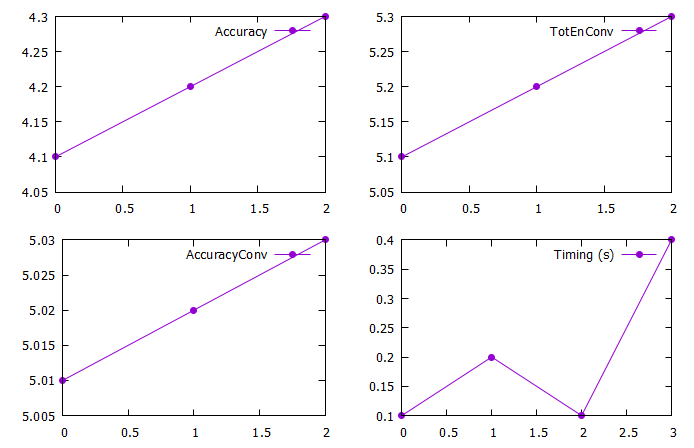
https://stackoverflow.com/questions/66311908
复制相似问题
腾讯云开发者

Copyright © 2013 - 2026 Tencent Cloud. All Rights Reserved. 腾讯云 版权所有
深圳市腾讯计算机系统有限公司 ICP备案/许可证号:粤B2-20090059  粤公网安备44030502008569号
腾讯云计算(北京)有限责任公司 京ICP证150476号 | 京ICP备11018762号