
NSMutableParagraphStyle.paragraphSpacingBefore应该在段落之前添加空格吗?
注意:从macOS Big /11.6.4开始,这一错误似乎已经修复。当使用paragraphSpacingBefore时,测试脚本现在生成第二个映像而不是第三个映像。
我正在macOS上编写一个命令行脚本,它从文本中创建图像。我想在上面给一些段落额外的空间,让它们从上一段开始。由于脚本的工作方式,将更容易设置在段落上放置额外空间的属性,而不是更改上一段的属性。我以为这就是paragraphSpacingBefore on NSMutableParagraphStyle的目的。
但是,虽然我可以让paragraphSpacing在第一段之后提供空间,但paragraphSpacingBefore似乎在第二段之后添加了空间。
这个非常简单的测试脚本将创建一个包含三个段落的映像。
将paragraphSpacing行和paragraphSpacingBefore行注释掉后,段落之间或周围不添加额外的间距:

如果paragraphSpacing行未注释,则在这三个段落之间有空格:
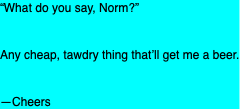
但是,如果paragraphSpacing行被注释掉,而paragraphSpacingBefore行未注释,则这三个段落之间没有空格,但是在第三段之后添加了空间:
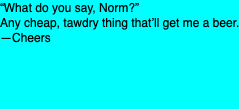
最后的间距似乎是paragraphSpacingBefore值的两倍;如果我注释掉cheers +=行,使其只有两个段落,那么最后一段后面的空间似乎减少了一半:
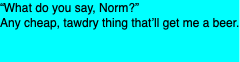
这对我来说毫无意义。我希望第三个图像(使用paragraphSpacingBefore与第二个图像非常相似)。我误解了paragraphSpacingBefore的意思,而且/或我做错了什么。
#!/usr/bin/swift
//test paragraphSpacingBefore

import AppKit

//set up text
var cheers = "“What do you say, Norm?”\nAny cheap, tawdry thing that’ll get me a beer."
cheers += "\n—Cheers"

var paragraphStyle = NSMutableParagraphStyle()
//paragraphStyle.paragraphSpacing = 32
paragraphStyle.paragraphSpacingBefore = 32
var textAttributes = [NSAttributedString.Key.paragraphStyle:paragraphStyle]
let textLines = NSAttributedString(string:cheers, attributes:textAttributes)

//create image of text
let outputSize = textLines.size()
let textRect = NSRect(x: 0, y: 0, width: outputSize.width, height: outputSize.height)
let background = NSColor(red:0, green:1, blue:1, alpha:1)

let outputImage = NSImage(size:outputSize, flipped: false) { (outputRect) -> Bool in
    //set a background color
    background.setFill()
    outputRect.fill()

    //draw the text
    textLines.draw(in: textRect)
    return true
}

//save image to file
var imageData = outputImage.tiffRepresentation
let bitmappedText = NSBitmapImageRep(data: imageData!)
imageData = bitmappedText!.representation(using: NSBitmapImageRep.FileType.png, properties:[:])
do {
    try imageData!.write(to: NSURL.fileURL(withPath: "norm.png"))
} catch {
    print("Unable to save file.")
}如果paragraphSpacingBefore将空间放在第二和第三段之上,我做错了什么?
回答 1
Stack Overflow用户
发布于 2021-02-23 05:12:12
根据我的观察,只有在使用swift命令时才会出现这种行为:
swift YourScript.swift如果您在Xcode“命令行工具”项目中运行代码,或者在Xcode游乐场运行代码,或者使用swiftc编译代码,则运行它,
swiftc YourScript.swift && ./YourScriptparagraphSpacingBefore正确地将间距放置在正确的位置。
我怀疑您可能需要为swift指定一个选项才能工作,但我无法找到swift特有的相关选项。
因此,现在的解决方法就是编写一个新的bash/zsh脚本,该脚本运行:
swiftc YourScript.swift && ./YourScripthttps://stackoverflow.com/questions/66326863
复制相似问题
腾讯云开发者

Copyright © 2013 - 2026 Tencent Cloud. All Rights Reserved. 腾讯云 版权所有
深圳市腾讯计算机系统有限公司 ICP备案/许可证号:粤B2-20090059  粤公网安备44030502008569号
腾讯云计算(北京)有限责任公司 京ICP证150476号 | 京ICP备11018762号