
使用nltk清洗文本
使用nltk清洗文本
提问于 2021-02-23 18:25:14
我想以一种良好和有效的方式清理文本列。数据集是
pos_tweets = [('I loved that car!!', 'positive'),
    ('This view is amazing...', 'positive'),
    ('I feel very, very, great this morning :)', 'positive'),
    ('I am so excited about the concerts', 'positive'),
    ('He is my best friend', 'positive')]

df = pd.DataFrame(pos_tweets)
df.columns = ["tweet","class"]
df["tweet"] = df["tweet"].str.lower().str.split()
我正试图移除
- stopwords
- punctuation
- words大于要设置的阈值(小于3 chars)
- numbers
的单词)
从列tweets并应用词干。
我试了如下:
from nltk.corpus import stopwords
import pandas as pd
from nltk.stem.snowball import SnowballStemmer

stop = stopwords.words('English')
df.replace(to_replace='I', value="",regex=True) # what if I had more text columns?
df['cleaned'] = df['tweet'].str.replace('[^\w\s]','')
df['cleaned'] = df['cleaned'].str.replace('\d+', '')

# Use English stemmer
stemmer = SnowballStemmer("English")

df['all_cleaned'] = df['cleaned'].apply(lambda x: [stemmer.stem(y) for y in x]) # Stem every word.但是,我得到了一个错误:---> 21 df['cleaned'] = df['cleaned'].str.replace('\d+', ''):AttributeError: Can only use .str accessor with string values!
预期产出将是
   tweet     class
0                     love car  positive
1                  view amazing  positive
2  feel very very great morning  positive
3      be excite about concert  positive
4 best friend positive回答 2
Stack Overflow用户
回答已采纳
发布于 2021-02-23 18:56:15
如果您想要移除NLTK定义的停止词,如i、this、is等,则可以使用NLTK定义的停止字。请参考下面的代码,看看这是否满足您的要求。
import pandas as pd
import numpy as np
import re
import nltk
from nltk.corpus import stopwords
stop_words = set(stopwords.words('english'))
from nltk.stem.snowball import SnowballStemmer
st = SnowballStemmer('english')

# your define dataframe
pos_tweets = [('I loved that car!!', 'positive'),
('This view is amazing...', 'positive'),
('I feel very, very, great this morning :)', 'positive'),
('I am so excited about the concerts', 'positive'),
('He is my best friend', 'positive')]

df = pd.DataFrame(pos_tweets)
df.columns = ["tweet","class"]

# function to clean data
def clean_data(df, col, clean_col):

    # change to lower and remove spaces on either side
    df[clean_col] = df[col].apply(lambda x: x.lower().strip())

    # remove extra spaces in between
    df[clean_col] = df[clean_col].apply(lambda x: re.sub(' +', ' ', x))

    # remove punctuation
    df[clean_col] = df[clean_col].apply(lambda x: re.sub('[^a-zA-Z]', ' ', x))

    # remove stopwords and get the stem
    df[clean_col] = df[clean_col].apply(lambda x: ' '.join(st.stem(text) for text in x.split() if text not in stop_words))

    return df

# calling function
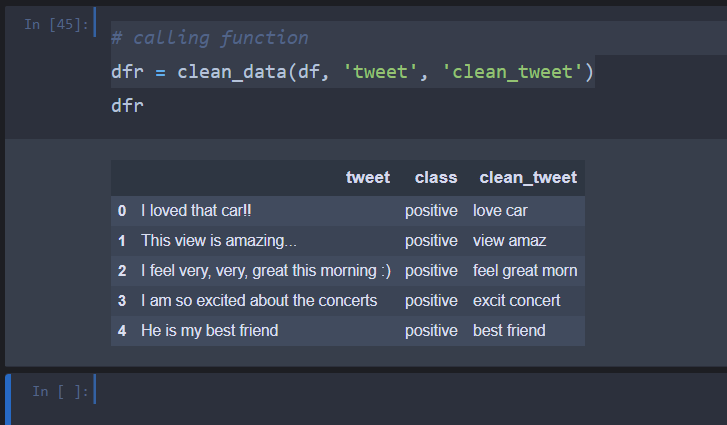
dfr = clean_data(df, 'tweet', 'clean_tweet')
下面是输出图像
Stack Overflow用户
发布于 2021-02-23 18:41:23
要严格回答有关为什么会出现此错误的问题:
您必须添加.astype(str)。以及您的模式作为原始字符串(r'[^\w\s]')。
工作代码:
import pandas as pd
pos_tweets = [('I loved that car!!', 'positive'),
    ('This view is amazing...', 'positive'),
    ('I feel very, very, great this morning :)', 'positive'),
    ('I am so excited about the concerts', 'positive'),
    ('He is my best friend', 'positive')]

df = pd.DataFrame(pos_tweets)
df.columns = ["tweet","class"]
df["tweet"] = df["tweet"].str.lower().str.split()

df.replace(to_replace='I', value="",regex=True) # what if I had more text columns?
df['cleaned'] = df['tweet'].astype(str).str.replace(r'[^\w\s]','')
df['cleaned'] = df['cleaned'].astype(str).str.replace(r'\d+', '')
但是它不会被替换,因为您的代码中还有另一个问题:
- 使用
df["tweet"] = df["tweet"].str.lower().str.split()将创建字符串列表,而不是字符串。因此,使用replace不起作用。 - ,您必须在其他调用中使用
regex=True和inplace=True来替换 - ,有些模式与任何现有的子字符串不匹配。例如,您试图匹配"I“,但是没有"I”,而是"i“,因为您调用了
.str.lower()
。
所以应该是:
(我改变了正则表达式,这样你就能看到它们起作用了。你只需要用你想要的改变它们)
import pandas as pd
pos_tweets = [('I loved that car!!', 'positive'),
    ('This view is amazing...', 'positive'),
    ('I feel very, very, great this morning :)', 'positive'),
    ('I am so excited about the concerts', 'positive'),
    ('He is my best friend', 'positive')]

df = pd.DataFrame(pos_tweets)
df.columns = ["tweet","class"]
df["tweet"] = df["tweet"].str.lower()

df.replace('i', "0",regex=True, inplace=True)
df['cleaned'] = df['tweet'].astype(str).str.replace(r'0','1')
df['cleaned'].replace(r'\d+', '2', regex=True, inplace=True)
对于关于秒针等的其他问题,一切都很好,因为@San深层Panchal提供了一个完整的工作代码:-)。编码愉快!
页面原文内容由Stack Overflow提供。腾讯云小微IT领域专用引擎提供翻译支持
原文链接:
https://stackoverflow.com/questions/66338970
复制相关文章
相似问题
腾讯云开发者

Copyright © 2013 - 2026 Tencent Cloud. All Rights Reserved. 腾讯云 版权所有
深圳市腾讯计算机系统有限公司 ICP备案/许可证号:粤B2-20090059  粤公网安备44030502008569号
腾讯云计算(北京)有限责任公司 京ICP证150476号 | 京ICP备11018762号