
统一编辑器:如何调整检查器属性字段的大小和空间值字段?
我正在尝试实现我的第一个统一编辑器代码,以便使用缩进命名条目和缩进和动态调整值字段的自定义数组属性抽屉。
我使用以下简单的git解决方案作为代码的基础,它允许在检查器中设置数组的标签:这里
在替换gitHub解决方案中的示例时,我使用这个枚举作为我的数组元素名称容器:
[System.Serializable]
public enum HealthNames
{
    General,
    Head,
    Body,
    RightArm,
    LeftArm,
    Rightleg,
    leftLeg,
}
并将其设置在单行为类中的数组上:
[ LabeledArray( typeof( HealthNames ) ) ]
public int[] m_aHealth = new int[ Enum.GetNames( typeof( HealthNames ) ).Length ];我在try语句的开头和结尾添加了EditorGUI.indentLevel++;和EditorGUI.indentLevel--;,以缩进数组元素的标签,使它们从size属性中脱颖而出。
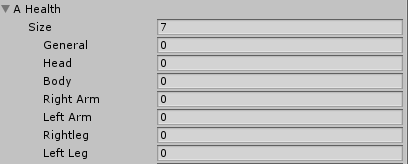
接下来,我已经搜索了在元素的值字段中添加缩进或从size属性的value字段中删除它的方法。但是没有找到使用EditorGUI的答案
我也希望能够动态地调整所有值字段的大小,但是在那里,没有一个答案是只使用EditorGUI的。没有办法在属性字段上使用EditorStyle.AnyField.WordWrap = true;。将PropertyField传递给IntField,使用EditorStyles.NumberField并预先将其wrod包装物设置为true没有任何效果。
我还发现了几年前的少量EditorGUILayout,但是由于解决方案是用EditorGUI构建的,所以无法工作。
希望你能对这件事有所启发
回答 1
Stack Overflow用户
发布于 2021-02-23 16:35:38
如果我正确地理解了您,您希望标签和缩进值字段。
我认为可以像这样做。
private const int INDENT = 15;

public override void OnGUI(Rect rect, SerializedProperty property, GUIContent label)
{
    EditorGUI.BeginProperty(rect, label, property);
    var fieldsRect = new Rect(rect.x + INDENT, rect.y, rect.width - INDENT, rect.height);
    try
    {
        var path = property.propertyPath;
        int pos = int.Parse(path.Split('[').LastOrDefault().TrimEnd(']'));
        EditorGUI.PropertyField(fieldRect, property, new GUIContent(ObjectNames.NicifyVariableName(((LabeledArrayAttribute)attribute).names[pos])), true);
    }
    catch
    {
        EditorGUI.PropertyField(fieldRect, property, label, true);
    }
    EditorGUI.EndProperty();
}https://stackoverflow.com/questions/66336693
复制相似问题
腾讯云开发者

Copyright © 2013 - 2026 Tencent Cloud. All Rights Reserved. 腾讯云 版权所有
深圳市腾讯计算机系统有限公司 ICP备案/许可证号:粤B2-20090059  粤公网安备44030502008569号
腾讯云计算(北京)有限责任公司 京ICP证150476号 | 京ICP备11018762号