
如何在UWP C#应用程序中只访问JSON文本的一部分?
如何在UWP C#应用程序中只访问JSON文本的一部分?
提问于 2021-02-24 15:00:18
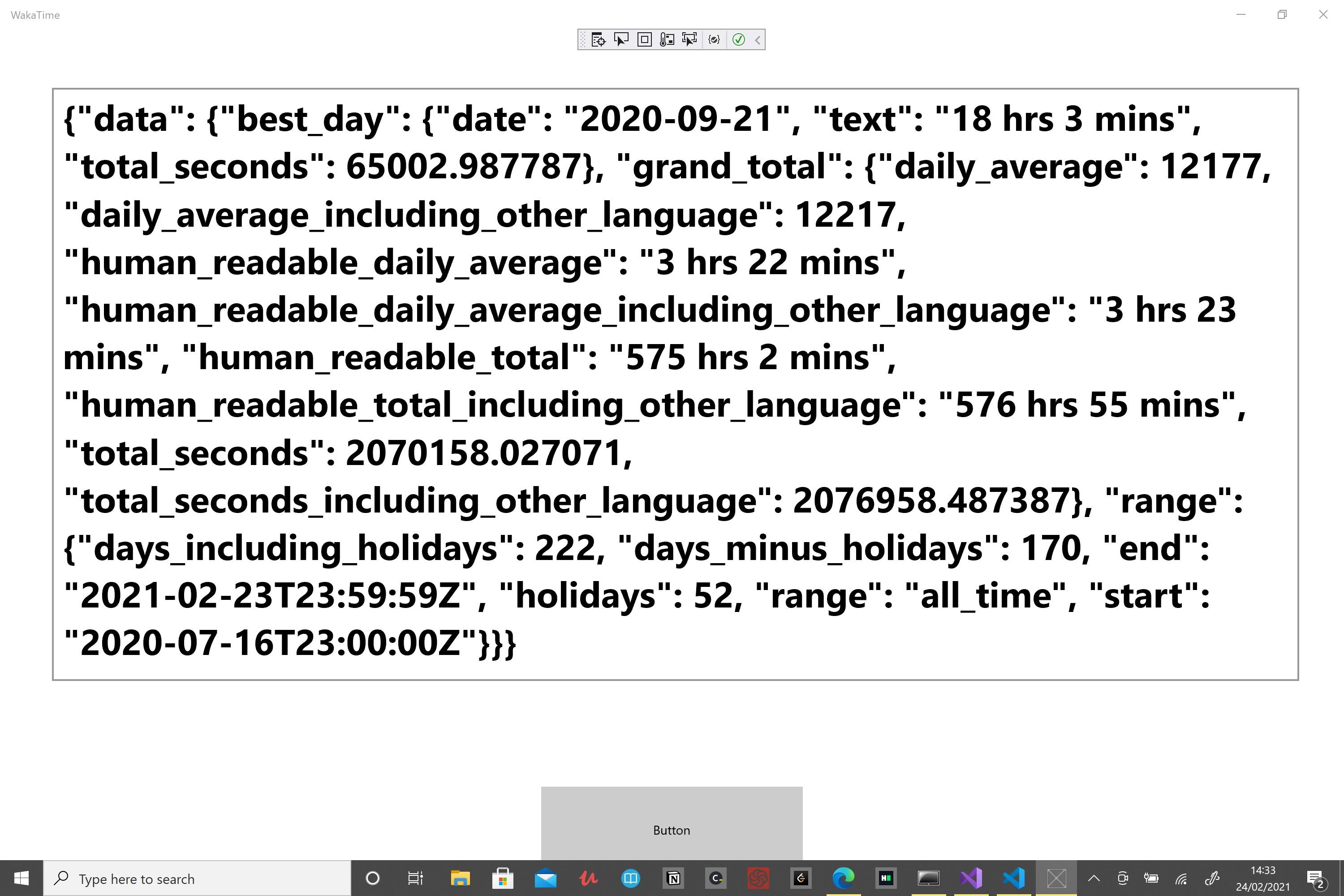
我正在尝试创建我的第一个UWP C#应用程序。单击名为“button”的按钮时,JSON将出现在名为“TextBox”的文本框中。
我正在尝试如何访问JSON文本( data.best_day.text )的一个部分,例如(在JavaScript中),data.best_day.text将给18小时3分钟的时间。我想为这个UWP应用程序做同样的事情。我读过一些资料,但它们不起作用,或者太复杂,无法理解。任何帮助都将不胜感激。:)
    // The Blank Page item template is documented at https://go.microsoft.com/fwlink/?LinkId=402352&clcid=0x409

    namespace WakaTime
    {
        /// <summary>
        /// An empty page that can be used on its own or navigated to within a Frame.
        /// </summary>
        public sealed partial class MainPage : Page
        {
            public MainPage()
            {
                this.InitializeComponent();
            }

            private async void Button_Click(object sender, RoutedEventArgs e)
            {
                var client = new HttpClient();
                var text = await client.GetStringAsync("https://wakatime.com/share/@DontBugMie/bef7afe4-102d-47a9-9678-6335510ebedd.json");

                TextBox.Text = text;
            }
        }
}回答 2
Stack Overflow用户
发布于 2021-02-24 15:25:18
如果你对这条路充满信心,试试这个
using System.Text.Json;
...
var jsonDoc = JsonDocument.Parse(text);
var best_day = jsonDoc.RootElement.GetProperty("data").GetProperty("best_day").GetProperty("text").GetString();
TextBox.Text = best_day;
如果需要多个值,则最好创建模型(DTO)并对其进行反序列化。
Stack Overflow用户
发布于 2021-02-24 15:18:45
获取实际的JSON并转到一个将JSON转换为C#的站点(搜索该站点)。另外,根据Visual版本的不同,它可能具有Edit - Paste Special - Paste JSON As CLasses的菜单选项,该菜单选项也将工作。现在可以将类添加到基于JSON的项目中。
然后在代码中反序列化到模型(或模型列表)。将其反序列化为实例后,根据需要访问best_day。
页面原文内容由Stack Overflow提供。腾讯云小微IT领域专用引擎提供翻译支持
原文链接:
https://stackoverflow.com/questions/66353439
复制相关文章
相似问题
腾讯云开发者

Copyright © 2013 - 2026 Tencent Cloud. All Rights Reserved. 腾讯云 版权所有
深圳市腾讯计算机系统有限公司 ICP备案/许可证号:粤B2-20090059  粤公网安备44030502008569号
腾讯云计算(北京)有限责任公司 京ICP证150476号 | 京ICP备11018762号