
在Android中打开外部数据库时的错误消息
我想在Android中加载一个外部数据库。我使用了在安卓平台上用SQLiteOpenHelper读取外部数据库教程中的方法。我在src/main/assets中创建了一个名为"assets“的文件夹,并在其中插入了数据库'Test_DB‘。不幸的是,当我启动应用程序时,我会收到错误消息:
Cannot open database 'C:/Users/user/Projects/AndroidStudioProjects/Bapp/Bapp_Projekt/app/src/main/assets/Test_DB.db': Directory C:/Users/user/Projects/AndroidStudioProjects/Bapp/Bapp_Projekt/app/src/main/assets doesn't exist数据库“Test_DB.db”也存在于上述路径中。您知道问题的原因以及我如何读取这个外部数据库文件吗?
在这里,您可以看到用于读取外部数据库的“DatabaseContext”类的代码:
package com.example.td.bapp;


import android.content.Context;
import android.content.ContextWrapper;
import android.database.DatabaseErrorHandler;
import android.database.sqlite.SQLiteDatabase;
import android.os.Environment;
import android.util.Log;

import java.io.File;

public class DatabaseContext extends ContextWrapper {

    private static final String DEBUG_CONTEXT = "DatabaseContext";

    public DatabaseContext(Context base) {
        super(base);
    }

    @Override
    public File getDatabasePath(String name)  {

        String dbfile = "C:/Users/user/Projects/AndroidStudioProjects/Bapp/Bapp_Projekt/app/src/main/assets/" + name;
        if (!dbfile.endsWith(".db")) {
            dbfile += ".db" ;
        }

        File result = new File(dbfile);

        if (!result.getParentFile().exists()) {
            result.getParentFile().mkdirs();
        }

        if (Log.isLoggable(DEBUG_CONTEXT, Log.WARN)) {
            Log.w(DEBUG_CONTEXT, "getDatabasePath(" + name + ") = " + result.getAbsolutePath());
        }

        return result;
    }

    /* this version is called for android devices >= api-11. thank to @damccull for fixing this. */
    @Override
    public SQLiteDatabase openOrCreateDatabase(String name, int mode, SQLiteDatabase.CursorFactory factory, DatabaseErrorHandler errorHandler) {
        return openOrCreateDatabase(name,mode, factory);
    }

    /* this version is called for android devices < api-11 */
    @Override
    public SQLiteDatabase openOrCreateDatabase(String name, int mode, SQLiteDatabase.CursorFactory factory) {
        SQLiteDatabase result = SQLiteDatabase.openOrCreateDatabase(getDatabasePath(name), null);

        if (Log.isLoggable(DEBUG_CONTEXT, Log.WARN)) {
            Log.w(DEBUG_CONTEXT, "openOrCreateDatabase(" + name + ",,) = " + result.getPath());
        }
        return result;
    }
}
这个类是在另一个类'DataBaseHelper‘中调用的,该类扩展了SQLiteOpenHelper,并具有以下构造函数
public DataBaseHelper(@Nullable Context context, String name) {
   // super(context, DATABASE, null, 1);
    super(new DatabaseContext(context), name, null, 1);

}
我会很感激你的每一份工作,并会非常感谢你的帮助。
我认为问题可能是我自己创建了文件夹“资产”,因为它以前并不存在。我如何告诉Android,这个“资产”文件夹应该包含在应用程序中?
UPDATE:我做了MikeT给我的建议,并使用了SQLiteAssetHelper SQLiteAssetHelper。现在可以加载数据库了。但是,数据库的每个查询都不会像数据库是空的一样返回任何内容。情况绝对不是这样。例如,以下查询的rowCount值为0,但这不是真。
public Cursor getDataDB_TableItemNamesByItemType(String itemType) {

    SQLiteDatabase db = this.getWritableDatabase();
    Cursor res = db.rawQuery("select * from " + TABLE_ITEM + " where "
            + ITEM_TYPE + " = '" + itemType+ "'", null);
    Log.e("LogTag", "res.getCount(): " + res.getCount());
    return res;

}
如果我对SQLdatabase执行完全相同的查询,就会得到正行计数(取决于参数itemType)。您能想象为什么我的外部读取数据库看起来是空的吗?
回答 2
Stack Overflow用户
发布于 2021-02-27 09:47:50
你的主要问题是这一行
String dbfile = "C:/Users/user/Projects/AndroidStudioProjects/Bapp/Bapp_Projekt/app/src/main/assets/" + name;您基本上是在告诉设备查看源代码,而不是在设备资产文件夹中查找资产文件(数据库)。
Android (假设您正在使用它)当它使已安装的包将文件放置在资产文件夹中,而不是在c:/user/user/Projects中时.
在本教程中(它不使用资产文件),但将该文件放在它使用的SD卡上:-
String dbfile = sdcard.getAbsolutePath() + File.separator+ "database" + File.separator + name;但是,当您将文件复制到项目的资产文件夹中时,您所做的就是将文件(数据库)从资产文件夹复制到某个位置(压缩后不能直接从资产文件夹使用数据库)。
下面是一个快速测试,它展示了如何完成上述工作(注意,step10是用于表/列的,必须相应地更改) 如何在Android仿真器上使用SQLite darabase启动应用程序?
另一种选择是使用SQLiteAssetHelper,这里有一个使用SQLiteAssetHelper .How将文件从项目资产文件夹复制到android中的设备数据文件夹?的指南
基于代码的示例
第1阶段-创建外部数据库
使用Navicat作为SQLite工具(我的首选工具)
数据库是用一个表(即item )创建的,该表有2列,即item_name和item_type
插入4行,用item_type of type1插入2行,用item_type of type2插入2行,如下所示:-
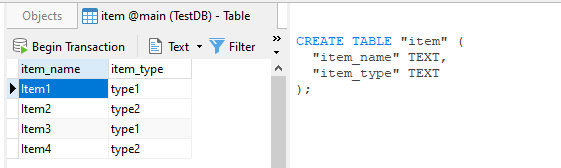
数据库连接被关闭,因此保存,然后重新打开连接,以确认数据库实际上已填充,然后连接再次关闭。
数据库文件的存在随后被确认在适当的位置,如下所示:

第2阶段-将数据库文件复制到资产文件夹中
在这种情况下,这个项目被称为SO66390748 (问题#)。
assets文件夹是在Apps src/main文件夹中创建的,默认情况下它不存在,然后将文件复制到该文件夹中,注意大小与预期的相同。

然后在Android中测试项目文件结构,以确认数据库是否存在于资产文件夹中:
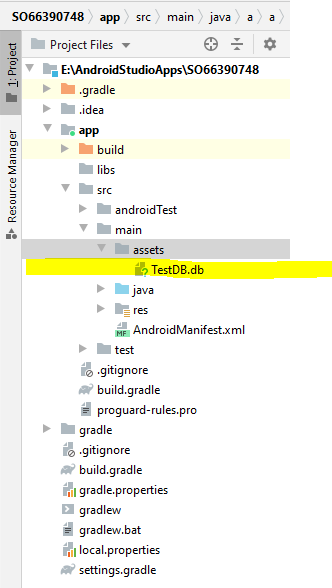
第3阶段-按照创建DatabaseHelper类
class DataBaseHelper extends SQLiteOpenHelper {

    private static final String TAG = "DBHELPER";
    public static final String DBNAME = "TestDB.db"; //<< Name of the database file in the assets folder
    public static final int DBVERSION = 1;
    public static final String TABLE_ITEM = "item";
    public static final String ITEM_NAME = "item_name";
    public static final String ITEM_TYPE = "item_type";

    SQLiteDatabase mDB;

    public DataBaseHelper(Context context) {
        super(context,DBNAME,null,DBVERSION);
        if (!ifDBExists(context)) {
            if (!copyDBFromAssets(context)) {
                throw new RuntimeException("Failed to Copy Database From Assets Folder");
            }
        }
        mDB = this.getWritableDatabase();
    }

    @Override
    public void onCreate(SQLiteDatabase sqLiteDatabase) {
        // Do NOTHING in here as the database has been copied from the assets
        // if it did not already exist
        Log.d(TAG, "METHOD onCreate called");
    }

    @Override
    public void onUpgrade(SQLiteDatabase sqLiteDatabase, int i, int i1) {
        Log.d(TAG,"METHOD onUpgrade called");
    }

    public Cursor getDataDB_TableItemNamesByItemType(String itemType) {
        SQLiteDatabase db = this.getWritableDatabase();
        Cursor res = db.rawQuery("select * from " + TABLE_ITEM + " where "
                + ITEM_TYPE + " = '" + itemType+ "'", null);
        Log.e("LogTag", "res.getCount(): " + res.getCount());
        return res;
    }

    /*
        Copies the database from the assets folder to the apps database folder (with logging)
        note databases folder is typically data/data/the_package_name/database
             however using getDatabasePath method gets the actual path (should it not be as above)
        This method can be significantly reduced one happy that it works.
     */
    private boolean copyDBFromAssets(Context context) {
        Log.d("CPYDBINFO","Starting attemtpt to cop database from the assets file.");
        String DBPATH = context.getDatabasePath(DBNAME).getPath();
        InputStream is;
        OutputStream os;
        int buffer_size = 8192;
        int length = buffer_size;
        long bytes_read = 0;
        long bytes_written = 0;
        byte[] buffer = new byte[length];

        try {

            is = context.getAssets().open(DBNAME);
        } catch (IOException e) {
            Log.e("CPYDB FAIL - NO ASSET","Failed to open the Asset file " + DBNAME);
            e.printStackTrace();
            return false;
        }

        try {
            os = new FileOutputStream(DBPATH);
        } catch (IOException e) {
            Log.e("CPYDB FAIL - OPENDB","Failed to open the Database File at " + DBPATH);
            e.printStackTrace();
            return false;
        }
        Log.d("CPYDBINFO","Initiating copy from asset file" + DBNAME + " to " + DBPATH);
        while (length >= buffer_size) {
            try {
                length = is.read(buffer,0,buffer_size);
            } catch (IOException e) {
                Log.e("CPYDB FAIL - RD ASSET",
                        "Failed while reading in data from the Asset. " +
                                String.valueOf(bytes_read) +
                                " bytes read successfully."
                );
                e.printStackTrace();
                return false;
            }
            bytes_read = bytes_read + length;
            try {
                os.write(buffer,0,buffer_size);
            } catch (IOException e) {
                Log.e("CPYDB FAIL - WR ASSET","failed while writing Database File " +
                        DBPATH +
                        ". " +
                        String.valueOf(bytes_written) +
                        " bytes written successfully.");
                e.printStackTrace();
                return false;

            }
            bytes_written = bytes_written + length;
        }
        Log.d("CPYDBINFO",
                "Read " + String.valueOf(bytes_read) + " bytes. " +
                        "Wrote " + String.valueOf(bytes_written) + " bytes."
        );
        try {
            os.flush();
            is.close();
            os.close();
        } catch (IOException e ) {
            Log.e("CPYDB FAIL - FINALISING","Failed Finalising Database Copy. " +
                    String.valueOf(bytes_read) +
                    " bytes read." +
                    String.valueOf(bytes_written) +
                    " bytes written."
            );
            e.printStackTrace();
            return false;
        }
        return true;
    }
    /*
    Checks to see if the database exists if not will create the respective directory (database)
    Creating the directory overcomes the NOT FOUND error
 */
    private boolean ifDBExists(Context context) {
        String dbparent = context.getDatabasePath(DBNAME).getParent();
        File f = context.getDatabasePath(DBNAME);
        if (!f.exists()) {
            Log.d("NODB MKDIRS","Database file not found, making directories."); //<<<< remove before the App goes live.
            File d = new File(dbparent);
            d.mkdirs();
            //return false;
        }
        return f.exists();
    }
}- 如您所见,您的原始
getDataDB_TableItemNamesByItemType并没有改变。 - 根据评论(我建议阅读它们),上面的内容有点冗长,但这使您能够看到正在发生的事情。显然,在发布App.之前删除了日志记录
第4阶段-调用数据库助手并从数据库中提取数据
在本例中,应用程序的主要活动用于调用。
所使用的活动是:
public class MainActivity extends AppCompatActivity {

    DataBaseHelper myDBHlpr;

    @Override
    protected void onCreate(Bundle savedInstanceState) {
        super.onCreate(savedInstanceState);
        setContentView(R.layout.activity_main);
        // Get an instance of the DatabaseHelper class (copy will be done IF DB does not exist)
        myDBHlpr = new DataBaseHelper(this);

        // Get some data from the database using your method
        Cursor csr = myDBHlpr.getDataDB_TableItemNamesByItemType("type2");
        while(csr.moveToNext()){
            Log.d("DB_ROWINFO",
                    "ITEM NAME is " + csr.getString(csr.getColumnIndex(DataBaseHelper.ITEM_NAME))
                    + "ITEM TYPE is "
                    + csr.getString((csr.getColumnIndex(DataBaseHelper.ITEM_TYPE))
                    )
            );
        }
        // ========================================
        // ALWAYS CLOSE CURSORS WHEN DONE WITH THEM
        // ========================================
        csr.close();
    }
}
阶段5-结果(日志)
如果该应用程序存在,则运行并生成:-
03-06 09:32:52.759 5341-5341/a.a.so66390748 I/art: Rejecting re-init on previously-failed class java.lang.Class<androidx.core.view.ViewCompat$2>
03-06 09:32:52.787 5341-5341/a.a.so66390748 D/NODB MKDIRS: Database file not found, making directories.
03-06 09:32:52.787 5341-5341/a.a.so66390748 D/CPYDBINFO: Starting attemtpt to cop database from the assets file.
03-06 09:32:52.787 5341-5341/a.a.so66390748 D/CPYDBINFO: Initiating copy from asset fileTestDB.db to /data/user/0/a.a.so66390748/databases/TestDB.db
03-06 09:32:52.787 5341-5341/a.a.so66390748 D/CPYDBINFO: Read 8191 bytes. Wrote 8191 bytes.
03-06 09:32:52.805 5341-5341/a.a.so66390748 D/DBHELPER: METHOD onCreate called
03-06 09:32:52.811 5341-5341/a.a.so66390748 E/LogTag: res.getCount(): 2
03-06 09:32:52.811 5341-5341/a.a.so66390748 D/DB_ROWINFO: ITEM NAME is Item2ITEM TYPE is type2
03-06 09:32:52.811 5341-5341/a.a.so66390748 D/DB_ROWINFO: ITEM NAME is Item4ITEM TYPE is type2
03-06 09:32:52.822 5341-5355/a.a.so66390748 D/OpenGLRenderer: Use EGL_SWAP_BEHAVIOR_PRESERVED: true
应用程序再次运行(未卸载),日志为:-
03-06 09:35:37.876 5465-5465/a.a.so66390748 I/art: Rejecting re-init on previously-failed class java.lang.Class<androidx.core.view.ViewCompat$2>
03-06 09:35:37.908 5465-5465/a.a.so66390748 E/LogTag: res.getCount(): 2
03-06 09:35:37.908 5465-5465/a.a.so66390748 D/DB_ROWINFO: ITEM NAME is Item2ITEM TYPE is type2
03-06 09:35:37.908 5465-5465/a.a.so66390748 D/DB_ROWINFO: ITEM NAME is Item4ITEM TYPE is type2
03-06 09:35:37.956 5465-5498/a.a.so66390748 D/OpenGLRenderer: Use EGL_SWAP_BEHAVIOR_PRESERVED: true
也就是说,数据库,因为它已经存在,因此数据库存在,没有复制数据库,但仍按预期提取数据。
上面的注释是在我方便的时候编写的,所以只使用了主活动和数据库助手。显然,您必须相应地修改代码,。
假设您遵循了注释中给出的建议,并尝试了SELECT * FROM the_table_name (即没有WHERE子句)。我说这是因为您使用的查询区分大小写,如果传递给您的getDataDB_TableItemNamesByItemType方法的参数不完全匹配,那么您将不提取任何内容。(例如,传递Type2而不是type2从计数中显示0)
Stack Overflow用户
发布于 2021-03-07 09:47:45
辅助
关于评论意见:
基本上,随着基于用户迭代的新项的添加和删除,数据库始终由用户动态更改。此外,数据库还应不时进行外部更改。如前所述,我可以轻松地通过重命名数据库来归档更新,我想知道是否存在一种更方便的方法(通常应该存在)。但是,当查看建议的代码时,它看起来比仅仅更改数据库名称要复杂得多。所以我想解决这个问题没有简单的办法。
我认为您需要考虑两个独立的功能。
也就是说,1)维护App用户的数据,2)更改应用程序提供的数据。
您可以通过使用单独但连接的数据库来分离它们,另一种方法是根据实体命名(实体是表、触发视图等)区分这两种类型。
- 例如,应用程序提供的实体被称为as_,或者用户的实体称为user_,或者两者兼而有之。
当检测到新的资产文件时,可以将现有文件重命名为old_TestDB.db,然后将新文件复制到TestDB.db。然后,您可以从用户的实体中删除所有行(如果您从未提供用户的数据,则可能不需要),然后连接old_TestDB.db,将数据从旧的复制到新的删除到old_TestDB.db的连接,最后删除old_TestDB.db文件(或者保留它,以防出现问题,以便您可以从中恢复)。
使用文件名检测新的资产文件可能会有问题,因为您可能会在“资产”文件夹中找到许多旧文件。因此,如果使用相同的文件名,那么应用程序的大小可能会更简单和更有利,但是使用了sqlite user_version。
sqlite user_version是存储在数据库头数据中的版本号。它是4字节,偏移量为60字节。您可以通过使用标准IO (如复制资产文件时)访问该数据库,而无需设置打开数据库的开销。您可以将其与已经存在的数据库进行比较,如果处理新的资产文件的方式不同,则进行比较。
您可以使用SQL PRAGMA user_version = n更改用户版本(有些编辑器允许您通过窗口更改此版本) 版本。
另一种方法将不尝试检测已更改的资产,也不使用SQLite user_version,而是始终假定更改的资产,因此当引入应用程序的新版本时,将额外增加传递给SQLiteOpenHelper的数据库版本,然后执行资产文件的副本,并在onUpgrade方法中应用用户的数据。但是,当数据库已经打开时,这可能会充满错误/问题(为了提取数据库的用户版本,user_version将更改为应用程序的数据库版本)。
但是,在开始编写代码之前,您应该首先设计相应的数据库。
https://stackoverflow.com/questions/66390748
复制相似问题
腾讯云开发者

Copyright © 2013 - 2026 Tencent Cloud. All Rights Reserved. 腾讯云 版权所有
深圳市腾讯计算机系统有限公司 ICP备案/许可证号:粤B2-20090059  粤公网安备44030502008569号
腾讯云计算(北京)有限责任公司 京ICP证150476号 | 京ICP备11018762号