
如何在文本较长时添加扩展按钮?
如何在文本较长时添加扩展按钮?
提问于 2021-03-02 11:43:46
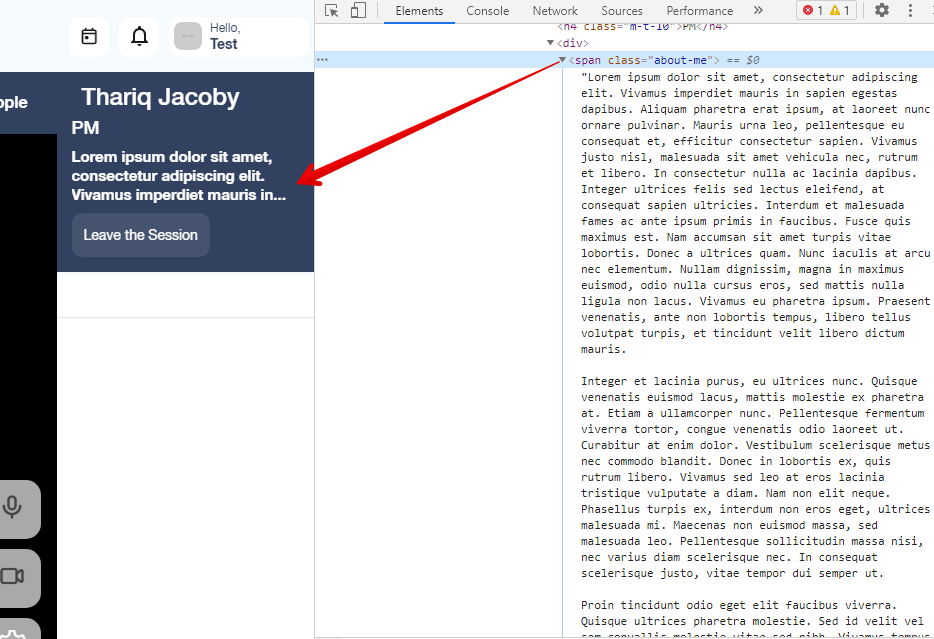
在我的react应用程序中,我有一个bio部分以及名字,当某人的个人简历很长时,我会显示(‘.’)。为此,我使用了css文本溢出属性。这是CSS代码
.about-me {
      overflow: hidden;
      text-overflow: ellipsis;
      display: -webkit-box;
      -webkit-line-clamp: 3;
      -webkit-box-orient: vertical;
    }
但是现在我想添加一个箭头按钮,当有人点击它时,它应该显示整个文本。
            <div>
              <span className="about-me">{(extraInfo && extraInfo.aboutMe) || ''}</span>
            </div>
我怎样才能做到这一点?
这是一张供参考的图片
回答 3
Stack Overflow用户
回答已采纳
发布于 2021-03-02 12:00:33
创建一个函数来显示一定数量的字符,并创造一个条件来显示短文本,例如:
limitChar.js:
function limitChar(str, limit) {
  return str.length > limit ? `${str.slice(0, limit)}...` : str;
}
App.js:
function App() {
  const [extraInfo, setExtraInfo] = React.useState(false);
  const text =
    "Lorem Ipsum is simply dummy text of the printing and typesetting industry. Lorem Ipsum has been the industry's standard dummy text ever since the 1500s, when an unknown printer took a galley of type and scrambled it to make a type specimen book. It has survived not only five centuries, but also the leap into electronic typesetting, remaining essentially unchanged. It was popularised in the 1960s with the release of Letraset sheets containing Lorem Ipsum passages, and more recently with desktop publishing software like Aldus PageMaker including versions of Lorem Ipsum.";
const limitCharLength = 80;

    return (
        <div>
            <p>{extraInfo ? text : limitCharacters(text. limitCharLength)}</p>
            <button onClick={() => setExtraInfo(true)}>Show More!</button>
        </div>
    )
}注意:有一些包可以这样做,比如文本省略。
Stack Overflow用户
发布于 2021-03-02 11:58:17
我感谢它将更容易切换。关于-我取决于按钮点击。
$( "#foo" ).toggleClass( className, addOrRemove );但是如果你更喜欢使用CSS,我有一些东西要给你:纯Css:选中的切换类
希望能帮上忙!
Stack Overflow用户
发布于 2021-03-02 11:56:10
您将希望在用户单击“read”时将另一个类应用于同一个div。
该类应将none值应用于阻止文本溢出和省略发生的line-clamp属性。
您的css将类似于:
.about-me.show-all {
      -webkit-line-clamp: none;
    }
只要您通过应该工作的JS代码应用“should”类,CSS就更具体了。
另外,请注意,如果您需要广泛的浏览器支持,那么您应该检查一下CSS是否能跨浏览器工作,如果您需要更广泛的浏览器支持,应该使用不同的方法来实现文本溢出。
页面原文内容由Stack Overflow提供。腾讯云小微IT领域专用引擎提供翻译支持
原文链接:
https://stackoverflow.com/questions/66438710
复制相关文章
相似问题
腾讯云开发者

Copyright © 2013 - 2026 Tencent Cloud. All Rights Reserved. 腾讯云 版权所有
深圳市腾讯计算机系统有限公司 ICP备案/许可证号:粤B2-20090059  粤公网安备44030502008569号
腾讯云计算(北京)有限责任公司 京ICP证150476号 | 京ICP备11018762号