
ChromeDriver只支持ChromeDriver 89
ChromeDriver只支持ChromeDriver 89
提问于 2021-03-04 17:25:09
使用Azure DevOps,管道就会停止工作,我在运行ng lint && ng e2e && ng test --watch=false时无法完成测试。这是在本地运行时起作用的。
[16:43:25] I/launcher - Running 1 instances of WebDriver
[16:43:25] I/direct - Using ChromeDriver directly...
[16:43:27] E/launcher - session not created: This version of ChromeDriver only supports Chrome version 89
Current browser version is 88.0.4298.0 with binary path D:\a\1\s\node_modules\puppeteer\.local-chromium\win64-818858\chrome-win\chrome.exe
  (Driver info: chromedriver=89.0.4389.23 (61b08ee2c50024bab004e48d2b1b083cdbdac579-refs/branch-heads/4389@{#294}),platform=Windows NT 10.0.17763 x86_64)
[16:43:27] E/launcher - SessionNotCreatedError: session not created: This version of ChromeDriver only supports Chrome version 89
Current browser version is 88.0.4298.0 with binary path D:\a\1\s\node_modules\puppeteer\.local-chromium\win64-818858\chrome-win\chrome.exe
  (Driver info: chromedriver=89.0.4389.23 (61b08ee2c50024bab004e48d2b1b083cdbdac579-refs/branch-heads/4389@{#294}),platform=Windows NT 10.0.17763 x86_64)
    at Object.checkLegacyResponse (D:\a\1\s\node_modules\selenium-webdriver\lib\error.js:546:15)
    at parseHttpResponse (D:\a\1\s\node_modules\selenium-webdriver\lib\http.js:509:13)
    at D:\a\1\s\node_modules\selenium-webdriver\lib\http.js:441:30
    at processTicksAndRejections (internal/process/task_queues.js:93:5)
From: Task: WebDriver.createSession()
    at Function.createSession (D:\a\1\s\node_modules\selenium-webdriver\lib\webdriver.js:769:24)
    at Function.createSession (D:\a\1\s\node_modules\selenium-webdriver\chrome.js:761:15)
    at Direct.getNewDriver (D:\a\1\s\node_modules\protractor\built\driverProviders\direct.js:77:33)
    at Runner.createBrowser (D:\a\1\s\node_modules\protractor\built\runner.js:195:43)
    at D:\a\1\s\node_modules\protractor\built\runner.js:339:29
    at _fulfilled (D:\a\1\s\node_modules\protractor\node_modules\q\q.js:834:54)
    at D:\a\1\s\node_modules\protractor\node_modules\q\q.js:863:30
    at Promise.promise.promiseDispatch (D:\a\1\s\node_modules\protractor\node_modules\q\q.js:796:13)
    at D:\a\1\s\node_modules\protractor\node_modules\q\q.js:556:49
    at runSingle (D:\a\1\s\node_modules\protractor\node_modules\q\q.js:137:13)
[16:43:27] E/launcher - Process exited with error code 199
##[error]Cmd.exe exited with code '1'.
我就是这样设置管道任务的。
木偶技师
cd node_modules/puppeteer
npm install
npm install webdriver-manager@latest> puppeteer@5.5.0 install D:\a\1\s\node_modules\puppeteer
> node install.js
Chromium is already in D:\a\1\s\node_modules\puppeteer\.local-chromium\win64-818858; skipping download.
> puppeteer@5.5.0 prepare D:\a\1\s\node_modules\puppeteer
> node typescript-if-required.js
added 848 packages from 915 contributors and audited 860 packages in 43.745s
96 packages are looking for funding
run `npm fund` for details
found 0 vulnerabilities
Finishing: npm install puppeteerng测试
ng lint && ng e2e && ng test --watch=false回答 2
Stack Overflow用户
回答已采纳
发布于 2021-03-05 07:44:15
根据文档: 2019数据中心和Ubuntu20.04.2LTS。我们发现托管代理上只有ChromeDriver 88.0.4324.96。
因此,我们有两项建议:
- 我们注意到测试在本地机器上运行良好,因此我们可以尝试在本地计算机中安装一个自代理,然后使用新的代理再试一次。
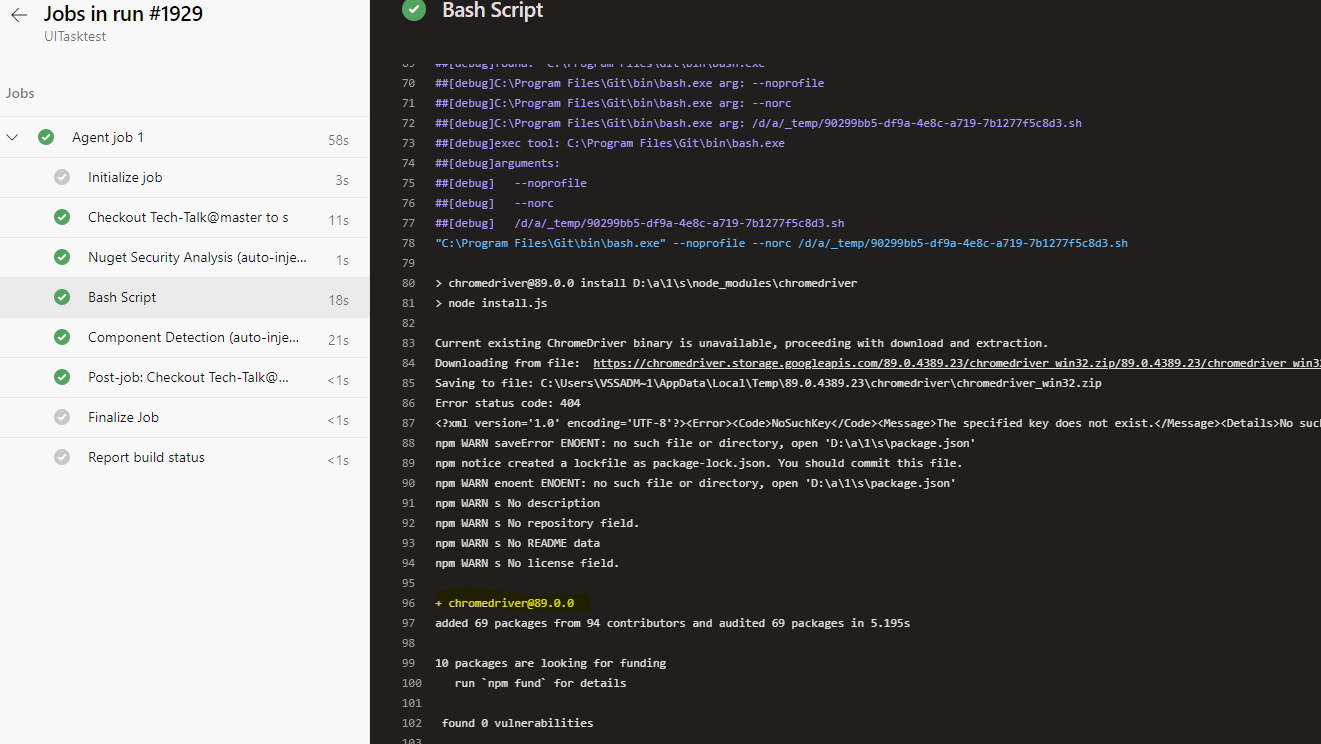
- 我们可以添加一个bash任务,并使用下面的脚本首先安装ChromeDriver的最新版本。
npm安装显色剂--chromedriver_cdnurl=https://chromedriver.storage.googleapis.com/89.0.4389.23/chromedriver_win32.zip
Stack Overflow用户
发布于 2021-08-31 02:26:17
页面原文内容由Stack Overflow提供。腾讯云小微IT领域专用引擎提供翻译支持
原文链接:
https://stackoverflow.com/questions/66479989
复制相关文章
相似问题
腾讯云开发者

Copyright © 2013 - 2026 Tencent Cloud. All Rights Reserved. 腾讯云 版权所有
深圳市腾讯计算机系统有限公司 ICP备案/许可证号:粤B2-20090059  粤公网安备44030502008569号
腾讯云计算(北京)有限责任公司 京ICP证150476号 | 京ICP备11018762号