
分配快捷方式在Pycharm中以调试模式运行当前文件
摘要
我正在寻找一种简单的方法来配置PyCharm,使其始终将当前文件作为debug/run命令的目标。最好通过指定快捷方式在PyCharm中以调试模式运行当前文件。
详细说明
我已经找到了通用run/debug命令的键绑定,但它们仅适用于当前选定的run configuration
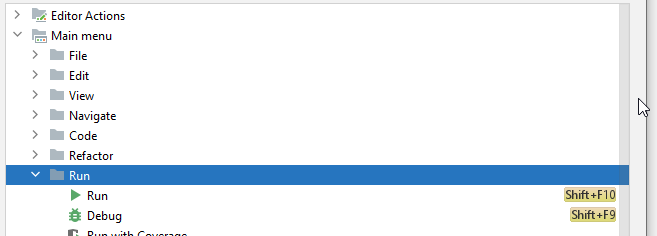
我要重新映射的是菜单中的以下命令:
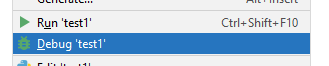
如您所见,为Run命令分配了一个默认快捷方式.我也想重新配置..。但最让我烦恼的是,Debug命令没有捷径。我也没有找到这两个中的任何一个的keymap设置。
这是否有可能在当前最新的PyCharm版本中实现?可能通过直接编辑某个配置文件来实现?在2017年创建了一个主题,但没有给出官方解决方案:https://intellij-support.jetbrains.com/hc/en-us/community/posts/115000475424-Remap-the-shortcut-to-run-the-current-file
试著解决
作为一种解决方案,我尝试创建了以下运行配置:
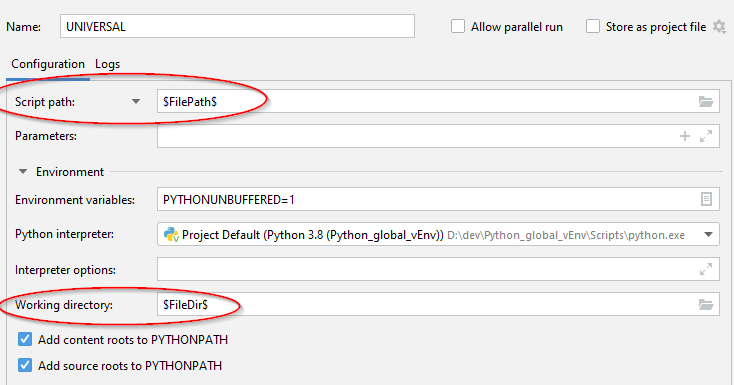
这将导致开始时出现以下错误:
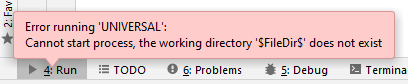
考虑到输出,恐怕变量替换在parameter字段以外的任何地方都不起作用。
要解决的问题
我为测试目的创建了大量不同的.py文件。为每个人创建单独的构建配置是一场噩梦.
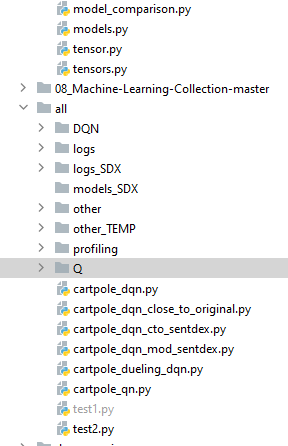
我试图解决的问题是能够从上面的列表中启动文件的debugging,而无需为每个文件显式地创建构建配置。没有一个文件是一个大程序的入口点。它们是独立的剧本。
回答 2
Stack Overflow用户
发布于 2021-03-05 16:01:53
在Keymap设置中,它被称为Run context configuration和Debug context configuration。前者默认具有快捷方式Ctrl-Shift-F10,而后者在默认情况下没有快捷方式。
同时,这两个命令都可用在上下文菜单中(在编辑器窗口中右击),其中有绿色箭头和bug图标。
Stack Overflow用户
发布于 2021-03-05 14:42:36
我的问题的答案已由@mported提供。
在等待响应时,我能够创建另一个同样“有效”的解决方案。
创建一个名为main.py的文件,该文件是项目的根目录。创建一个新的运行配置,其中脚本接受两个参数:$FileDir$和$FileNameWithoutAllExtensions$。选择主文件作为启动模块。它应该是这样的:
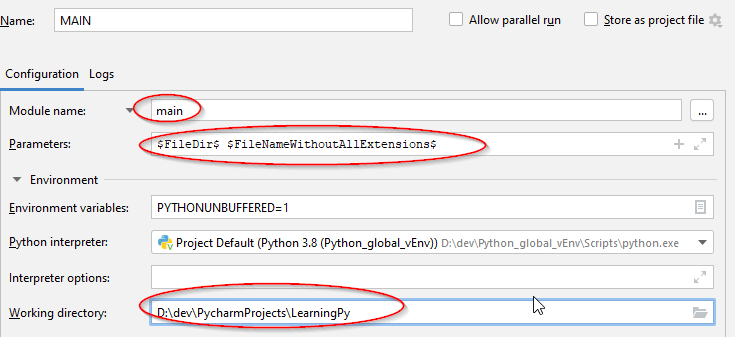
主要模块是使用第二个参数作为模块包含目标脚本。第一参数用于包括模块位置。
main.py
import sys
import os
import importlib

# Count the arguments
arguments = sys.argv
argumentsLength = len(arguments) - 1
print ("The script is called with %i arguments" % (argumentsLength))

if argumentsLength != 2:
    raise Exception('Invalid argument count')

fileDir = sys.argv[1]
print (f"filePath={fileDir}")

fileNameWithoutExtension = arguments[2]
print (f"fileNameWithoutExtension={fileNameWithoutExtension}")

# By default, you can't. When importing a file, Python only searches the directory that the entry-point script
# is running from and sys.path which includes locations such as the package installation directory
sys.path.insert(1, fileDir)

print (f"Executing module")
print (f"================================================")
importlib.import_module(fileNameWithoutExtension)
这种方法可能对某些人有用。它允许您像往常一样进入/调试代码。
然而,考虑到最初的请求细节-@ more 的答案更正确,因此是一个可接受的答案。
https://stackoverflow.com/questions/66492104
复制相似问题
腾讯云开发者

Copyright © 2013 - 2026 Tencent Cloud. All Rights Reserved. 腾讯云 版权所有
深圳市腾讯计算机系统有限公司 ICP备案/许可证号:粤B2-20090059  粤公网安备44030502008569号
腾讯云计算(北京)有限责任公司 京ICP证150476号 | 京ICP备11018762号