
为什么他在桌子里表现得很奇怪?
为什么他在桌子里表现得很奇怪?
提问于 2021-03-07 09:59:00
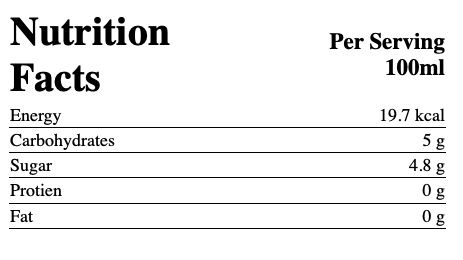
我正在创建我的网站,在桌子上遇到了一个奇怪的问题,当我试图在it下面插入一个人力资源( hr )时,不知何故将人力资源放在了部门之上。
我希望每一行都有一个人力资源,以便使每一行都与人力资源分开。
<div style="width:100%;">
    <div style="width:48%; align-items:center;">
        <table style=" width:380px; height:100px; position: relative;margin: auto;">
            <th style="font-size:35px; text-align: left; font-weight:bold;">Nutrition Facts</th>
            <th style="font-size:20px; text-align: right;">Per Serving 100ml</th>
            <tr style="border-bottom: 3px;">
                <td>Energy</td>
                <td style="float:right;">19.7 kcal</td>
            </tr>
            <tr>
                <td>Carbohydrates</td>
                <td style="float:right;">5 g</td>
            </tr>
            <tr>
                <td>Sugar</td>
                <td style="float:right;">4.8 g</td>
            </tr>
            <tr>
                <td>Protien</td>
                <td style="float:right;">0 g</td>
            </tr>
            <tr>
                <td>Fat</td>
                <td style="float:right;">0 g</td>
            </tr>
        </table>
    </div>
    <div style="width:53%;">
        <img style="height:450px; padding-top:50px; float:left;" src="https://www.diabete.qc.ca/wp-content/uploads/2014/08/Les-fruits-768x768.png">
    </div>
</div>
已经尝试将hr放置在td、tr和table中。
谢谢你
回答 1
Stack Overflow用户
回答已采纳
发布于 2021-03-07 10:07:31
您可以给td一个底部的边框。如果td在它们之间没有空间,它将显示为人力资源。
注意:与其使用float:right,不如使用text-align:right。
td {
  text-align:right;
  border-bottom:1px solid black;
}
table {
  border:0px;
  border-spacing: 0px;
}
更新
正如Alohci所指出的,如果设置边框间距,tr可以有一个样式!
tr {
  border-bottom:1px solid red;
}
table {
  border:0px;
  border-spacing: 0px;
  border-collapse: collapse;
}
页面原文内容由Stack Overflow提供。腾讯云小微IT领域专用引擎提供翻译支持
原文链接:
https://stackoverflow.com/questions/66515223
复制相关文章
相似问题
腾讯云开发者

Copyright © 2013 - 2026 Tencent Cloud. All Rights Reserved. 腾讯云 版权所有
深圳市腾讯计算机系统有限公司 ICP备案/许可证号:粤B2-20090059  粤公网安备44030502008569号
腾讯云计算(北京)有限责任公司 京ICP证150476号 | 京ICP备11018762号