
如何从多个csv文件中读取数据并在Python中写入同一张单Excel表
如何从多个csv文件中读取数据并在Python中写入同一张单Excel表
提问于 2021-03-08 13:12:14
我希望将多个csv文件数据附加到同一个excel表中,在数据之间有一个空行。
1.csv
ID  Currency    Val1    Val2        Month
101 INR     57007037.32 1292025.24  2021-03
102 INR     49171143.9  1303785.98  2021-02
2.csv
ID  Currency    Val1    Val2        Month
103 INR     67733998.9  1370086.78  2020-12
104 INR     48838409.39 1203648.32  2020-11
现在,我想把下面的空行写进excel单张中。
output.xlsx
ID  Currency    Val1    Val2        Month
101 INR     57007037.32 1292025.24  2021-03
102 INR     49171143.9  1303785.98  2021-02

103 INR     67733998.9  1370086.78  2020-12
104 INR     48838409.39 1203648.32  2020-11
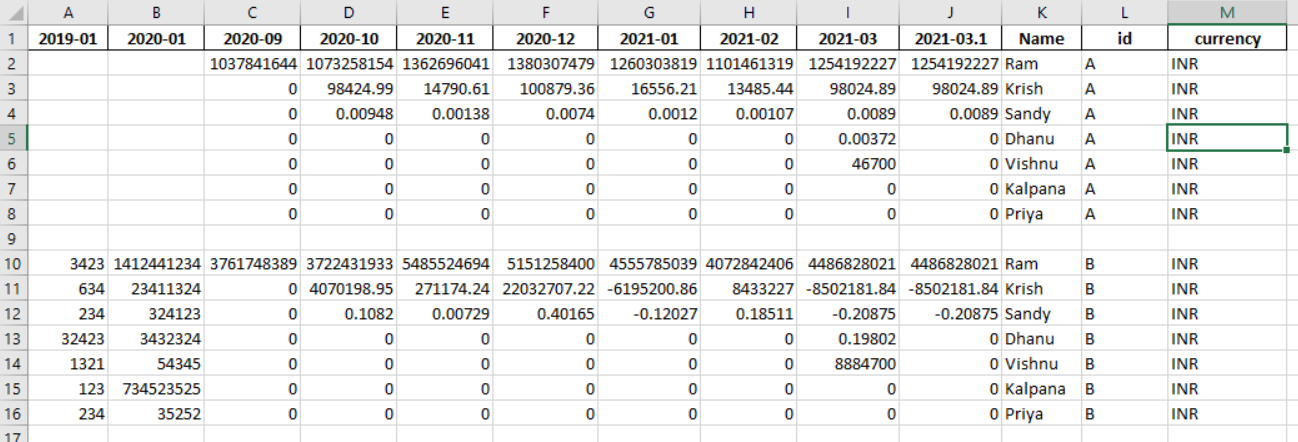
错误:
回答 4
Stack Overflow用户
回答已采纳
发布于 2021-04-25 18:47:06
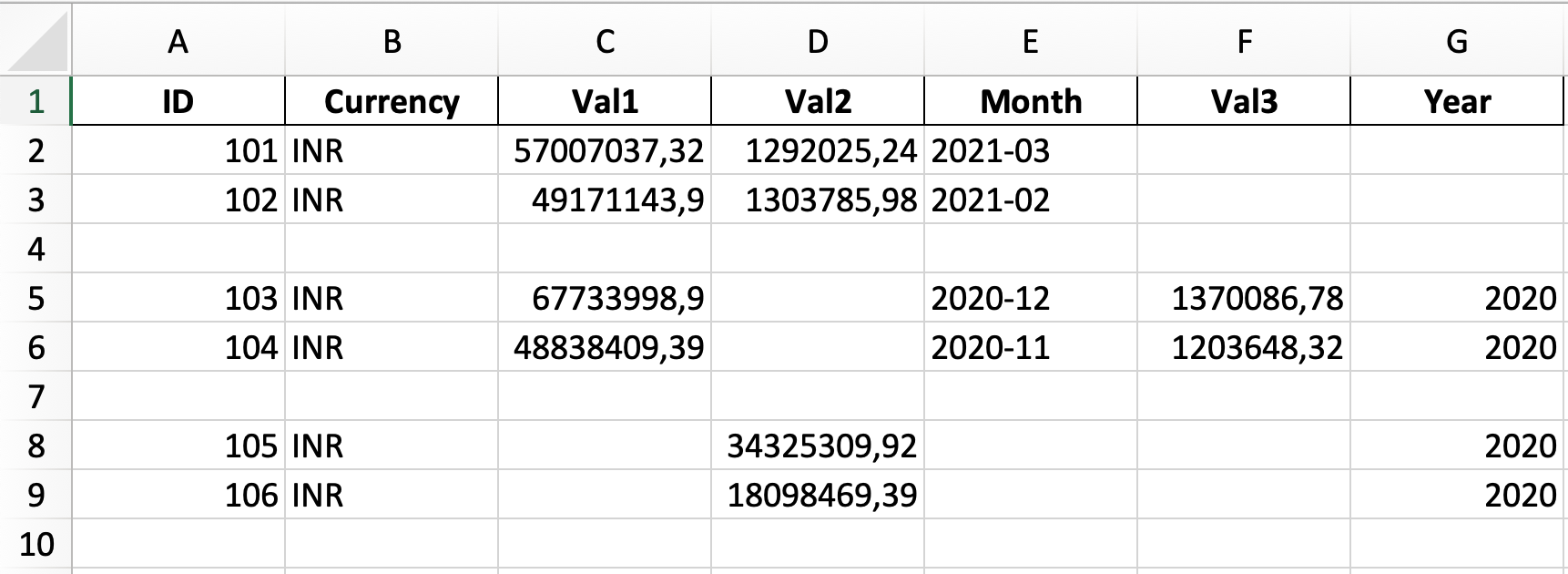
1.csv:
ID;Currency;Val1;Val2;Month
101;INR;57007037.32;1292025.24;2021-03
102;INR;49171143.9;1303785.98;2021-02
2.csv:
ID;Currency;Val1;Val3;Month;Year
103;INR;67733998.9;1370086.78;2020-12;2020
104;INR;48838409.39;1203648.32;2020-11;2020
3.csv
ID;Currency;Val2;Year
105;INR;34325309.92;2020
106;INR;18098469.39;2020import pandas as pd
import numpy as np
dfs = []
files = ["1.csv", "2.csv", "3.csv"]
for csv in files:
df = pd.read_csv(csv, delimiter=";")
df = df.append(pd.DataFrame([[np.NaN] * df.shape[1]], columns=df.columns))
dfs.append(df)
dfs = pd.concat(dfs).to_excel("output.xlsx", na_rep="", index=False)
编辑:列顺序问题
>>> df
    2019-01   2020-01   2020-09  ...   2021-03  2021-03.1   Name  id  currency
0  0.665912  0.140293  0.501259  ...  0.714760   0.586644    Ram   A       INR
1  0.217433  0.950174  0.618288  ...  0.699932   0.219194  Krish   A       INR
2  0.419540  0.788270  0.490949  ...  0.315056   0.312781  Sandy   A       INR
3 0.034803 0.335773 0.563574 ... 0.580068 0.949062 Dhanu A INR>>> BASECOLS = ["id", "currency", "Name"]
>>> cols = BASECOLS + list(reversed(df.columns[~df.columns.isin(BASECOLS)]))
>>> df[cols]
id currency Name 2021-03.1 2021-03 ... 2020-09 2020-01 2019-01
0 A INR Ram 0.586644 0.714760 ... 0.501259 0.140293 0.665912
1 A INR Krish 0.219194 0.699932 ... 0.618288 0.950174 0.217433
2 A INR Sandy 0.312781 0.315056 ... 0.490949 0.788270 0.419540
3 A INR Dhanu 0.949062 0.580068 ... 0.563574 0.335773 0.034803Stack Overflow用户
发布于 2021-03-08 13:17:37
在我看来,套餐使这件事容易得多:
import pandas as pd

files = [
    'path/to/file1.csv',
    'path/to/file2.csv',
    'path/to/file3.csv',
]


spreadsheet = pd.ExcelWriter('path/to/output.xlsx')

for file in files:
    sheet_name = file.split('.')[0]
    data = pd.read_csv(file)
    data.to_excel(spreadsheet, sheet_name=sheet_name, index=None)

spreadsheet.save()Stack Overflow用户
发布于 2021-03-08 13:27:33
我建议用熊猫。它有一个优秀的xlsx作者thant可以为您做的工作非常简单。基本上,您必须初始化excel编写器,然后遍历csvs,逐个读取并写入文件。我建议您使用pd.ExcelWriter,这样xlsx文件只会被碰一次。此外,mode='a'允许您将工作表附加到现有的excel文件中,如果希望覆盖整个文件,则将其删除。见文档。
import pandas as pd
with pd.ExcelWriter('output.xlsx', mode='a') as writer:
    #here you loop through csvs and load
    for csv in csvs:
        df = pd.read_csv(csv)
df.to_excel(writer, sheet_name=csv)页面原文内容由Stack Overflow提供。腾讯云小微IT领域专用引擎提供翻译支持
原文链接:
https://stackoverflow.com/questions/66530497
复制相关文章
相似问题
腾讯云开发者

Copyright © 2013 - 2026 Tencent Cloud. All Rights Reserved. 腾讯云 版权所有
深圳市腾讯计算机系统有限公司 ICP备案/许可证号:粤B2-20090059  粤公网安备44030502008569号
腾讯云计算(北京)有限责任公司 京ICP证150476号 | 京ICP备11018762号